How Backup Works
Cygna Forest Recovery backs up each domain controller on a schedule you set, and moves every completed backup into a vault on a machine that is not joined to the domain. This chapter explains how a backup travels from the domain controller to the vault, what is recorded about it, how it is protected while it is stored, and how long it is kept.
The path of a backup
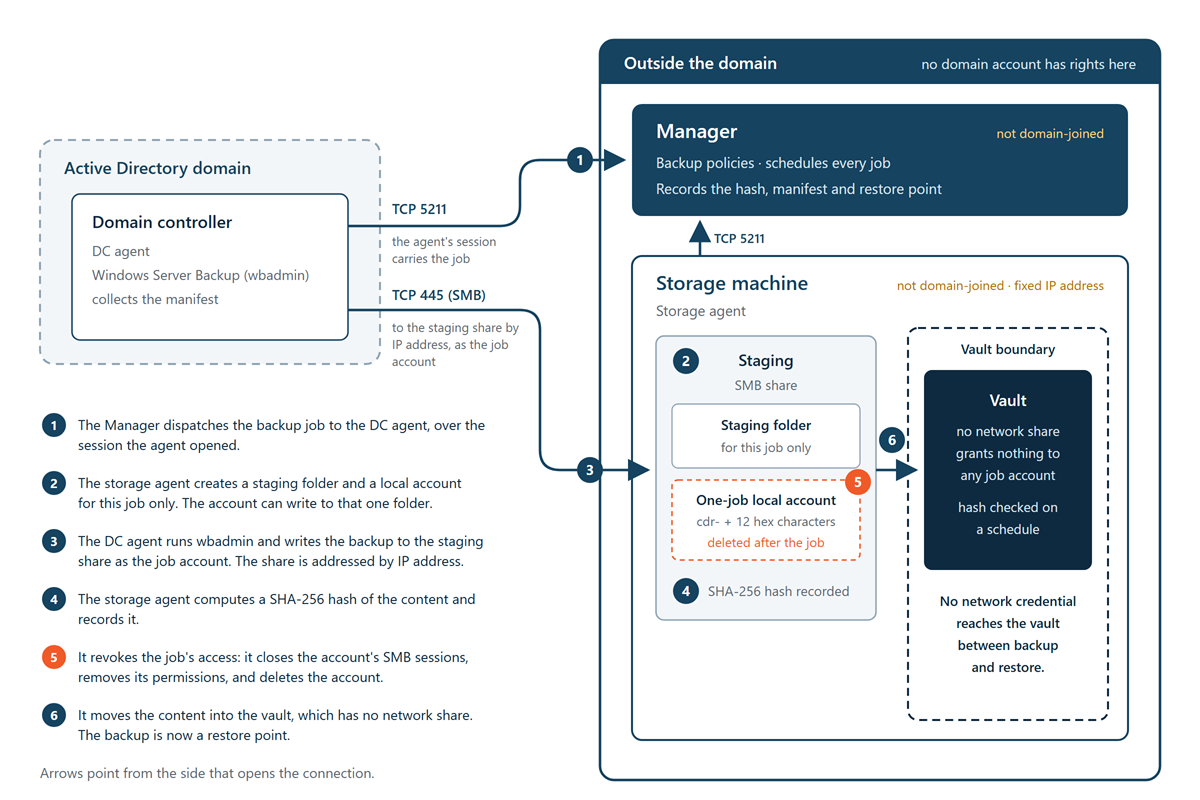
Every backup follows the same sequence. The order of the steps is what keeps a backup out of reach of the directory it protects.
-
The Manager starts the job. Each domain controller has a backup policy with an interval and a backup type. When a policy falls due, the Manager dispatches the job. Agents never start a backup on their own. A policy can also have a start time in the Manager's local time, which is the earliest each backup is due. A small random spread, around the interval or only after the start time, keeps a large estate from backing up all at once, and the Manager limits how many backups run at the same time.
-
The storage agent prepares a staging folder and a one-time account. The storage agent reserves room in the vault for the incoming backup, creates a staging folder for this job only, and creates a local account on the storage machine for this job only. The account can write to that one folder and nothing else.
-
The domain controller writes the backup to staging. The DC agent runs Windows Server Backup (
wbadmin) against the staging share, using the per-job account. The staging share is addressed by the storage machine's IP address, not by its name, so a poisoned DNS record cannot send the backup to another machine. While the backup runs, the DC agent also records what it needs to know about the machine: its operating system, hardware, network settings, and directory role. That record becomes the backup's manifest. -
The storage agent hashes the content. When the job finishes, the storage agent computes a SHA-256 hash of the backup. The hash is recorded with the manifest and in the Manager's database, and is used later to prove that the backup has not changed.
-
The job's access is revoked. The storage agent closes the account's network sessions, removes every permission the account held, and then deletes the account.
-
The backup moves into the vault. The storage agent moves the content into the vault, which has no network share and grants nothing to any job account. It then checks that no permission for the deleted account came along with the content. The backup is now a restore point.
Every backup is a full backup. There are no incremental or differential backups, so each restore point stands on its own and does not depend on any other.
Why this design is safe
- No domain account has rights to backup storage—The storage machine is not joined to the domain, so domain credentials, including Domain Admins and Enterprise Admins, have no access to it.
- Each write credential lives only as long as its job—An account is created for one job, can reach one folder, and is deleted when the job ends. No account ever covers two backups.
- Nothing on the network can reach the vault—Between a backup and a restore, no credential exists that can read, change, or delete a backup over the network. A restore gets its own short-lived, read-only access to the one backup it needs.
- Nothing on the network can delete a backup—Backups are deleted only by the retention rules that run on the storage machine itself.
- Changes are detectable—Each backup's hash is checked again on a schedule and before it is restored.
- Backups can be proven—With an optional Isolated Recovery Host, backups are test-restored onto isolated virtual machines and checked as working domain controllers, on a schedule and on demand. See Test Restores.
Who does what
| Component | Role in backup |
|---|---|
| Manager | Holds the backup policies and schedules every job. Records each job's outcome, its manifest, and its restore point. Never touches the vault directly. |
| DC agent | Runs wbadmin on the domain controller, writes the backup to its staging folder, collects the manifest, and captures the backup's version identifier. |
| Storage agent | Owns staging and the vault on the storage machine. Creates and deletes the per-job accounts, hashes and commits backups, verifies stored backups, applies retention, and reports vault capacity. |
Operators with the Backup Operator role create and change backup policies and start backups on demand. For the tasks, see Backup Tasks.
