Test Restores
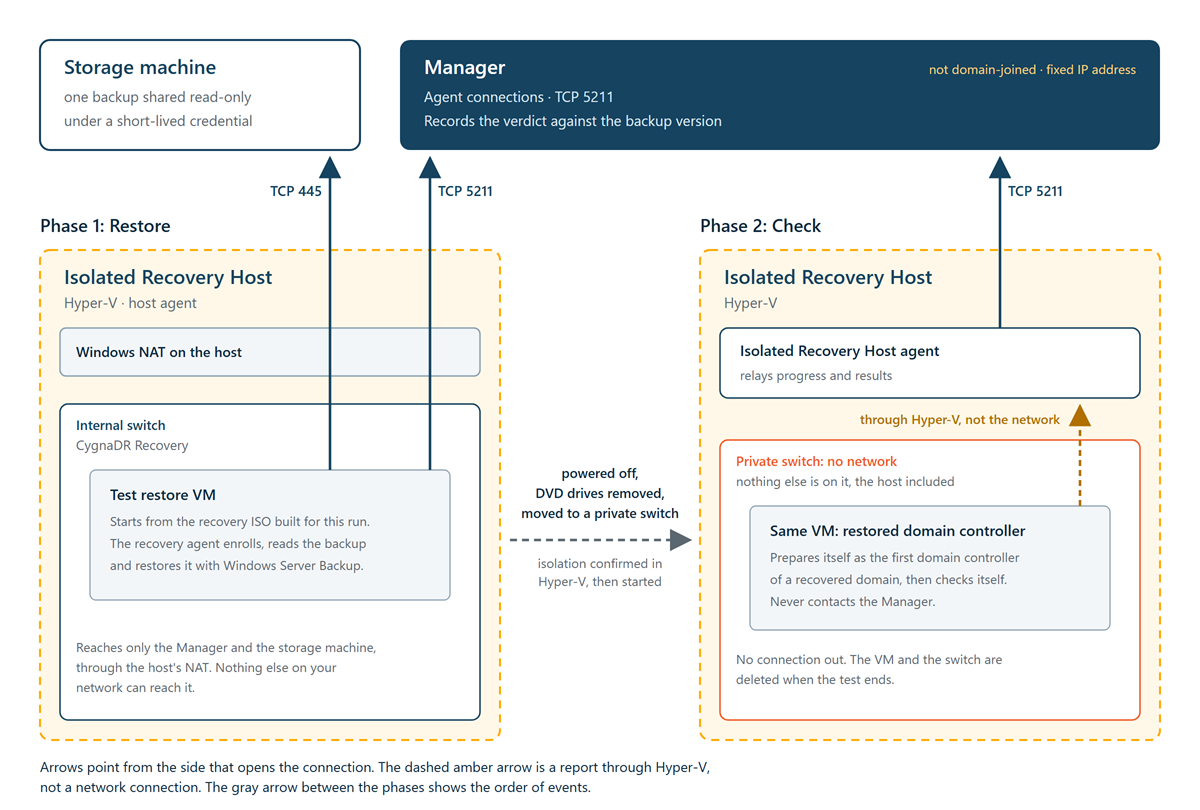
A stored backup that passes its integrity checks is still not proven to restore. A test restore proves it:Cygna Forest Recovery restores the backup onto a new virtual machine on an Isolated Recovery Host, starts the restored system where it cannot reach your network, and checks that it comes up as a working domain controller. The result is recorded against that backup.
Nothing in production changes. The original domain controller keeps running, and the restored copy never reaches its network. When the test ends, the virtual machine and its disks are deleted.
Test restores need an Isolated Recovery Host, which is optional. Without one, everything else works the same, and backups are shown as not verified. To set one up, see Setting Up an Isolated Recovery Host.
How a test restore runs
A test restore is a full system recovery onto a new virtual machine. Up to the moment the restored system first starts, it follows exactly the path a real recovery takes, so it tests that path as well as the backup.
- The host builds a virtual machine. The Isolated Recovery Host agent creates a virtual machine shaped like the backed-up domain controller, from the hardware recorded in the backup, reduced to the processors and free memory the host has. It is connected to the host's recovery network, which reaches the Manager and the storage machine through the host and is unreachable from anywhere else.
- The backup is restored. The virtual machine starts from a recovery ISO built for this run. The recovery agent in it enrolls with the Manager, reads the backup from the vault under a short-lived credential, and restores it with Windows Server Backup, as in any full system recovery.
- The virtual machine is cut off. When the restore finishes, the recovery agent powers the virtual machine off instead of restarting it, so the restored Windows cannot start yet. The host agent moves every network adapter to a private switch created for this run; nothing else is on that switch, not even the host. It also removes the virtual machine's DVD drives, so no media can stay attached. It confirms both from Hyper-V's own records, and only then starts the virtual machine. The host agent enforces this itself, whatever it is asked to do.
- The restored system checks itself. Instructions written to the restored disk, and signed by the Manager, tell the restored domain controller to prepare itself as the first domain controller of a recovered domain and then check itself. It never tries to contact the Manager. It reports its progress and results through Hyper-V, and the host agent relays them.
- Everything is deleted. The virtual machine, its disks, the ISO copy, and the private switch are deleted. Anything the host could not delete is removed the next time the host agent starts.
What is checked
The restored domain controller is prepared the way Microsoft's forest recovery guidance prepares the first restored domain controller of a domain:
- Its SYSVOL is marked authoritative, and it does not wait for replication partners at startup, because it has none on its private switch.
- It is made its own reliable time source: its NTP server is turned on, it announces itself as a reliable time server, and the Windows Time service is set to start automatically. A domain's first restored domain controller has no other time source to follow, and a domain controller that serves no time does not advertise as one.
- Its DNS client is pointed at itself, first at its own address and then at 127.0.0.1, so it can resolve its own names without the DNS servers it used in production, which are not on its private switch. A domain controller without the DNS Server role has its own names mapped locally for the checks instead.
- It keeps the IPv4 address its backup recorded, even one that DHCP gave it, when the backup recorded an address on one adapter. The private switch has no DHCP server, and the domain controller's DNS records name that address.
It then restarts and runs these checks, repeating them every 30 seconds for up to 20 minutes while its services come up:
| Check | What it confirms |
|---|---|
| Prepared as the first DC |
The preparation above was applied and the system restarted. The check's detail says what the backup had, for example that its NTP server was off. The check fails when the DNS client could not be pointed at the domain controller itself, when a setting could not be written, or when a Windows Time Group Policy turns the NTP server off or announces no time server. A Group Policy setting overrides the local one, so the detail names the policy setting; a recovered domain's first domain controller must serve time, so that policy has to change before this domain controller can be one. |
| Directory service running | Active Directory Domain Services started. |
| SYSVOL ready, SYSVOL shared, NETLOGON shared | SYSVOL is ready and both shares are published. |
| DNS zones loaded | The DNS zone that holds the domain's names loaded, on a domain controller that runs DNS. That can be the domain's own zone, a parent domain's zone, or the root zone. A domain controller without the DNS Server role, or one that holds no zone with the domain's names, passes with a note that a forest recovery needs DNS for the domain from its first restored domain controller, and has its own names mapped locally for the checks. A zone it holds that did not load fails the check. |
| dcdiag (local tests) | The dcdiag tests that need no other domain controller pass: Advertising, Services, NetLogons, and SysVolCheck. |
| Object counts | The restored directory's object counts are compared with the counts last reported for the domain. This check is advisory and does not decide the verdict. |
Verdicts
Each test restore ends with one of these results, recorded against the backup version it tested:
- Restore verified—The backup restored, the restored system started isolated, was prepared as the first domain controller, and passed every required check.
- Restore failed—Something the backup is responsible for went wrong. The verdict names the step and the reason: the restore itself, the restored system not starting, its agent not reporting, or a check that did not pass. If the restored system says nothing within 90 minutes of starting, the host's own evidence decides the reason, for example that Hyper-V never received a heartbeat from it.
- No verdict—The test could not do its part, for example because the host could not build or isolate the virtual machine, the test was cancelled, or the host stopped reporting on the virtual machine before a verdict. The backup is not blamed and stays unverified. If a test restore restores and then ends with no verdict, and the virtual machine's console shows that Secure Boot refused to start the system, the host is most likely behind on Windows updates; see Keeping the host current.
The host agent reads the isolated virtual machine every 20 seconds and reports what it reads when it changes, and at least every two minutes. If a read fails, the host keeps trying and reports why it cannot read the virtual machine. If the Manager hears nothing about the virtual machine for six minutes, it says so on the run's timeline and asks the host to watch the virtual machine again, without restarting or moving it. If the host's report is still incomplete when the 90 minutes are up, the run ends with no verdict at step host: what the host could not see is not held against the backup. Plan the test restore again.
A verdict is about one backup version only. A newer backup of the same domain controller starts unverified.
Verdicts are shown on the run's page, in the Test restore column of the Restore Points Screen screen (sortable and searchable, with a link to each run) and on each restore point's page, next to each restore point in the restore point list of a new single-DC restore (test restore verified, test restore failed, test restore running, test restore waiting to start, or test restore inconclusive), in cdr restore show, and in cdr backup list. Two alerts report on them; see Alerts later in this topic.
A test restore that completes its restore also proves the recovery image it started from, exactly as a real full system recovery does. For more information, see Recovery Images.
Scheduled test restores
Test restores go only to a host an operator has approved. A newly installed host waits for approval however ready it is, and a drained host takes no new test restore. With more than one approved host, each test restore goes to whichever host can run one. Once an approved host is ready, the Manager schedules test restores itself. It looks for work two minutes after it starts and every five minutes after that, and chooses in this order:
- Each domain controller's new backups first. For each domain controller whose newest full system backup has not passed a test restore, it tests that backup before a deadline. The deadline is the Test each DC's new backups within setting (30 days by default), counted from the domain controller's first backup taken after the newest one that passed. A backup that passed is never tested again, so a domain controller whose newest backup has passed waits for its next one. A test restore that an operator started counts.
- New recovery images in the time left. For each recovery image that no restore has proven yet, it tests the smallest full system backup from the last 30 days of a domain controller that image serves, starting from that image. An image test starts only when it would finish before a domain controller's test must start. Only the newest image of each operating system variant on each storage agent is tested: that is the image a restore would start from, so proving an older one would prove nothing a recovery relies on. This is controlled by the Prove new recovery images setting.
So that new images are proven even when the domain controllers' tests leave no time between them, a domain controller's scheduled test starts from an untested image of its operating system variant when one is waiting, and proves that image too. A domain controller already past its deadline is tested with the proven image instead, to clear its alert sooner. If a test that started from an untested image fails, the domain controller waits for the retry like after any failed test.
Scheduled test restores keep out of the way:
- One test restore runs on a host at a time.
- None starts while a backup is running, or when one is due within the Keep clear of backups for setting (120 minutes by default).
- After a scheduled test restore of a domain controller or image does not pass, the schedule leaves it alone for the After a scheduled test restore fails, wait setting (24 hours by default) and moves on to the next.
- A scheduled test restore never accepts a confirmation on a person's behalf. If its checks need one, it is discarded and tried again later.
The earliest deadline goes first. Each test starts as late as still lets every domain controller waiting finish before its deadline, and before the backups the schedule predicts from the enabled backup policies. The prediction allows for only Maximum concurrent backups running at once, so domain controllers sharing a start time keep test restores away until the last of their backups is expected to finish. The result is about one test per domain controller in each period, run shortly before its deadline. Each test restore reads a full backup from the vault, and a host runs one at a time, so the host's speed and the vault's load decide how many domain controllers a period can cover. With more than a host can reach, the tests start earlier and run back to back. If a deadline still passes, the alert for domain controllers with no recent verified backup is raised: add a host or lengthen the period if it keeps happening.
Only full system backups can be test-restored. Retired domain controllers are skipped. The Agents screen and cdr recovery-host list show what the schedule last decided for each host and why. For the settings, see Settings Reference.
Test restores and the rest of the product
- A test restore never holds a backup, never delays a DC agent update, and never blocks a real recovery. A recovery always takes priority; a test restore waits for anything else in progress on the same domain controller.
- The original domain controller keeps running throughout. The restored copy is never mistaken for it, because it never contacts the Manager.
- The recovery banner, the Dashboard's live operations panel, and
cdr restore listsay that a test restore is one, and whether it was scheduled or who approved it. On the Recovery Plans screen, a test restore is listed as a single-DC restore. See Dashboard. - Keep the Isolated Recovery Host on current Windows updates, and its agent at the version the Manager offers, so that the host supports everything the Manager asks of it during a test restore. See Maintaining Agents.
- A test restore can be cancelled at any point. The virtual machine is deleted and the backup stays unverified.
- Planning and approving a test restore requires the
plan.approvecapability, and running or cancelling it requiresplan.execute, as for any restore. Scheduled test restores run as schedule in the audit trail.
Alerts
- Domain controllers whose latest test restore failed (critical)—The newest test restore of a domain controller's backups ended with Restore failed. Open the test restore to see the step and the reason, then test a newer backup.
- Domain controllers with no recent verified backup (warning)—A domain controller's newest backup has not passed a test restore, and its deadline under the Test each DC's new backups within setting has passed: the hosts did not reach it in time, or its tests are not passing. This alert is raised only while an Isolated Recovery Host is enrolled, and only for domain controllers with full system backups. Setting the period to 0 turns it off.
These alerts appear on the Alerts screen. For details, see Alerts Reference.
