Settings Reference
This topic lists every setting you can see on the Configuration screen, grouped as the screen groups them: Manager, DC agent, storage agent, and Isolated Recovery Host agent. For each it gives the label shown in the console, what it does, its default, the values it accepts, and any flags that change how it is saved or applied.
You change settings on the Configuration screen, which needs the System Admin role, or with cdr config set. cdr config show prints every setting with its key, its default, and whether anyone has changed it. For the screen, see Configuration; for the commands, see Configuration and Exclusion Commands.
Settings chosen at installation, such as the Manager's ports and the agents' Manager address, are installer properties rather than settings on this screen. See Installing the Manager.
How settings are applied
The Manager holds the settings for itself and for every agent in its database. When you save, it pushes agent settings to every connected agent at once; an agent that was offline picks up the change on its next connection. Every agent caches the last values it received and keeps running on them if it cannot reach the Manager. Each agent reports the configuration revision it is running, and the Machines in this scope card on each agent tab shows whether each agent is on the current configuration.
Which value wins
For a setting managed from the console, an agent uses, in order:
-
An override for that one machine, if there is one.
-
The fleet value set on the Configuration screen.
-
The product default.
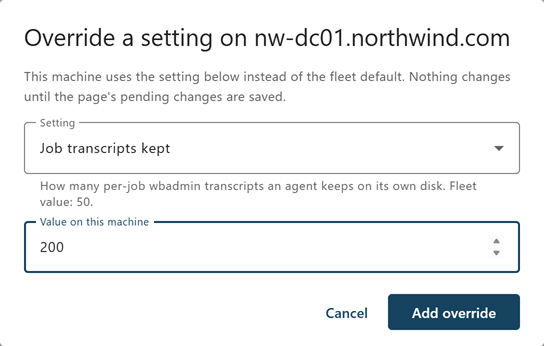
To give one machine a different value, open the agent tab on the Configuration screen, find the machine in Machines in this scope, and select Override a setting on this machine…. The override is saved with the page's other pending changes. Follow the fleet default removes it. With cdr, use cdr config set <key> <value> --agent <agent id>. Per-machine overrides are most useful for trying a change, such as Heartbeat interval, on one domain controller before the whole fleet.
Settings set on the machine
Settings flagged Set on the machine are read from the machine's own configuration and are shown read-only in the console, as each agent reports them. They are the values that must be known before the service can reach the Manager, such as the Manager address and the storage root, and the storage machine's deletion floors, which are kept out of the Manager's reach on purpose.
Each component reads two local sources:
- The registry key the installer writes—
HKLM\SOFTWARE\Cygna Labs\Disaster Recovery Suite\<Manager | DC Agent | Storage Agent | Isolated Recovery Host Agent>\Configuration, which holds the values given at installation. It is locked to SYSTEM and Administrators. - appsettings.json—The file in the component's program folder. It is read above the registry, so a value written in its
CygnaDRsection wins over the installed one.
To change a local value, add it to the CygnaDR section of appsettings.json and restart the service. Do not add a key with an empty value to fall back to the installed one: an empty string is a value, and on the log folder settings it turns the file log off. Remove the key instead. To move an agent to a new Manager address or fingerprint, reinstall it with the new installer property rather than editing the file; see Maintaining Agents.
Note: A setting that is managed from the console is ignored if it also appears in a machine's appsettings.json. The Configuration screen names any such keys under the machine, so you can remove them from the file. On the Manager, keys set in appsettings.json before an upgrade are imported into the database once, on the first start after the upgrade; after that the database wins.
Update policy
One setting decides whether an agent accepts updates from the Manager. Every agent kind shows it, read-only, as Allow updates from the manager. It is never set from the console. It is read from the machine's policy key, which no installer creates, changes, or removes, so an upgrade cannot undo it and Group Policy can set it across many machines:
HKLM\SOFTWARE\Policies\Cygna Labs\Disaster Recovery Suite\<agent>\CygnaDR\Update
<agent> is DC Agent, Storage Agent, or Isolated Recovery Host Agent. The values can be strings (true or false) or REG_DWORD values (0 is false, anything else is true). Restart the agent after a change.
AllowRemote—Defaulttrue. Set it tofalseto stop the agent accepting updates from the Manager. A DC agent is then updated by push install, and a storage agent or Isolated Recovery Host agent by hand.
Any other value under the key is ignored, and the agent says so when it starts.
Flags
The console marks settings with these flags:
| Flag | Meaning |
|---|---|
| Restart required | Saved at once, but not in force until the service restarts. The machine's entry on the Configuration screen lists the settings that are waiting for a restart. |
| Can delete data | Changing the setting can delete data. Saving it needs you to type CONFIRM, and cdr config set asks for confirmation (or --yes when there is no terminal). |
| Cannot weaken the machine's floor | The storage machine takes the more protective of its own local value and the value from the Manager. When it declines a value, the console shows the value it sent and the value in use. Weakening such a setting has to be done on the storage machine itself. |
| Set on the machine | Read from the machine's own configuration and shown read-only in the console. |
The Manager also checks settings against each other when you save. It refuses a save that leaves the storage agents' Reservation timeout less than 30 minutes longer than the Manager's Backup job timeout, and it warns when a retention ceiling is below the storage machine's own floor, because the floor wins.
Manager settings
These settings are read by the Manager. Unless a setting is flagged Restart required, a change takes effect on the next sweep or dispatch.
Backup execution
| Setting | Description | Default | Range | Flags |
|---|---|---|---|---|
| Backup job timeout | How long the Manager waits for a DC agent to report the result of a backup. A timeout does not stop the backup on the domain controller, so a value that is too low records a failure for a backup that is still running. Size it against your slowest backup under load, and keep it at least 30 minutes below the storage agents' Reservation timeout. | 240 minutes | 1–10,080 | — |
| Vault commit timeout | How long the Manager waits for the storage agent to report that a backup has been hashed and moved into the vault. Hashing reads every byte, and commits run side by side, so size it against your largest backup with other backups running. A commit reported after this timeout is recorded as confirmed late, with the advice to raise it. A commit reported late for another reason, such as a Manager restart, names that reason instead. | 90 minutes | 1–10,080 | — |
| Maximum concurrent backups | How many domain controllers may back up at once. | 4 | 1–512 | Restart required |
| Schedule jitter | A random spread applied to each policy's interval, so that many policies do not fire at the same moment. 0 means every policy fires exactly on its interval. Applies to policies with no start time; a policy with a start time uses Start time spread instead. | 5% | 0–50 | — |
| Start time spread | How long after its start time a policy may be due, so that domain controllers sharing a start time do not all ask for a backup slot at once. Never before the start time, and at most half the policy's interval. The backup slots (Maximum concurrent backups) then decide when each backup actually starts. 0 means every policy with a start time is due exactly at it. | 30 minutes | 0–240 | — |
| Size estimate sample count | How many recent backups of a domain controller are averaged to estimate the size of its next backup. The storage agent reserves vault space against this estimate before it accepts a backup. | 5 | 1–100 | — |
| Restart reconciliation grace | How long the Manager waits after it starts for agents to reconnect before it decides the outcome of backups that were running when it stopped. A Manager restart does not stop a running backup, and a backup whose vault commit the storage agent is still running is left to complete. | 5 minutes | 1–1,440 | Restart required |
Test restores
These settings control scheduled test restores on an Isolated Recovery Host. They do nothing until a host is enrolled and ready. Test restores that an operator starts are not held back by them. See Test Restores.
| Setting | Description | Default | Range | Flags |
|---|---|---|---|---|
| Prove new recovery images | Test-restores one backup with each recovery image that no restore has proven yet: the smallest full system backup from the last 30 days of a domain controller the image serves, starting from that image. Only the newest image of each operating system variant on each storage agent is tested, because that is the image a restore would start from. | On | On, Off | — |
| Test each DC's new backups within | How long a domain controller's backups may go untested. Before then its newest backup is test-restored, unless that one has already passed. The time runs from the domain controller's first backup taken after the newest one that passed; a backup that passed is never tested again. One domain controller at a time per host, the earliest deadline first, each started as late as still lets every domain controller waiting finish in time. Each test reads a whole full system backup from the vault, so the host's speed and the vault's load decide how many domain controllers a period can cover; with more than a host can reach, the tests start earlier and run back to back. A domain controller whose deadline passes raises the Domain controllers with no recent verified backup alert. 0 turns off both the rotation and that alert. | 30 days | 0–365 days | — |
| Keep clear of backups for | A scheduled test restore does not start while a backup runs, or when one is due within this long. 0 starts whenever no backup is running. | 120 minutes | 0–1,440 minutes | — |
| After a scheduled test restore fails, wait | How long before the same domain controller or recovery image is scheduled again after a scheduled test restore that did not pass. The schedule moves on to the next one meanwhile. | 24 hours | 1–720 hours | — |
Database retention
These settings control how long the Manager keeps records in its own database. They do not affect backups in the vault; vault retention is set on the storage agents tab. For the day settings, 0 means keep forever.
| Setting | Description | Default | Range | Flags |
|---|---|---|---|---|
| Job progress | How long the detailed progress of each backup job is kept. The job record itself is kept separately. | 90 days | 0–36,500 | — |
| Agent sessions | How long the history of closed agent connections is kept. A live session is always kept. | 365 days | 0–36,500 | — |
| Backup jobs | How long backup job records are kept. These records are what reports are built from, and they cannot be rebuilt from the vault. | 0 (keep forever) | 0–36,500 | Can delete data |
| Manifests | How long backup manifests are kept. A manifest describes the domain controller at backup time and is what restore preflight checks against; a restore point whose manifest is deleted cannot be planned. | 0 (keep forever) | 0–36,500 | Can delete data |
| Audit trail | How long audit entries are kept. Shortening it deletes the record that attestations are drawn from. Set a window only where your own data-protection rules require it. | 0 (keep forever) | 0–36,500 | Can delete data |
| Sweep interval | How often the database retention sweep runs. 0 is not accepted. | 24 hours | 1–8,760 | — |
Agent deployment
| Setting | Description | Default | Range | Flags |
|---|---|---|---|---|
| Package folder | A folder on the Manager machine that holds the agent packages to deploy and compare against: the DC agent, storage agent, and Isolated Recovery Host agent packages. The newest package of each kind is the version every agent of that kind is compared against; the newest DC agent package is also the one the console installs. The default is the redist folder that the Manager installs beside itself, so upgrading the Manager also updates the packages. Other MSI files in the folder are reported and ignored. An empty value turns console installs and update checks off. |
redist
|
Folder path | — |
| Remote management transport | How the Manager starts the installer on a domain controller: winrm (TCP 5985) or dcom (TCP 135 and dynamic RPC). WinRM from the Manager, which is outside the domain, needs each target in the Manager machine's WinRM TrustedHosts list; DCOM needs the Windows Management Instrumentation (WMI-In) firewall group enabled on the targets. A single deployment can use the other transport. |
winrm
|
winrm, dcom |
— |
| Update agents automatically | Brings every agent up to the build in the package folder without an operator asking, as each one can take it. On every check, each DC agent, the storage machine, and each approved Isolated Recovery Host that is behind the package for its kind is updated as Update on the Agents screen does it: over its own connection, checked by the agent, with no credential. An agent that is not connected or is busy waits for a later check; one that cannot update itself is listed and never retried; a failed update is tried again after six hours, or at once when a newer package arrives. Off by default, because an update restarts the agent and some estates want to choose when. See Updating agents automatically. | Off | On, Off | — |
| Check for agents to update every | How often automatic updates look for outdated agents that can take an update now. An agent passed over is looked at again on the next check. Agents waiting for a free place among those updating at once do not wait for the interval: one starts within a minute of another finishing. Has no effect while automatic updates are off. | 30 minutes | 5–1440 minutes | — |
| Agents updated at once | How many agents automatic updates keep updating together; another starts as soon as one finishes. A higher number works through a large estate sooner, at the cost of more package traffic at once over the links to remote sites. Updates an operator starts are not counted against it. Lowering it lets those already running finish. Has no effect while automatic updates are off. | 8 | 1–50 | — |
The mail server the Manager sends every email through: recovery plan notifications, the recovery report, license expiry warnings, and alerts. Who receives each email is not set here; each recovery plan names its own notification addresses, license warnings go to the recipients in the License settings, and alerts to the recipients in the Alert notifications settings. One email goes to at most 25 recipients. A change takes effect with the next email. The emailed recovery report has its PDF attached, made by the Manager's own PDF renderer, which needs no settings.
| Setting | Description | Default | Range | Flags |
|---|---|---|---|---|
| SMTP server | The mail server the Manager sends every email through. Empty: nothing is emailed. | Empty | Host name or IP address | — |
| SMTP port | The mail server's port: 587 for STARTTLS, 465 for TLS from the first byte, 25 for an unencrypted relay. | 587 | 1–65,535 | — |
| SMTP security | starttls upgrades the connection and refuses a server that will not upgrade; tls is encrypted from the start; none sends in the clear. The Manager's email names the forest's domain controllers and what is wrong with them, so use none only for a relay on the same host or on an isolated recovery network. |
starttls
|
starttls, tls, none |
— |
| SMTP user | The account the Manager signs in to the mail server as. Empty: no sign-in, for a relay that accepts the Manager. | Empty | Text | — |
| SMTP password |
The SMTP user's password. It is write-only: once saved, it is never shown or returned again, and the console and To keep it, leave the field as it is. To replace it, enter a new one. To remove it, clear it. Changing SMTP server or SMTP security while a password is stored needs the password entered again, or cleared, in the same save; otherwise the save is refused. The stored password is never sent to a server other than the one it was entered for. A database moved to another machine cannot decrypt it. The Manager then treats it as not set and logs that it needs entering again. |
Not set | Text | — |
| From address | The address the Manager's email comes from. Required to send any email. | Empty | Email address | — |
| Console address in emails |
The console's address as emails link to it, such as Set it when recipients reach the console by another name: an alias, a DNS name in another domain, or a reverse proxy. Use a name the Manager's certificate carries, or the browser warns about the link. |
Empty | An https address, with no query or fragment |
— |
License
Who is told by email as the license nears its end. A change takes effect with the next warning. For the license itself, see Licensing.
| Setting | Description | Default | Range | Flags |
|---|---|---|---|---|
| Expiry warning recipients |
Who is emailed as the license nears its end, separated by commas. Empty: warnings are not emailed. Sent 30, 15, 7, 5, 4, 3, 2, and 1 days before the license ends; when the grace period begins and on the same days before it is over; and on the day backups and recovery operations stop. A trial has no grace period. The console's alerts and banner say the same whether or not anybody is emailed, and every warning is in the Manager's log and the audit trail. Sent through the server in the Email settings, so set those up too. |
Empty | Email addresses | — |
Alert notifications
Who is emailed when an alert is raised or cleared, how often alerts are checked, and which severities are emailed. A change takes effect at once. For how alert email works, see Alerts Reference; the Alerts screen shows whether it is working (see Alerts).
| Setting | Description | Default | Range | Flags |
|---|---|---|---|---|
| Recipients |
Who is emailed when an alert is raised or cleared, separated by commas. Empty: alerts are not emailed. The Manager refuses a save with more than 25 addresses or with a value that is not an email address; use a distribution list for more. When recipients are first set, the first check reports everything raised at that moment. Clearing them stops alert email and forgets what was reported. Sent through the server in the Email settings, so set those up too. Each email sent, and each failure to send, is in the audit trail and the Manager's log. |
Empty | Up to 25 email addresses | — |
| Check interval | How often alerts are checked for anything raised or cleared since the last check. An object counts as cleared once two checks in a row have not found it. The first check after the Manager starts waits five minutes, or this long if it is longer, so that agents have reconnected. | 5 minutes | 1–1,440 minutes | — |
| Reminder interval | How long after it was last emailed an alert still raised is reported again. Any email that lists an object counts, so a reminder comes this long after the last email of any kind, not on a fixed schedule. A reminder lists everything still raised. 0 means an alert still raised is not reported again. | 24 hours | 0–720 hours | — |
| Minimum severity | The least severe alert that is emailed, in the order the Alerts screen uses: critical, warning, unknown (a fact nothing could confirm, such as an agent that is not connected), info. Raising it stops reports about the alerts it leaves out without reporting them cleared; lowering it reports the alerts it brings in as raised. On the Configuration screen the choices read Critical only, Warning and above, Could not find out, and above, and Every severity. |
warning
|
critical, warning, unknown, info |
— |
Configuration backups
How often the Manager sends an encrypted configuration backup to the storage machine, and how many the storage machine keeps. See Manager Configuration Backups.
| Setting | Description | Default | Range | Flags |
|---|---|---|---|---|
| Back up this manager's configuration every | How often the Manager sends an encrypted copy of its database, enrollment token, and secret settings to the storage machine. Backups wait until the recovery passphrase is set. 0 means no scheduled backups; Back up now still works. | 24 hours | 0–168 | — |
| Configuration backups to keep | How many configuration backups the storage machine keeps; the oldest is removed when a new one is stored. The storage machine keeps more if its own minimums say so. Keep enough to reach back past a change made in error or a compromise that goes unnoticed for a while. | 14 | 1–365 | — |
Local to each machine
| Setting | Description | Default | Range | Flags |
|---|---|---|---|---|
| Log folder | Where the Manager writes its service log. An installed Manager writes to %ProgramData%\Cygna Labs\Disaster Recovery Suite Manager\logs. An empty value turns the file log off. |
Set by the installer | Folder path | Set on the machine, Restart required |
| Log retention (days) | How many days of service log files are kept before the oldest are deleted. 0 keeps every file. | 30 | 0 or more | Set on the machine, Restart required |
DC agent settings
These settings are sent to every DC agent as a fleet default. Agents apply a change when they receive it, and an agent that was offline catches up on its next connection.
| Setting | Description | Default | Range | Flags |
|---|---|---|---|---|
| Heartbeat interval | How often each DC agent sends a heartbeat to the Manager. The Manager shows an agent as disconnected after it misses three heartbeats plus a minute: under two minutes at the default, about 16 minutes at 300 seconds. Raise it to reduce the packet rate from a large fleet or over a metered link. The heartbeat is also what keeps an idle connection open through firewalls, so do not raise it beyond what your firewalls keep open. | 15 seconds | 15–300 | — |
| Topology report interval | How often each DC agent reports what it can see of the directory: forests, domains, sites, and domain controllers. The Manager treats topology as stale when no report has arrived for twice this interval. | 12 hours | 1–8,760 | — |
| Job transcripts kept | How many wbadmin transcripts each DC agent keeps on the domain controller. Transcripts are also sent to the Manager, so this only limits what is kept on the DC's disk. | 50 | 1–10,000 | — |
| Unreported result max age | How far back an agent looks, when it reconnects, for finished jobs whose outcome the Manager was never told. | 48 hours | 1–8,760 | — |
| Install the Windows Server Backup feature | Lets the agent install the Windows Server Backup feature itself if wbadmin is missing; without it every backup of the DC fails. The agent always checks for the feature and reports whether it is there. Turn this off, for the fleet or for one DC, where adding a Windows feature to a domain controller must go through change control; that DC then reports the feature missing, and its backups fail until it is installed by hand. | On | On, Off | Restart required |
| Manager address | The address the agent dials, set at installation with MANAGERADDRESS. |
Set by the installer | https:// address |
Set on the machine, Restart required |
| Manager CA fingerprint | The SHA-256 fingerprint of the Manager CA that the agent trusts, set at installation with MANAGERCAFINGERPRINT. Public, not secret. |
Set by the installer | Fingerprint | Set on the machine, Restart required |
| Job log folder | Where wbadmin transcripts are written on the DC. An installed agent uses %ProgramData%\Cygna Labs\Disaster Recovery Suite DC Agent\job-logs. |
Set by the installer | Folder path | Set on the machine, Restart required |
| Restore staging volume | The volume a DC state recovery copies the backup onto before the DC restarts into Directory Services Restore Mode. Empty picks the fixed volume, other than the system volume, with the most free space. The system volume is never used. | Empty | Volume | Set on the machine |
| Log folder | Where the DC agent writes its service log. An installed agent writes to %ProgramData%\Cygna Labs\Disaster Recovery Suite DC Agent\logs. An empty value turns the file log off. |
Set by the installer | Folder path | Set on the machine, Restart required |
| Log retention (days) | How many days of service log files are kept. 0 keeps every file. | 30 | 0 or more | Set on the machine, Restart required |
Storage agent settings
These settings are sent to the storage agents, which cache them and keep running on the last values they received if the Manager is unreachable.
Staging
| Setting | Description | Default | Range | Flags |
|---|---|---|---|---|
| Staging share override (UNC) | Leave empty to have the agent find the share on its own machine that publishes the staging folder and advertise it by IP address. Set it only when staging is reached some other way. Point it at a share of the staging folder only. Do not share the storage root: a share over the storage root also exposes the vault. | Empty | UNC path | Restart required |
| Advertised host | Overrides the address domain controllers are given for staging. Required on a storage machine with more than one network address: the agent cannot tell which one the DCs reach, so it advertises its machine name instead, which makes backups depend on DNS name resolution. Set it to the address domain controllers should use. The same address is what a full system recovery's recovery environment dials to fetch the recovery image and read the vault, so an IP address needs no DNS during a recovery. A host name is also accepted, but then every full system recovery depends on DNS resolving it, and restore preflight says so. | Empty | IP address or name | Restart required |
| Manage the staging share's permissions | Lets the agent grant the staging writers group Change permission on the staging share if it is missing. Turned off, the agent still checks the share and reports what is wrong. It never removes or narrows an existing entry. | On | On, Off | Restart required |
| Credential lifetime | The expiry stamped on the per-job credential a domain controller uses to write its backup. The account is deleted as soon as the backup is sealed, which is normally much sooner. | 24 hours | 1–8,760 | — |
Vault
| Setting | Description | Default | Range | Flags |
|---|---|---|---|---|
| Capacity measurement interval | How often the agent measures its vault and reports capacity to the Manager. Raise it on a very large vault, because the first measurement after a restart reads the whole vault. | 5 minutes | 1–10,080 | — |
| Remove BUILTIN\Administrators from the vault | Leaves only SYSTEM and the CygnaDR Administrators group on the vault and staging permissions. A local administrator can still take ownership, so this is evidence rather than a barrier: reading the backups then needs a deliberate ownership change. The agent refuses to apply it while the CygnaDR Administrators group is empty. |
Off | On, Off | Restart required |
| Size estimate margin | Padding added to the Manager's size estimate before vault space is reserved for an incoming backup. | 20% | 0–500 | — |
| Reservation timeout | Releases vault space held for a backup that failed without committing. Must be at least 30 minutes longer than the Manager's Backup job timeout. | 270 minutes | 1–10,080 | — |
| Abandoned staging window | How long a staging folder may sit with no writes before it is treated as a job's leftovers. This is what protects a backup that is still running. | 4 hours | 1–8,760 | — |
| Delete abandoned staging folders | On, the sweep deletes idle staging folders to reclaim space. A backup that finished but was never committed is committed by the Manager from staging within the hour, or as soon as the storage agent reconnects, well before the sweep would remove it. Off, the folders are reported and kept, and the space is not reclaimed. | On | On, Off | Can delete data, Cannot weaken the machine's floor |
Vault retention
For how these settings work together, see Retention.
| Setting | Description | Default | Range | Flags |
|---|---|---|---|---|
| Retention floor | No version inside this window is deleted to make room for an incoming backup; the backup is refused instead. Applies to space pressure only. 0 means no version is protected by age, which the agent warns about at startup. | 180 days | 0–36,500 | Set on the machine, Cannot weaken the machine's floor |
| Minimum versions per DC | No rule, for any reason, takes a domain controller below this many versions. | 1 | 1–10,000 | Set on the machine, Cannot weaken the machine's floor |
| Maximum version age | Versions older than this are deleted. A value from the Manager cannot go inside the storage machine's retention floor. 0 means keep forever. | 0 (keep forever) | 0–36,500 | Can delete data, Cannot weaken the machine's floor |
| Maximum versions per DC | The most versions kept for each domain controller, however recent they are. Which versions are kept is decided by Retention mode. 0 means unlimited. | 2 | 0–10,000 | Can delete data, Cannot weaken the machine's floor |
| Retention mode | Which versions the count ceiling and a full disk delete. newest keeps the most recent versions and, under space pressure, deletes only versions older than the floor. thinned keeps each DC's newest version and its deepest inside the floor and deletes from between them, and under space pressure can delete versions inside the floor, from the middle only. |
newest
|
newest, thinned |
Can delete data |
| Free space reserve | Free space kept on the vault volume beyond what an incoming backup needs. When free space falls below the reserve, the vault refuses every backup. Fractional values are accepted. | 10 GB | 0–1,048,576 | — |
| Sweep interval | How often the vault retention sweep runs. 0 is not accepted. | 1 hour | 1–8,760 | — |
| Dry run | Selects and reports what retention would delete without deleting anything. Use it to preview a new policy. A storage machine that sets dry run locally cannot have it turned off from the console. | Off | On, Off | Cannot weaken the machine's floor |
Note: The retention floor and the minimum versions per DC are set in the storage agent's appsettings.json on the storage machine, and cannot be set from the Manager or from an installer property. The console can tighten retention but never weaken it.
Configuration backups
The storage machine's own limits on the Manager's configuration backups. The Manager says how many to keep; the storage machine keeps at least its own minimum and decides what is deleted, so that a compromised Manager cannot remove the history. See Manager Configuration Backups.
| Setting | Description | Default | Range | Flags |
|---|---|---|---|---|
| Configuration backups always kept | The storage machine keeps at least this many configuration backups, whatever the Manager asks. | 7 | 1–1,000 | Set on the machine, Cannot weaken the machine's floor |
| Configuration backups never pruned before | No configuration backup younger than this is deleted, however many there are. When the folder fills instead, the folder limit refuses the next backup. 0 means backups beyond the count are deleted at any age. | 7 days | 0–3,650 | Set on the machine, Cannot weaken the machine's floor |
| Configuration backups folder limit | A configuration backup that would take the manager-backups folder past this size is refused. Every backup also leaves the vault's Free space reserve free. |
100 GB | 1–100,000 | Set on the machine |
Set these in the CygnaDR section of the storage agent's appsettings.json on the storage machine, as CygnaDR:ConfigBackup:MinKeep, CygnaDR:ConfigBackup:MinAgeDays, and CygnaDR:ConfigBackup:MaxFolderGb. Restart the storage agent after changing them.
Vault verification
For what verification checks, see Vault Protection and Integrity.
| Setting | Description | Default | Range | Flags |
|---|---|---|---|---|
| Verify committed backups | Re-reads committed backups and checks them against the hash recorded when they were committed. The check only reads: a failure is reported and the version is left where it is. | On | On, Off | — |
| Verification interval | How often a verification pass runs. 0 is not accepted; to stop verification, turn Verify committed backups off. | 24 hours | 1–8,760 | — |
| Versions per pass | How many versions one pass reads before it waits for the next interval. The least recently verified versions go first. A large vault needs a shorter interval or more versions per pass; the Repository screen shows how far behind verification is. | 5 | 1–10,000 | — |
| Re-verify after | How old a passing result may be before the version is read again. A version that failed is read again on every pass. | 30 days | 1–3,650 | — |
OS media library
| Setting | Description | Default | Range | Flags |
|---|---|---|---|---|
| Media folder | A folder of Windows Server ISO files that you supply, as a local path or a UNC path. Empty turns the OS media library off. Nothing in the folder is ever written, moved, or deleted. | Empty | Folder path | Restart required |
| Scan interval | How often the agent scans the whole media folder. | 12 hours | 1–8,760 | — |
| Watch the folder for changes | Rescans when the folder changes, in addition to the scheduled scan. | On | On, Off | Restart required |
| Change debounce | How long changes must settle before a watched rescan runs, so copying a large ISO produces one scan. | 60 seconds | 1–86,400 | — |
| Compute content hashes | Hashes every ISO, so a file replaced under the same name is detected. This reads every byte of every ISO on the storage machine; size and modification time catch most changes without it. | Off | On, Off | — |
| Include subfolders | Scans folders below the media folder as well. | On | On, Off | Restart required |
| Maximum files per scan | The most files one scan reads. A scan that reaches the limit is reported as partial. | 200 | 1–100,000 | — |
Recovery images
For setting up recovery images, see Setting Up OS Media and Recovery Images.
| Setting | Description | Default | Range | Flags |
|---|---|---|---|---|
| Recovery image folder | Where recovery images are built and served from. While it is empty, no images are built and no domain controller can use full system recovery; DC state recovery is unaffected. Use a different folder from the media folder. | Empty | Folder path | Restart required |
| Build working folder | Scratch space for image builds, roughly the size of an image. The build log is written here too. Empty uses a folder beside the image folder. | Empty | Folder path | Restart required |
| Recovery agent folder | Overrides the recovery agent placed inside each image. Leave empty to use the one installed with this storage agent, which is the normal case. Changing it makes every existing image out of date. Set on the storage machine (CygnaDR:RecoveryImages:AgentFolder), never from the Manager: the storage agent runs the program it finds here as SYSTEM, and every recovery image then starts it on each restored domain controller. |
Empty | Folder path | Set on the machine, Restart required |
| Driver folder | Drivers to add to every image, such as storage controller or network drivers for physical hardware. Drivers are added even if they are unsigned. Empty adds none. Set on the storage machine (CygnaDR:RecoveryImages:DriverFolder), never from the Manager, because a driver in the image runs in the kernel of every machine the image restores. |
Empty | Folder path | Set on the machine, Restart required |
| Build check interval | How often the agent checks whether any required recovery image is missing or out of date, and builds it if so. | 24 hours | 1–8,760 | — |
Local to each machine
| Setting | Description | Default | Range | Flags |
|---|---|---|---|---|
| Storage root | The folder that holds staging and the vault, set at installation with STORAGEROOT. It cannot be set from the Manager. |
Set by the installer | Absolute path | Set on the machine, Restart required |
| Manager address | The address the agent dials, set at installation with MANAGERADDRESS. |
Set by the installer | https:// address |
Set on the machine, Restart required |
| Manager CA fingerprint | The SHA-256 fingerprint of the Manager CA that the agent trusts, set at installation with MANAGERCAFINGERPRINT. |
Set by the installer | Fingerprint | Set on the machine, Restart required |
| Log folder | Where the storage agent writes its service log. An installed agent writes to %ProgramData%\Cygna Labs\Disaster Recovery Suite Storage Agent\logs. An empty value turns the file log off. |
Set by the installer | Folder path | Set on the machine, Restart required |
| Log retention (days) | How many days of service log files are kept. 0 keeps every file. | 30 | 0 or more | Set on the machine, Restart required |
Isolated Recovery Host agent settings
These settings are sent to every Isolated Recovery Host agent, on the Isolated Recovery Host agents tab. An installation without a host has nothing to send them to. Each applies as soon as the agent receives it. For what the agent does with them, see Setting Up an Isolated Recovery Host.
Readiness
| Setting | Description | Default | Range | Flags |
|---|---|---|---|---|
| Readiness check interval | How often the host checks and reports whether it can run test restores: Hyper-V, its switches, disk, and memory. The host also checks at every connection. | 15 minutes | 1–1,440 minutes | — |
Windows features
| Setting | Description | Default | Range | Flags |
|---|---|---|---|---|
| Install Hyper-V | Has the agent install Hyper-V and its PowerShell module when the host lacks them. Tried when the agent starts and when this is turned on, once per run of the service. It cannot succeed where the processor offers no virtualization, which on a virtual machine means nested virtualization. | On | On, Off | — |
| Restart to finish installing | Lets the agent restart the host to finish a Hyper-V install, once per install, five minutes after asking Windows, so shutdown /a can cancel it. Never when the storage agent, the Manager, or a domain controller is on the same machine; the agent then reports that a restart is needed. |
On | On, Off | — |
Verification VMs
| Setting | Description | Default | Range | Flags |
|---|---|---|---|---|
| Folder for verification VMs | Where test restore virtual machines and their restored disks go. Empty, the agent chooses a CygnaDR\Recovery VMs folder on the data drive with the most free space. Set, give a full local path, such as D:\CygnaDR\VMs; where hosts have different drives, list a folder for each, separated by ;, and each host takes the first on a drive it has. A host can also be given its own folder as an override on that machine; an override belongs to the host's agent, so a host that replaces it needs its own. Only NTFS and ReFS drives can hold virtual disks. |
Empty | Local folder paths | — |
| Create the recovery network | Has the agent create an internal Hyper-V switch named CygnaDR Recovery, give the host the first address of the recovery network prefix on it, and put Windows NAT behind it. Test restore virtual machines restore over it. The agent never creates an external switch, but it accepts one an operator made. | On | On, Off | — |
| Recovery network prefix | The private network behind the recovery switch's NAT. Choose one used nowhere the host or the virtual machines need to reach. Each test restore gives its virtual machine a static address in it. A change re-creates the switch's address and NAT on the next check, never during a test restore. | 172.31.250.0/24
|
A private IPv4 network, /16 to /29 | — |
Local to each machine
| Setting | Description | Default | Range | Flags |
|---|---|---|---|---|
| Allow updates from the manager | Whether this machine's Isolated Recovery Host agent accepts a newer build of itself from the Manager. Set in the machine's update policy, never from the console. See Update policy. | On | On, Off | Set on the machine, Restart required |
| Manager address | The address the agent dials, set at installation with MANAGERADDRESS. |
Set by the installer | https:// address |
Set on the machine, Restart required |
| Manager CA fingerprint | The SHA-256 fingerprint of the Manager CA that the agent trusts, set at installation with MANAGERCAFINGERPRINT. |
Set by the installer | Fingerprint | Set on the machine, Restart required |
| State file path | Where the agent keeps its state, including its cached copy of this configuration. | data/host-agent-state.json
|
File path | Set on the machine, Restart required |
| Log folder | Where the agent writes its service log. An installed agent writes to %ProgramData%\Cygna Labs\Disaster Recovery Suite Isolated Recovery Host Agent\logs. An empty value turns the file log off. |
Set by the installer | Folder path | Set on the machine, Restart required |
| Log retention (days) | How many days of service log files are kept. 0 keeps every file. | 30 | 0 or more | Set on the machine, Restart required |
