Manager Configuration Backups
The Manager sends an encrypted copy of itself to the storage machine every day. With one of these configuration backups and the recovery passphrase, you can build a new Manager on new hardware, and every agent reconnects to it without being touched. When the Manager machine is gone and you have no backup of the whole machine, it is the simplest way back.
What a configuration backup holds
- The Manager database—Inventory, the restore-point index, policies, recovery plans, settings, operator accounts and roles, the audit trail, and the certificate authority with its escrow copy.
- The enrollment token—The token the Manager was installed with. It lives in the registry, not in the database, so a database snapshot cannot bring it back.
- Secret settings—Such as the SMTP password. They are protected for the machine that saved them, so a copy of the database cannot carry them to another machine.
- Multi-factor authentication enrollments—Each operator's enrollment, so operators keep using their authenticator app on a Manager built from the backup.
The backup is encrypted, and only the recovery passphrase that was current when it was written opens it. The storage machine keeps the file but cannot read it. Each backup is roughly the size of the Manager's database, compressed, and is named cygnadr-config-<yyyyMMdd-HHmmss>.cdrbundle, with the time it was written in UTC.
The Manager builds each backup in a work folder beside its database and removes it once it has been sent, so no copy stays on the Manager.
Where backups are kept
The storage machine keeps the copies, in <StorageRoot>\manager-backups beside the vault. The storage agent creates the folder when it starts and gives it the vault's permissions. It is never shared and is not under the staging folder that domain controllers write to. To open it, sign in to the storage machine with an account in the CygnaDR Administrators group.
Only the storage machine receives configuration backups. A candidate storage agent, which anyone holding the enrollment token could have enrolled, is sent none, because a configuration backup carries the Manager's CA key and every operator account. When the storage machine is replaced, a configuration backup is sent to the new one straight away. A replaced machine keeps the copies it already holds until you wipe it. See Moving the Storage Machine or an Isolated Recovery Host.
Schedule and retention
- Schedule—The Manager sends a backup every 24 hours by default, set by Back up this manager's configuration every. Set it to 0 to turn the schedule off; Back up now still works.
- Start—Backups start once the recovery passphrase is set. The first is sent a few minutes after the Manager service starts.
- Retries—A scheduled backup that fails is tried again an hour later. A storage machine that was offline receives one soon after it reconnects.
- New passphrase—Setting a new recovery passphrase starts a backup straight away, so that a copy under the new passphrase exists at once.
- How many are kept—Configuration backups to keep tells the storage machine how many to keep, 14 by default. The oldest is removed when a new one is stored.
For the defaults and ranges, see Settings Reference.
The storage machine decides what is deleted
The history of configuration backups exists for the day the Manager is compromised, so the Manager cannot delete it. The Manager only says how many to keep. The storage machine applies its own limits, which are set on that machine and cannot be changed from the console:
- Configuration backups always kept—It never keeps fewer than this many, whatever the Manager asks.
- Configuration backups never pruned before—It never deletes a backup younger than this.
- Configuration backups folder limit—It refuses a backup that would take the folder past this size, and any backup that would leave less than the vault's Free space reserve free on the volume.
The storage machine removes the oldest backups by its own file times, never overwrites a backup it holds, and never touches a file in the folder that is not named like a configuration backup. To delete configuration backups yourself, delete the files on the storage machine.
Checking configuration backups
At the foot of the License screen (Administration > License), the Configuration backups card, below the Manager recovery card, shows whether the Manager is being backed up and where the copies are. cdr config backup shows the same; see Configuration and Exclusion Commands.
| Row | Shows |
|---|---|
| State | Current with when the last backup was stored; Stale when the newest is more than twice the interval old; None yet; Running; Last attempt failed; or Not running, with the reason, for example that the recovery passphrase is not set. |
| Schedule | How often a backup is sent, how many are kept, and when the next is due. |
| Each storage machine, by name | How many backups it holds, the newest one's age and size, and the folder they are in. None yet if it holds none, Offline if it is not connected. |
| Earlier passphrase | Shown when the storage machine holds backups written before the recovery passphrase was last set. They still open with the previous passphrase. See After you change the recovery passphrase. |
Under Recent attempts, the card lists the last five attempts: Stored, Running, Refused, or Failed, when, whether it was scheduled or started by an operator, the storage machine, and why any attempt did not store. Every attempt is also recorded in the audit trail.
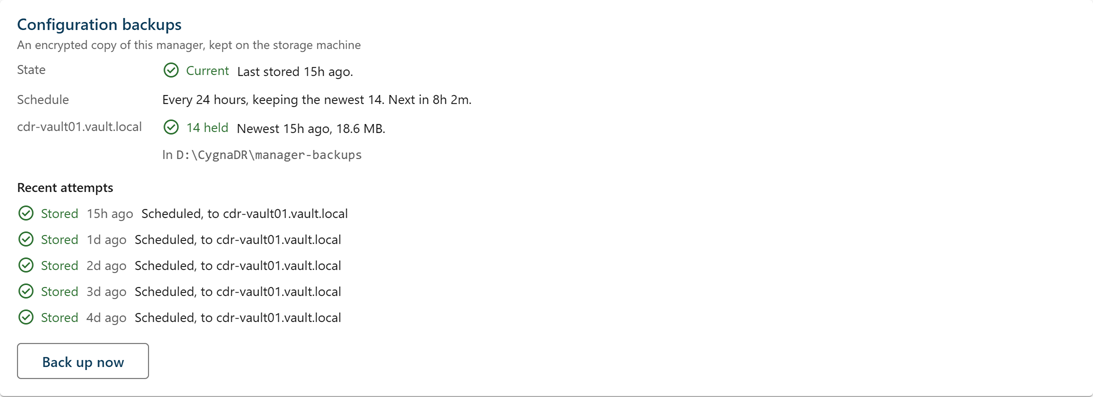
Check the card on the day you install the Manager, and after any change to the Manager or the storage machine.
Taking a backup now
Take one before an upgrade, or after a change you want captured at once. You need the config.export capability, held by the System Admin role and the break-glass account.
To take a configuration backup now:
-
Select Administration > License.
-
On the Configuration backups card, select Back up now.
The button shows Backing up… while the Manager writes the backup and sends it, and the card updates when the storage machine has answered. Its outcome appears under Recent attempts. The button is unavailable until the recovery passphrase is set, and while a backup is running.
From the command line, run cdr config backup run, which waits until the storage machine has stored the backup.
After you change the recovery passphrase
A new recovery passphrase protects only what is written from then on. Every configuration backup and database snapshot written before the change still opens with the previous passphrase, and each holds the CA key; a configuration backup also holds the enrollment token and the secret settings. The Earlier passphrase row on the card counts the configuration backups that open only with an earlier passphrase.
If the previous passphrase may have been seen by someone who can also reach those copies, delete them:
- On each storage machine, the files in
manager-backupswritten before the change. - On the Manager, the older files in the
snapshotsfolder, and any copies in your file backups.
Deleting is done on the storage machine on purpose: the Manager cannot delete its own backups there, so a compromised Manager cannot either. If the CA key itself may have been exposed, a new passphrase is not enough; replace the Manager. See Re-Keying the Manager CA.
When a backup is not stored
The card and cdr config backup give the reason in full. The most common reasons are:
- The recovery passphrase is not set—Without it nobody could ever open a backup. Set it on the Manager recovery card.
- No storage agent is connected—A backup is sent when it reconnects.
- The Manager's data volume is short of space—Building a backup needs about twice the database's size plus 1 GB free on the volume that holds the database. Free some space there.
- The storage machine refused it—The folder limit or the vault's free space reserve would be passed, or the
manager-backupsfolder is missing. Raise the limit on the storage machine or let older backups age out, free space on the volume, or restart the storage agent so that it creates the folder with the right permissions. - The database was moved here by hand—The key that encrypts backups was protected for the old machine. Run
CygnaDR.Manager.exe ca recover, or set the recovery passphrase again.
To rebuild a Manager from a configuration backup, see Building a new Manager from a configuration backup.
