Protecting the Manager
The Manager is what you use to run a recovery, so it has to survive whatever takes your directory down, or be easy to bring back. Your backups are safe on the storage machine whatever happens to the Manager, but without a working Manager nothing can plan or drive a restore from them. A little preparation on the day you install it decides whether bringing it back takes an hour or means visiting every domain controller.
What makes a Manager
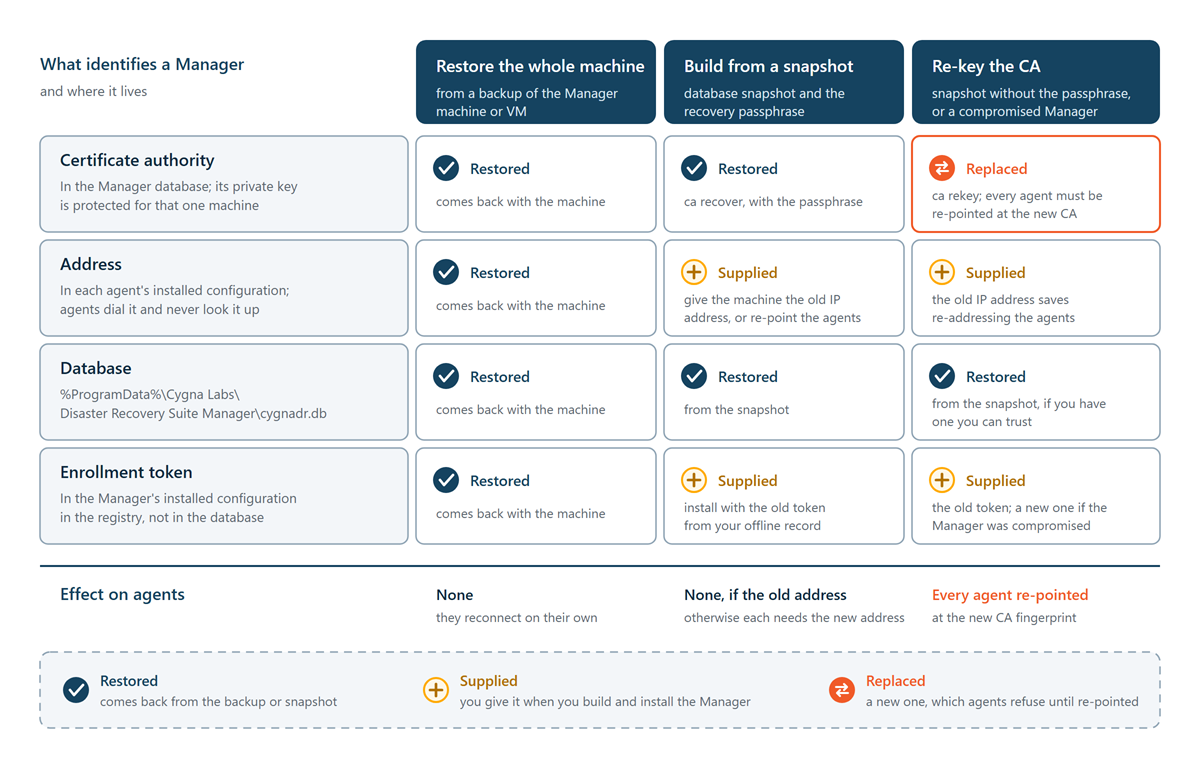
Reinstalling the Manager and copying its database is not enough on its own. Four things identify a Manager, and a replacement needs all four:
| What | Where it lives | Why it matters |
|---|---|---|
| The certificate authority | In the Manager database, with its private key protected by Windows data protection for that machine | Every agent was installed with this CA's fingerprint and trusts nothing else. A Manager with a different CA is refused by every agent. |
| The address | In each agent's installed configuration | Agents do not look the Manager up. They dial the address they were installed with. |
| The database | %ProgramData%\Cygna Labs\Disaster Recovery Suite Manager\cygnadr.db
|
Inventory, restore points, policies, plans, settings, operator accounts (the break-glass account included), and the audit trail. |
| The enrollment token | In the Manager's installed configuration in the registry, not in the database. A configuration backup carries it. | An agent the Manager does not recognize enrolls again with the token it kept. A Manager installed with a different token refuses them all. |
The CA is the hard part. Because its key is protected for one machine, a copy of the database on new hardware carries a CA that cannot be used there. The Manager then refuses to start rather than create a new CA that every agent would refuse. The way through is the recovery passphrase, which you set at the first sign-in. The Manager keeps a second copy of the CA key encrypted with it, and on a new machine CygnaDR.Manager.exe ca recover uses that copy to make the CA usable again.
The Manager also sends a configuration backup to the storage machine every day: its database together with the enrollment token and the secret settings, such as the SMTP password, that a database copy cannot carry to another machine. It is encrypted, and only the recovery passphrase opens it. With a configuration backup and the passphrase, a new Manager starts with the same CA, and agents reconnect without being touched. See Manager Configuration Backups.
Ways back
| You have | What to do | Effect on agents |
|---|---|---|
| A backup of the whole Manager machine | Restore the machine | None; they reconnect on their own. |
| A configuration backup and the recovery passphrase | Build a new Manager and import the backup | None, if the new Manager has the old address. |
| A database snapshot and the recovery passphrase | Build a new Manager from the snapshot | None, if the new Manager has the old address. |
| A database snapshot but no recovery passphrase | Build from the snapshot and re-key the CA | Every agent must be re-pointed at the new CA. |
| Nothing | Install a new Manager | Every agent must be re-pointed. History and the restore-point index are lost; the backups remain on the storage machine. |
| A Manager that was compromised | Replace it with a re-keyed Manager and a new enrollment token | Every agent must be re-pointed and given the new token. |
Whichever way you go, anything that happened after the backup or snapshot you restore from is missing from the restored Manager, including backups taken since. Afterwards, take a fresh backup of every domain controller you back up.
A support package is not a way back. Its copy of the Manager database has the CA key, password hashes, and other credentials removed, so it cannot start or restore a Manager. Use a file-level backup, a configuration backup, or a database snapshot with the recovery passphrase.
Watching the Manager's readiness
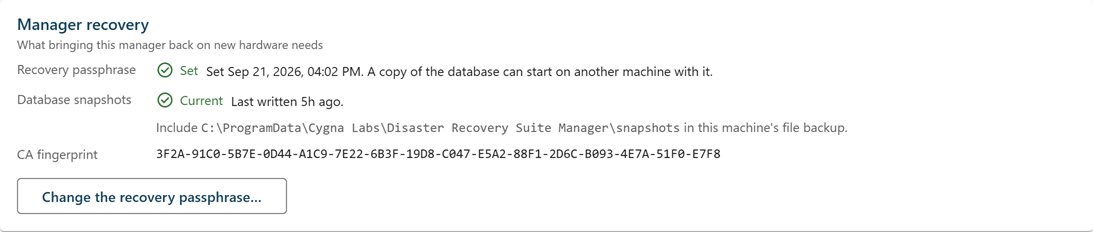
The Manager recovery card, at the foot of the License screen (Administration > License), shows whether the recovery passphrase is set, when the last database snapshot was written (it is marked Stale after two days), and the CA fingerprint. Check it after installation and after any change to the Manager.
Below it, the Configuration backups card shows whether configuration backups are reaching the storage machine, how many each storage machine holds, and the folder they are in. It is marked Stale when the newest backup is more than twice the backup interval old.