Recovering a Domain
A domain recovery brings one domain back from backup inside a forest that is still running. One domain controller of the domain is restored on an isolated target. The domain's other domain controllers are removed from the directory and promoted again afterward. The restored domain is fenced off from its old state: its operations master roles are seized, its RID pool is raised, and its machine account and krbtgt passwords are reset. The domain then rejoins the live forest, and the global catalogs in the other domains are reconciled with it. Use it when every domain controller of one child or tree domain is lost or compromised and the forest root is healthy. A domain recovery writes to machines outside the domain—global catalogs and trust partners—and the plan lists them before you approve.
You cannot recover the forest root domain, or the only domain of a single-domain forest, this way. Domain recovery never seizes the forest-wide roles, which live in the root; recover the forest instead (see Recovering a Forest).
Before you begin
- You need the Restore Operator role, or one operator who can approve and another who can execute.
- Someone with the Backup Operator role is available for the backup checkpoint near the end of the plan, unless the plan runs unattended. The Restore Operator role cannot start a backup.
- No other recovery plan is active for the same forest. A forest can have only one plan at a time.
- At least one writable domain controller of the domain has a usable full system restore point, a connected agent or a candidate machine to recover onto, and a recovery image for its operating system. If the incident is an attack, choose a restore point from before the compromise.
- Every global catalog outside the domain has a DC agent. The domain's partition is reconciled on each of them through its agent, and preflight refuses a global catalog without one.
- The topology is current. A global catalog the Manager does not know about keeps its lingering objects. Refresh it if the Forests screen shows the topology as stale.
- The restore target is isolated: cut off from production, with firewalled paths only to the Manager's agent port and the storage machine's SMB. Do not simply unplug the machine. See Isolating Recovery Targets.
- You have, for the domain, a Domain Admin account and password that are valid as of the restore point—usually the built-in Administrator. The plan acts as this account; the Manager holds it in memory only.
- You have chosen a new Directory Services Restore Mode (DSRM) administrator password for the recovered domain controllers, and somewhere to keep it under your password policy.
- The built-in Administrator account of every domain in the forest is enabled and its password is known. Logons that need a global catalog can fail while the catalogs are reconciled.
- For each trust with another domain of the forest that has a live domain controller with a DC agent, an administrator account and password for that partner domain. The plan resets the partner's side through that agent, as that account.
- For each trust whose partner has no DC agent, and each external trust, an administrator of the partner domain is ready to reset the partner's side.
For the full list, see Recovery Requirements. For what is not recovered, such as certificate services and DHCP on the same machines, see What Recovery Does Not Cover.
Build the plan
To build a domain recovery plan:
-
Go to Recovery > Recovery Plans, and under Active Directory recovery, select Domain recovery.
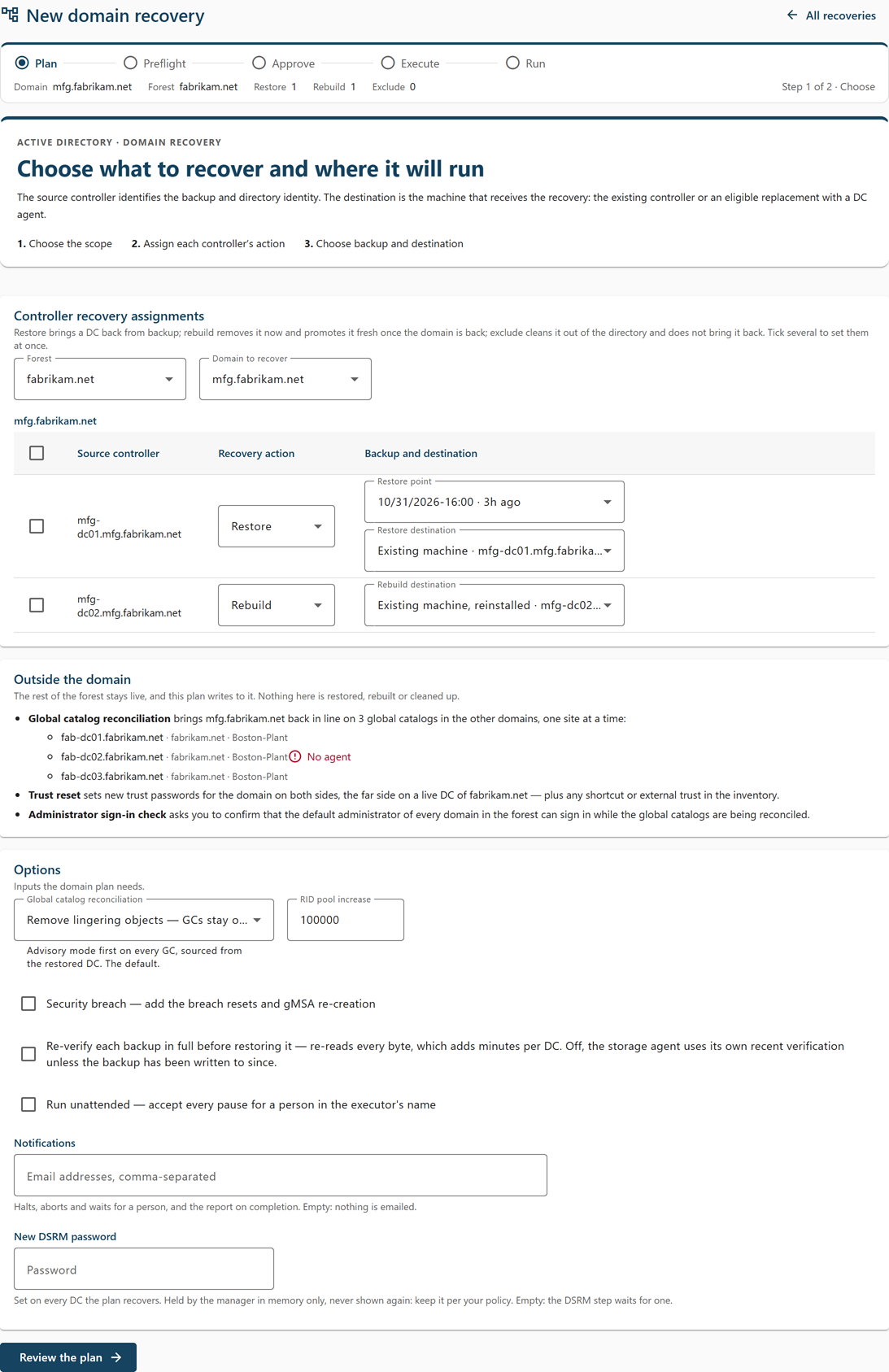
The New domain recovery page opens at step 1, Choose.
-
Select the Forest, and then the Domain to recover.
The page lists the domain's domain controllers with a Recovery action for each. By default, the connected writable PDC emulator (or the first eligible domain controller) is set to Restore and every other domain controller to Rebuild. A domain controller under an active exclusion is marked "excluded from protection" and starts as Exclude; if only excluded domain controllers can be restored, one of them is still set to Restore. Retired domain controllers are not listed. Domain controllers of the forest with no known domain—usually a demotion that did not finish—are not in the plan, and a notice counts them.
-
Set the recovery action of each domain controller:
- Restore—brought back from backup by a full system recovery. Restore exactly one domain controller; a plan that restores two cannot be approved. The others are rebuilt and replicate the whole directory from it.
- Rebuild—removed from the directory now and promoted fresh once the domain is back. Its Windows roles and features are reinstalled from its last backup's record before it is promoted; their configuration and its installed programs are not. Read-only domain controllers can only be rebuilt.
- Exclude—neither restored nor rebuilt. Its metadata is removed from the directory along with the domain's other domain controllers, and it is not brought back. Keep the machine off the network.
To set several at once, select their checkboxes and then Restore, Rebuild, or Exclude in the bar at the bottom of the screen.
-
For the domain controller you restore, select the Restore point, and in Restore destination, select Existing machine or a candidate machine (Replacement).
Use a candidate when the original machine will not start. See Full System Recovery onto a Candidate for how to prepare one.
-
For each domain controller you rebuild, choose in Rebuild destination either Existing machine, reinstalled or a candidate machine (Replacement).
A bound candidate is renamed to the domain controller's name, given its roles and features back, and promoted. Each machine can be bound to only one domain controller.
-
Review the Outside the domain card.
It lists what the plan does to the rest of the forest: Global catalog reconciliation of the global catalogs in other domains, one site at a time; Trust reset of the domain's trusts on both sides; and the Administrator sign-in check, which asks you to confirm that the default administrator of every domain can sign in while the global catalogs are being reconciled. A global catalog marked No agent blocks the plan until you install the agent on it or remove its global catalog role.
-
Under Options, set:
- Global catalog reconciliation—Remove lingering objects — GCs stay online (the default, which runs in advisory mode first on every global catalog) or Unhost, then rehost — for small forests (every global catalog drops the domain and takes it back site by site, and cannot answer for it in between).
- RID pool increase—how far the domain's available RID pool is raised. The default is 100,000.
- Security breach—select this if the domain was compromised. It adds breach resets on the restored domain controller and re-creation of the domain's group managed service accounts.
- Re-verify each backup in full before restoring it—optional; adds a full read of the backup.
- Run unattended—optional. See Recovering a Forest. A domain recovery always resets the domain's trusts. A trust reset carried out by hand—an external trust, or a partner with no DC agent—stops for a person even in an unattended plan; the trust resets the agents carry out do not.
- Notifications > Email addresses, comma-separated—optional. These addresses receive the plan's halts, aborts, and waits for a person, and its recovery report when it completes.
- New DSRM password > Password and Password again—optional. The password the plan sets on every domain controller it recovers. Leave it empty to supply it later; the DSRM step waits for it.
The notification and DSRM password fields are shown only to an operator with the
plan.executecapability. -
Select Review the plan.
If the button is unavailable, the reason is shown beside it. Step 2, Review, states what the plan will do in the domain and in the rest of the forest.
-
Select Build the plan.
The plan's page opens with the status Draft. Building writes nothing to any machine.
Approve, supply credentials, and execute
To start the recovery:
-
On the plan's page, review the Preflight findings card and resolve every hard check. To change your choices, select Edit this draft.
One advisory check is always present: the plan changes machines outside the domain being recovered. Read it. If the domain controller is restored onto a candidate machine, the checks also compare the candidate's firmware and disks with the chosen restore point. They run again when you approve, and approval is refused if one of them blocks.
-
Select Approve this plan.
-
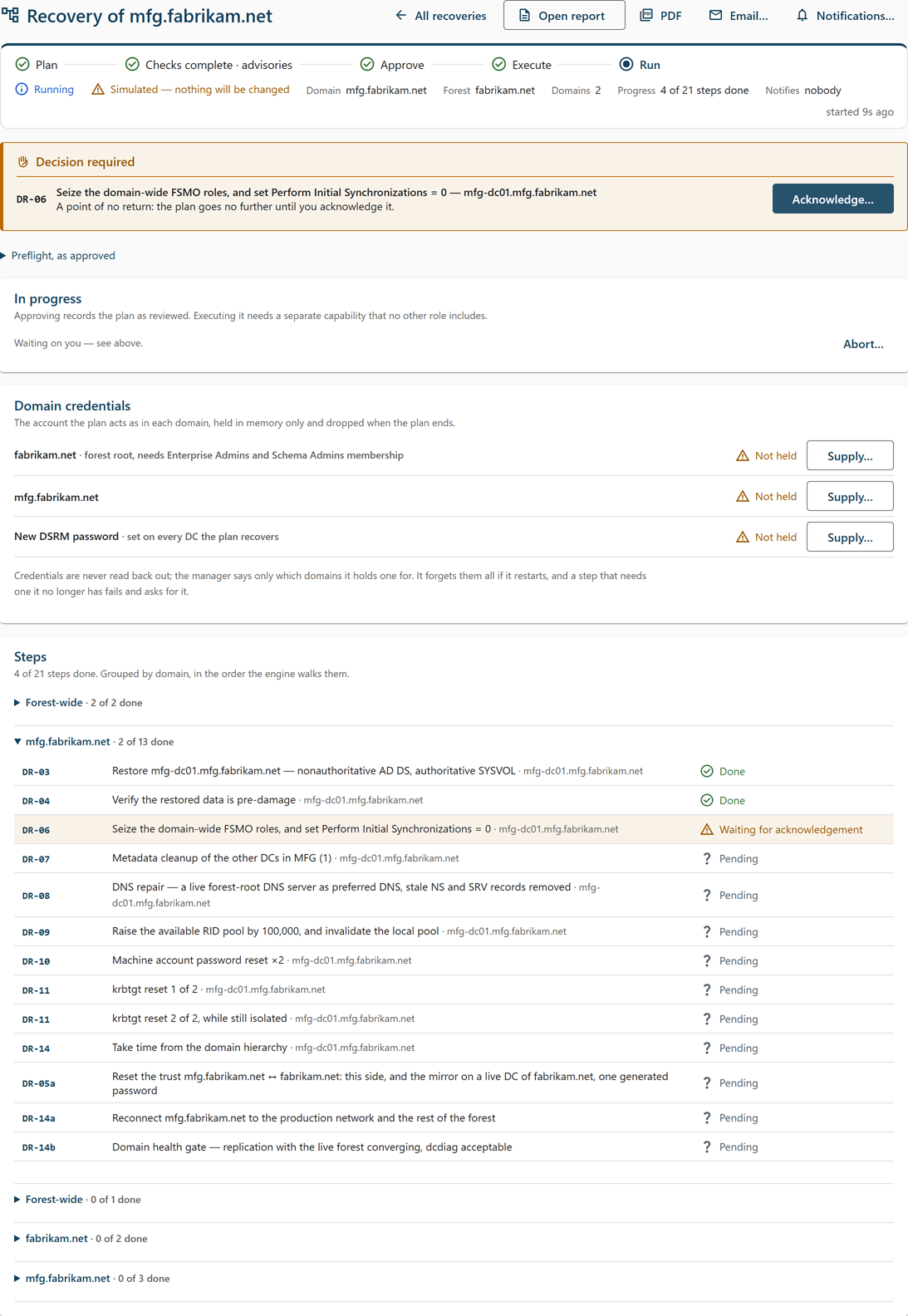
On the Domain credentials card, select Supply… for each domain listed, enter the Administrator account (for example
CHILD\Administrator) and Password, and select Hand to the plan.The card lists the recovered domain and each partner domain whose live domain controller resets its side of a trust. Each row shows Held by the manager or Not held, read from the plan itself, so the card is accurate when you open the page and after a Manager restart. A step that cannot run without a credential waits in Waiting for a credential until one is supplied. The Manager forgets every credential if it restarts; supply them again if the card shows Not held.
-
If the New DSRM password row shows Not held, select Supply…, enter the Password twice, and select Hand to the plan. You can also do this later; the DSRM step waits for it.
-
Select Execute…, enter the domain's FQDN, and select Execute recovery.
For an unattended plan, the dialog is Execute the UNATTENDED recovery of <domain>: type the domain's name, attest the isolation of the restore target, and select Execute unattended.
Note: Aborting later stops the plan but does not undo steps that have already run.
Note: Important: An unattended domain plan attests that the restored data predates the damage, attests the administrator sign-in check, and attests the reconnect, without anyone checking. Cygna Forest Recovery reconnects nothing itself. Before you execute one, make sure every original domain controller the recovery replaces is already powered off, wiped, or isolated, and that the network is ready for the domain to rejoin the forest.
What happens during the recovery
The Steps card lists every step in the order the Manager runs it, with its code, title, machine, and state. The run stops for you at each decision; the Decision required section at the top of the page says what is needed, and the banner on other screens reads "A recovery is waiting for you". The steps, in order:
| Step | What happens | Your part |
|---|---|---|
| DR-02 | Isolate every restore target. | Attest that nothing of production can reach the targets and that their only links are the firewalled paths to the Manager's agent port and the storage machine's SMB. See Isolating Recovery Targets. |
| DR-03 | Restore the domain controller (non-authoritative AD DS, authoritative SYSVOL). Select Follow the restore to watch the restore run. | Watch. If its preflight raises a check only you can accept, select Decide on the restore and decide on the restore run. |
| DR-04 | Verify the restored data is from before the damage. | Sign in to the restored domain controller and spot-check the directory. Attest, or reject and re-plan with an older restore point. |
| DR-05 | Breach resets (breach response only). | Acknowledge, then carry out by hand and attest. |
| DR-06 to DR-10 | Seize the domain-wide operations master roles, clean up the other domain controllers' metadata (a domain controller already absent from the restored directory counts as removed), repair DNS, raise the RID pool, and reset the machine account password twice. | Acknowledge each point of no return. |
| DR-05a | Reset each of the domain's trusts on both sides with one password, breach response or not. Where the partner is a domain of the forest with a live domain controller that has a DC agent, the agents carry out two steps: Reset <domain>'s side of the trust with <partner> on the restored domain controller, and Reset <partner>'s side of the trust with <domain>, on a live DC with the partner domain's credential. Otherwise, one step is carried out by hand: this side, and the mirror on a live domain controller of the partner. | Acknowledge each agent step. For a step carried out by hand, acknowledge, carry it out, and attest; it stops for a person even in an unattended plan. |
| DR-11 | Reset the krbtgt password twice, back to back while the domain is still isolated. In a plan created with a gap between the resets, the second reset waits it out. | Acknowledge each reset. |
| DR-13, DR-14 | Remove the global catalog flag from the restored domain controller, and set it to take time from the domain hierarchy. | Watch. |
| DR-14a | Reconnect the domain to production and the rest of the forest. From here until the last rebuilt domain controller is confirmed, the domain serves on its restored domain controller alone, and the page shows Live on reduced DCs. | Reconnect the network, then acknowledge. This cannot be undone. |
| DR-14b | Domain health gate: replication with the live forest converges and dcdiag passes. | Watch. |
| DR-15a | Logon continuity before the global catalogs are disturbed. | Attest that every domain's built-in Administrator is enabled and its password known. |
| DR-15 | Reconcile the domain on every global catalog outside it, one site at a time. | Watch. |
| DR-16 | Re-create the domain's group managed service accounts (breach response only). | Acknowledge. |
| DR-17 | Add the global catalog back if the restored domain controller was one, take a backup checkpoint, rebuild the other domain controllers (reinstalling the roles and features each had before promoting it), set Initial Synchronizations back to 1, set the new DSRM password you supplied on every recovered domain controller (on a newly promoted domain controller, this waits up to 15 minutes for its first RID pool), and produce the recovery report and email it to the plan's notification addresses. | Carry out the backup checkpoint by hand and attest; an unattended plan passes over it and the report says so. Make sure each rebuild has its machine. Supply the new DSRM password if the plan does not hold one. Read the report. |
How to respond to each kind of decision is the same as in a forest recovery. See Recovering a Forest. In short:
- Waiting for acknowledgement—select Acknowledge…, type the step code (for example
DR-06), and select Acknowledge DR-06. - Waiting for you—do what the prompt asks, and then select Attest, or select Reject… with a reason to halt the plan.
- Waiting for a credential—select Supply credentials… or Supply DSRM password…, enter it, and select Hand to the plan. The step runs by itself once it is supplied.
- Waiting (krbtgt)—only in a plan created with a gap between the krbtgt resets. The second reset runs by itself at the time shown. To run it early, select Run it now…, give a reason, and select Override the wait.
- Waiting for its machine to be built—if no candidate is bound to the rebuild, install Windows Server cleanly on the domain controller's own machine, with its name, and install the DC agent. The step runs once the agent connects.
If the plan has notification addresses, each wait is also emailed to them once.
Halts, retries, and aborting
If a step fails, the plan's status changes to Halted — a step failed, and the page names the step, the machine, and the error. Nothing more is issued until the step is retried or the plan is aborted. Fix what failed it, select Retry <step>… in the halted banner, and select Retry the step: the step runs again from its checkpoint and the plan carries on.
You can abort at any time before the plan finishes: select Abort…, enter a reason, and select Abort recovery. The dialog says what aborting now leaves. Steps that have already run are not undone. Each restore the plan started is asked to stop; one that is already writing carries on, and if its machine is gone, close it as abandoned from its own page.
Using the command line
cdr recovery plan corp.example.com --domain child.corp.example.com --restore "dc11.child.corp.example.com=09/02/2026-23:00" --rebuild dc12.child.corp.example.com --gc-strategy lingering-objects
cdr recovery show <plan>
cdr recovery approve <plan>
cdr recovery secrets <plan> --domain child.corp.example.com --admin "CHILD\Administrator"
cdr recovery secrets <plan> --dsrm
cdr recovery execute <plan>
cdr recovery ack <plan> DR-06@child.corp.example.com --confirm DR-06
cdr recovery attest <plan> <step>
cdr recovery retry <plan> <step>
cdr recovery report <plan>
cdr recovery abort <plan> --reason "Re-planning with an older restore point"
--restore takes <fqdn>=<version>, with an optional :rollback or :server mode (full system recovery by default); --onto binds a candidate to a restored or rebuilt domain controller; --breach sets the breach response; --unattended, --notify, and --dsrm match the console's options. cdr recovery show lists each step ID and what a waiting step needs. For every option, see Recovery Plan Commands.
Result and next steps
When every step is done, the plan's status is Completed. The domain runs from the restored domain controller and its rebuilt partners, connected to the live forest. Every domain controller the plan restored or rebuilt that has an enabled backup policy is due for a backup at once; each backup starts when the domain controller's agent connects. Next, read the recovery report, complete its follow-ups, and check that those backups completed. The plan page's Open report, PDF, and Email… actions give you the report at any time; see After a Recovery.
