Isolating Recovery Targets
A forest or domain recovery restores domain controllers from backups that are not yet trusted, and fences the recovered directory off from its old state before it rejoins production. Until then, the restore targets must be isolated: nothing of production may reach them, and they must have no route out. The plan's first operator step (FR-02 in a forest recovery, DR-02 in a domain recovery) asks you to attest that this is so.
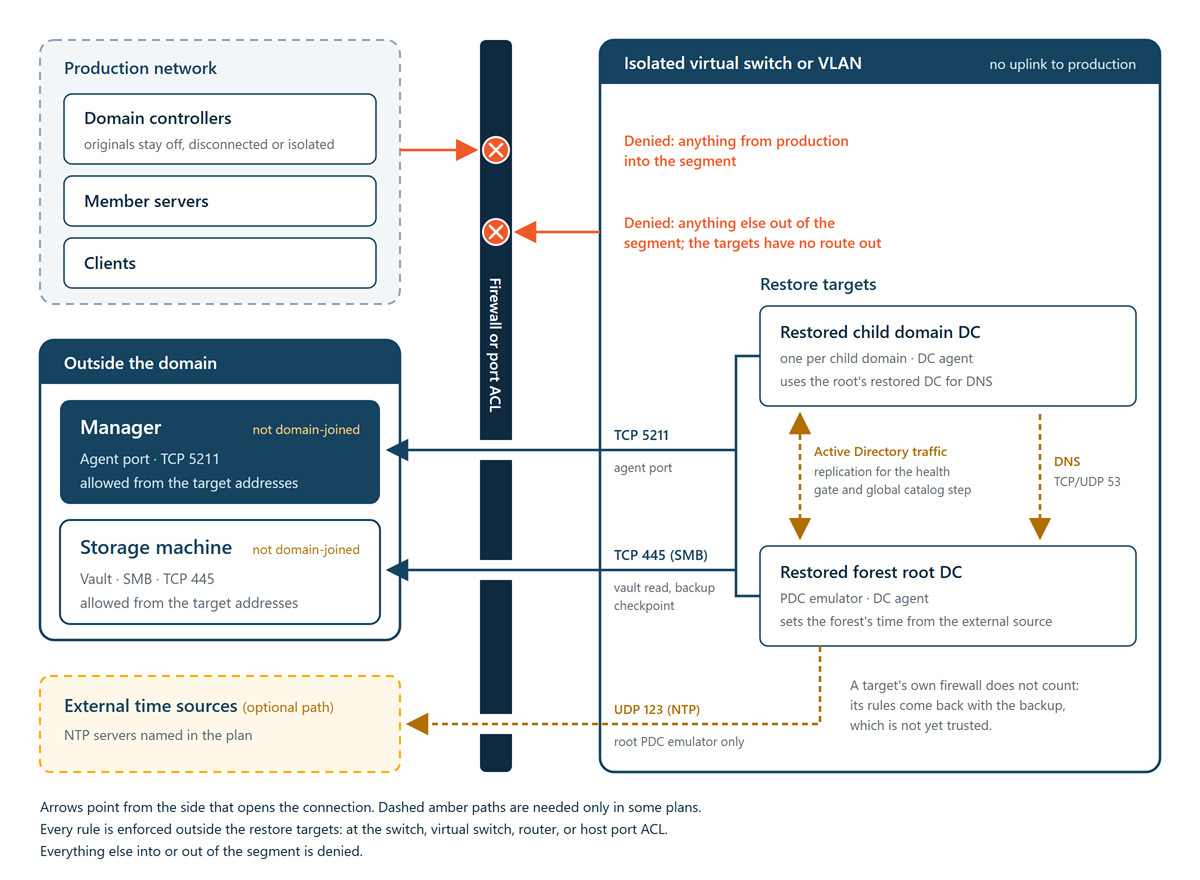
Isolated does not mean unplugged. The restore itself needs the network: the target's agent reports to the Manager and runs every step after the restore, and the restore reads the backup from the vault over SMB for its whole length. Isolation therefore means firewalling. The Manager and the storage machine can share a network with the targets, as long as the only links between them are the paths described here.
What you attest
When you attest isolation, you confirm that, for every restore target in the plan:
- No domain controller, member, or client of the directory being recovered, and no other production machine, can reach it.
- It has no route out.
- Its only links are two firewalled paths: to the Manager on the agent port, and to the storage machine over SMB.
- Those paths are enforced outside the target—at the switch, the virtual switch, a router, or the host's port ACL—not by the target's own firewall.
The target's own firewall does not count because the target is restored from a backup that is not trusted until you have checked the restored data. Its firewall rules come back with that backup.
In an unattended plan, the person who executes the plan attests isolation in the execute dialog, as the plan starts, instead of when the plan reaches the step.
Required paths
| From | To | Port | Used by |
|---|---|---|---|
| Each restore target | Manager | TCP 5211 (the agent port, by default) | The recovery agent in the recovery environment while it restores, and the restored domain controller's DC agent from its first start, which carries out every later step. |
| Each restore target | Storage machine | TCP 445 (SMB) | The restore reading the backup from the vault, and the backup checkpoint writing a fresh backup. |
For every port the product uses, see Ports and Protocols.
Paths you may also need
Depending on the plan, allow these as well, each limited to the machines named:
- Time source—in a forest recovery, the restored root PDC emulator is pointed at the external time sources you name in the plan, over NTP (UDP 123). Allow it to reach those servers and nothing else. Without this path the time step cannot confirm the external source; the check shows as not confirmed and becomes a follow-up in the recovery report.
- Between restored domain controllers—in a forest with more than one domain, the restored domain controllers of each domain are joined to one isolated network, must reach each other, and must resolve each other's names. Allow Active Directory traffic among them, and only among them. From the DNS repair on, a child domain's restored domain controller needs DNS (TCP and UDP 53) to the forest root's restored domain controller, which the repair makes its preferred DNS server. The health gate and the global catalog step then pull replication between the restored domain controllers.
- Rebuilt domain controllers—a rebuilt domain controller is promoted from a restored one after the reconnect. Its machine needs the same agent port to the Manager, and must reach the restored domain controller of its domain, which holds the RID master role: the DSRM password step waits up to 15 minutes for a newly promoted domain controller's first RID pool from it.
Reference layouts
Any layout works if it enforces the paths above outside the targets. Three common ones:
- Isolated Hyper-V virtual switch with port ACLs—connect the restore targets to a private or internal virtual switch with no uplink to production. Give the Manager and the storage machine, or a firewall in front of them, an adapter on that switch, and use Hyper-V port ACLs on each target's adapter to allow only the agent port to the Manager and SMB to the storage machine. Virtual domain controllers can keep their original addresses on such a switch.
- VLAN with router ACLs—place the restore targets on a dedicated VLAN. On the router or layer 3 switch that joins it to the rest of the network, deny everything from the VLAN except the agent port to the Manager's address and SMB to the storage machine's address, and deny everything into the VLAN from production.
- Physical targets—cable physical domain controllers to dedicated switch ports or a dedicated switch, and apply the same rules with switch port ACLs or the upstream firewall.
Do not give the Manager a second network adapter with a general route between production and the targets. If the Manager must sit on both networks, firewall that adapter down to the agent port from the target addresses.
Rules on the Manager and storage machine
Limit the inbound rules on both machines to what the recovery needs:
- On the Manager, allow the agent port only from the addresses the restore targets use during the recovery, in addition to your normal agents.
- On the storage machine, allow SMB only from the same addresses, in addition to the domain controllers it serves normally.
The restore reads the vault with a short-lived, read-only credential issued for that restore. The vault path stays reachable from the restored domain controller's first start until the backup checkpoint, so keep the SMB rule limited to the restore targets' addresses.
Addressing
Restored domain controllers keep their original IP addresses unless the plan gives them other ones. If an original domain controller is still running anywhere the isolated segment can see, the two collide. Power off, disconnect, or isolate every original before the restore, and keep it that way for good: once the recovered directory goes live, an original that returns still holds the directory as it was before the recovery.
Name resolution
The recovery does not depend on production DNS:
- The vault is addressed by the storage agent's advertised address, which by default is the storage machine's IP address, so the recovery environment needs no DNS to reach it. On a storage machine with more than one network address, set the advertised host to the IP address the restore targets reach; otherwise the agent falls back to its machine name, and the restore needs DNS to resolve it.
- The Manager's address is resolved to an IPv4 address before the recovery environment starts, so the recovery environment needs no DNS to reach the Manager either.
- The restored domain controller's DC agent dials the Manager address it was installed with. If that is a name, the isolated segment must resolve it. Install DC agents with the Manager's IP address to remove this dependency. See Deploying DC Agents.
Restored domain controllers resolve each other through their own DNS once the plan repairs it. In a child domain, the repair makes the forest root's restored domain controller the preferred DNS server.
Before you attest
To check isolation before you attest it:
-
Confirm that every original domain controller of the directory being recovered is powered off, disconnected, or isolated, and will stay so.
-
Confirm that each restore target is connected only to the isolated segment, and that its adapter or switch port carries the rules described here.
-
From a machine on the isolated segment, confirm that you cannot reach a production domain controller, member server, or client, nor any address outside the allowed paths.
-
Confirm that the Manager's agent port and the storage machine's SMB answer from the isolated segment. On the plan's page, each target's agent shows as connected.
-
In a forest recovery, confirm that the restored root PDC emulator can reach the named time sources, if you allowed that path.
-
Attest the step on the plan's page, or with
cdr recovery attest.
