Protection Summary
The Protection Summary screen gives the backup history, current coverage, and evidence for review: how many backups ran over a period and what they produced, and how well each domain and forest is covered now. You can export what is on the screen as a CSV file, for example as evidence for an audit.
To open it, select Monitoring > Protection Summary. The screen requires the reports.view capability, which every role includes.
Tiles
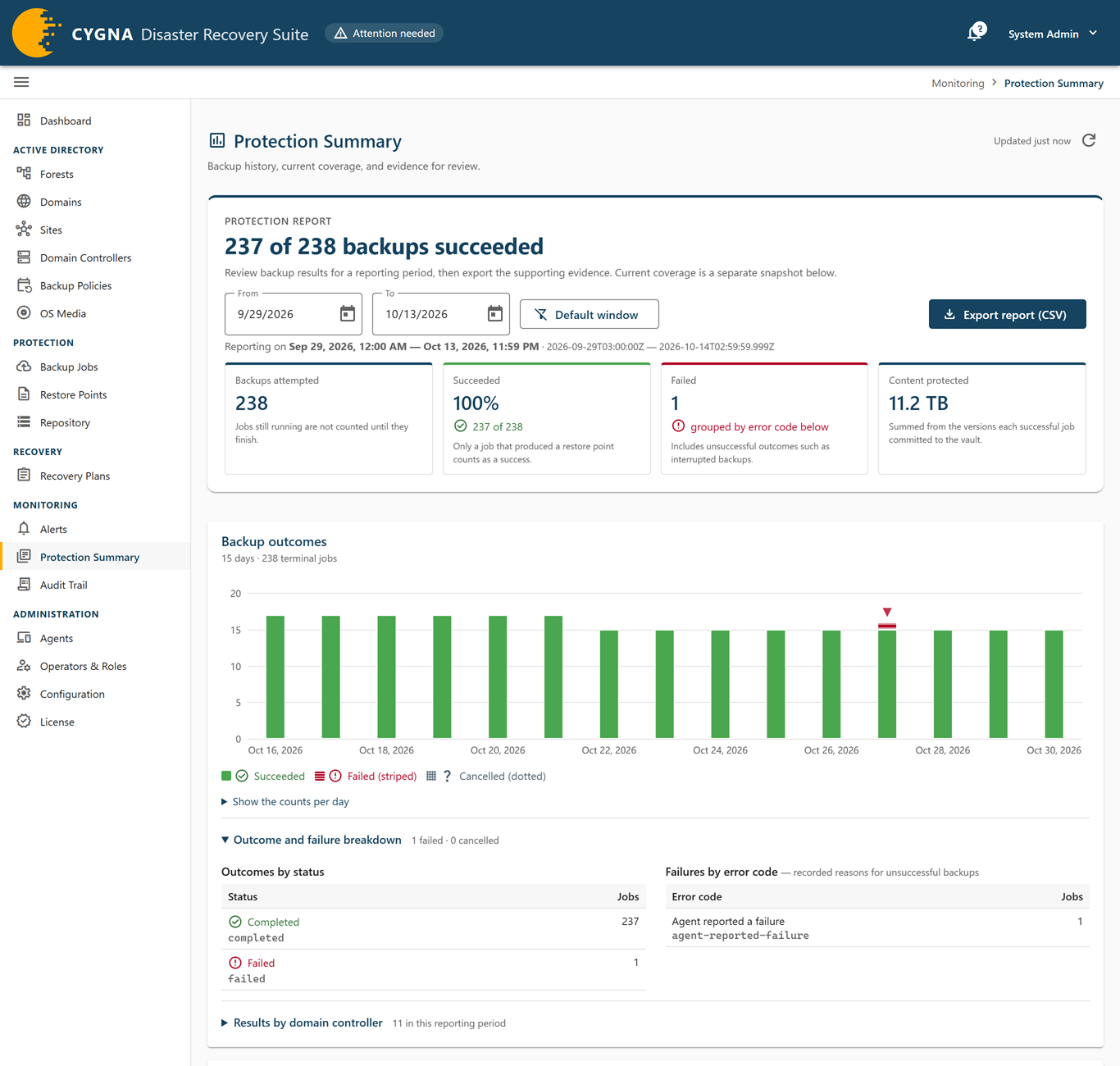
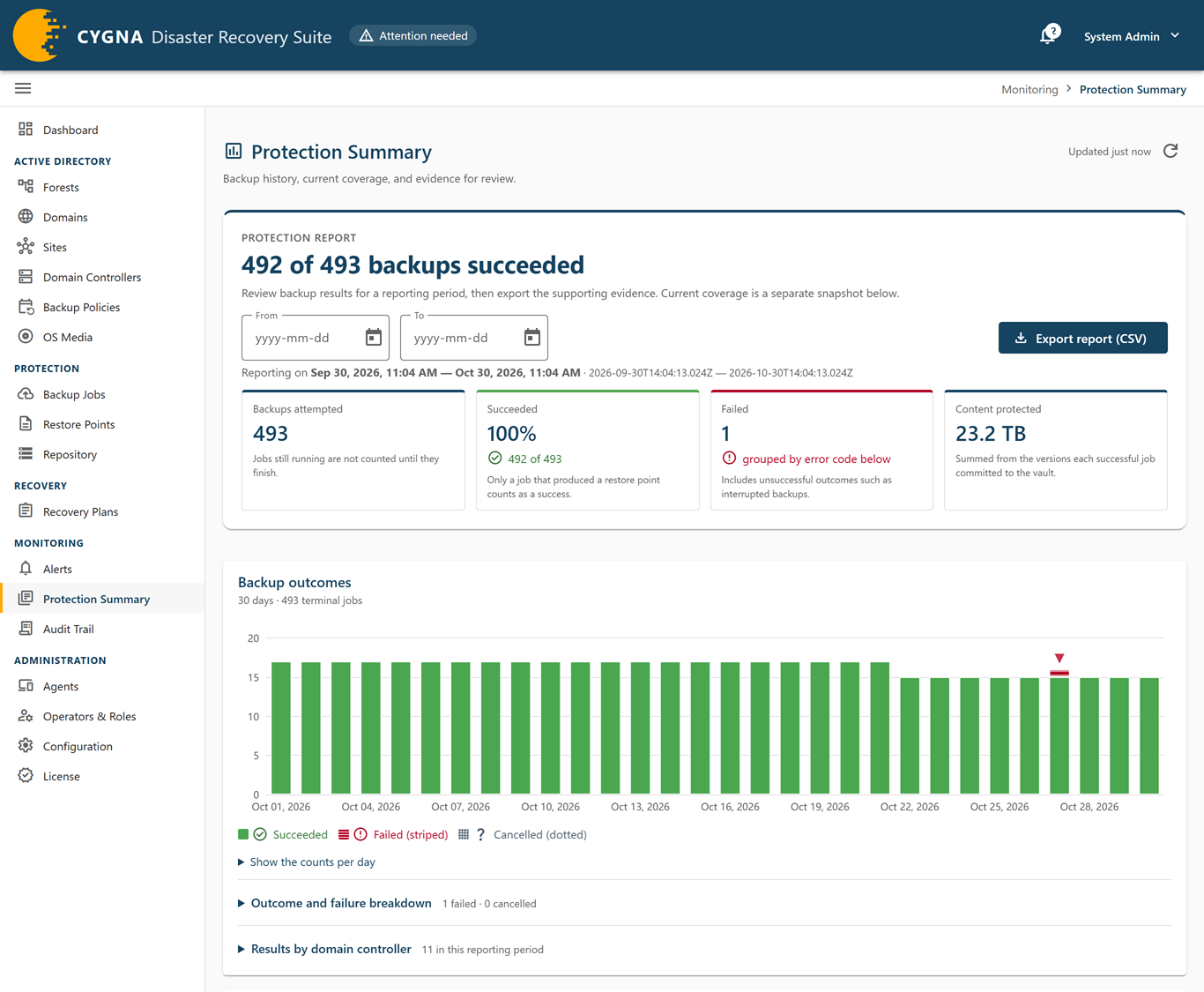
The Protection report panel at the top of the screen opens with a headline such as how many of the window's backups succeeded, and holds the report window, the export button, and these tiles:
| Tile | Meaning |
|---|---|
| Backups attempted | Jobs that finished in the window. Jobs still running are not counted. |
| Succeeded | Jobs that produced a restore point, with the success rate. The tile is green at 100%, amber at 90% or more, and red below 90%. |
| Failed | Jobs that failed, including unsuccessful outcomes such as interrupted backups, grouped by error code in the card below. Shown only when there are failures. |
| Content protected | The total size committed to the vault by successful jobs in the window. Shown only when something was committed. |
Backup outcomes
This card reports on a window of time. Set From and To in the Protection report panel at the top of the screen to choose it, or select Default window to return to the last 30 days. The window can be at most 366 days. The Protection report panel shows the window in both local time and UTC.
- Chart—Succeeded, failed, and cancelled backups per day. Select Show the counts per day for the same figures as a table, by UTC day.
- Outcomes by status—Jobs per final status. Expand Outcome and failure breakdown to see this table and the next.
- Failures by error code—The recorded reasons for unsuccessful backups, grouped by the error code the Manager recorded, not by tool text, so they can be counted. Failures recorded without a code are shown as Uncoded rather than dropped.
- Results by domain controller—Expand this section, which shows how many domain controllers had results in the window. For each domain controller: Succeeded, Failed, Cancelled, Protected (size committed), and Last success.
For what each error code means, see Backup Job Errors.
Coverage and freshness
This card is a snapshot of coverage as it stands now, not a history over the window.
- Per domain—Domain, Coverage, DCs, Protected (with the numbers that need a backup policy and are rebuilt on recovery beneath it, when there are any), Full system recovery options, Recovery point, and Judged against (the freshness window the recovery point is measured against).
- Per forest—Forest, Readiness, Domains recoverable (could be recovered today, including domains with a finding against them), Domains covered (recoverable and meeting every coverage rule), and DCs protected. DCs protected counts protected domain controllers against the backup targets, so domain controllers rebuilt on recovery are named beside the figure rather than counted as a shortfall. Those a domain needs backed up because it has too few backup targets stay in the total and are named as need a backup policy. Domains and domain controllers excluded by an operator are named the same way, for example
2 of 4 · 1 need a backup policy · 4 rebuilt on recovery · 1 excluded, and are left out of the total.
For the coverage and readiness verdicts, see Coverage and Readiness.
Recovery history
Restores and recoveries are recorded in the audit trail, with their gate results and each operator acknowledgment, and every run and plan is listed on the Recovery Plans screen. The card links to both: View audit trail and Recovery plans.
Exporting the report
Select Export report (CSV) to download what is on the screen as a CSV file named cygnadr-report-<from>-to-<to>.csv, with the window's UTC dates in the name. The file is UTF-8 and every timestamp is given in both UTC and local time. It contains these sections:
| Section | Contents |
|---|---|
| Report header | The window start and end, and when the report was generated. |
| Backups per day | Day, Succeeded, Failed, Cancelled. |
| Outcomes by status code | Status code, its wording, and the count. |
| Failures by error code | Error code, its wording, and the count. |
| Per machine | Machine, Succeeded, Failed, Cancelled, Bytes protected, Last succeeded. |
| Domain coverage | As at generation: Domain, Forest, coverage code and wording, DCs, Protected, Need a backup policy, Rebuilt on recovery, first-DC candidates, full system recovery capable, recovery point. |
| Forest readiness | As at generation: Forest, readiness code and wording, Domains, Recoverable, Covered, DCs, Protected, Domains excluded, DCs excluded, DCs needing a backup policy, DCs rebuilt on recovery. |