Backup Jobs
The Backup Jobs screen lists every backup the Manager has attempted, what each one produced, and why any of them failed. Use it to follow a backup while it runs, to check that scheduled backups are succeeding, and to find the cause of a failure.
To open it, select Protection > Backup Jobs. The screen requires the backup.view capability, which every role includes, and refreshes itself every few seconds. Operators with the backup.run capability (Backup Operator role) can also retry a job that ended without a restore point.
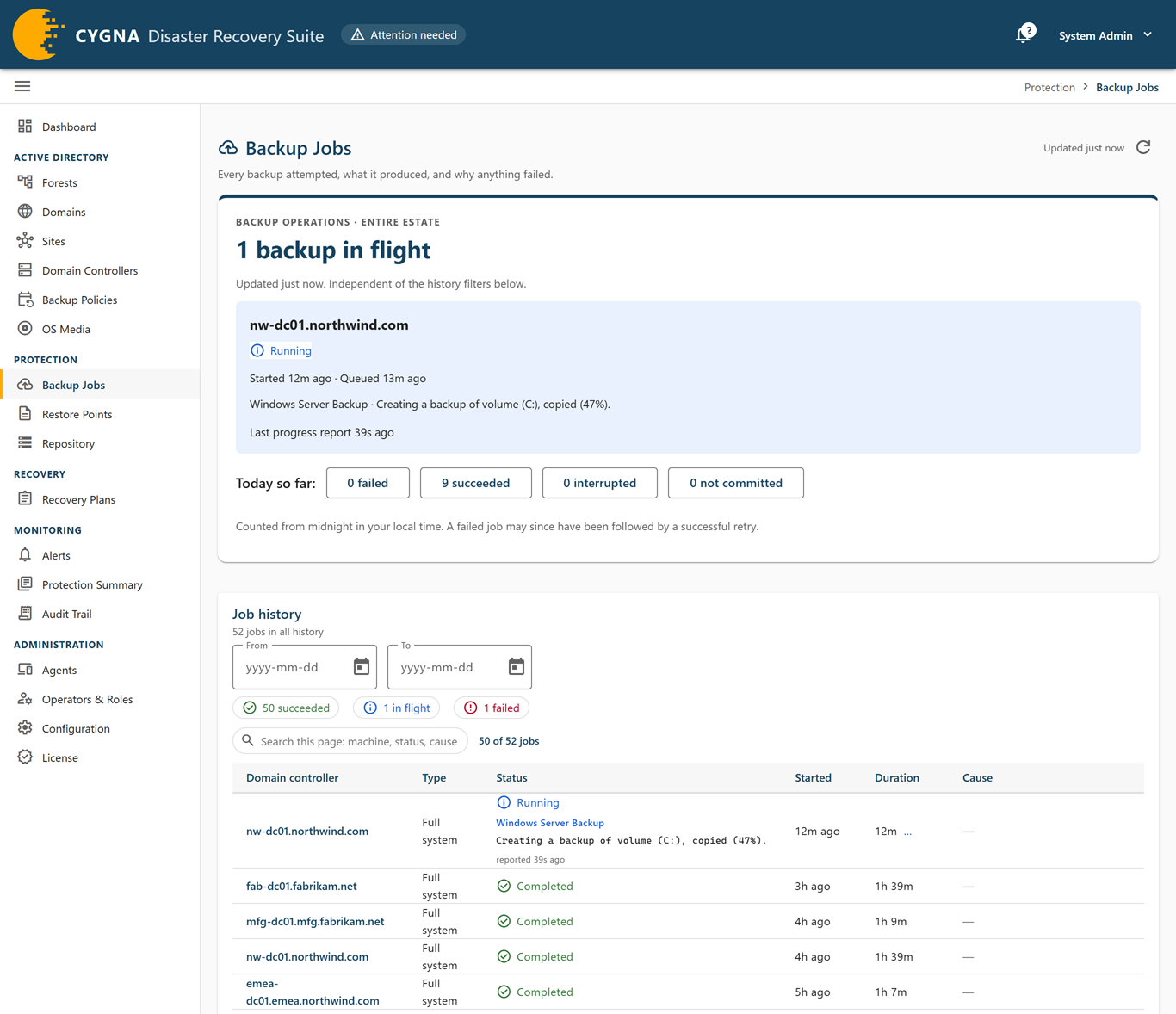
Backup operations
The card at the top of the screen covers the entire estate and ignores the history filters below it. It lists each backup in flight with its machine, status, when it was queued and started, the last phase the agent reported, and when that report arrived.
After Today so far:, buttons count the jobs created since midnight in your browser's time zone that failed, succeeded, were interrupted, or were not committed. Select one to filter the job history to those jobs. A failure today may already have been followed by a successful retry.
Job history
The Job history card holds the list of jobs. Its subtitle gives the number of jobs in all history, or the number that match your filters.
Filters
- From and To—Limit the list to jobs created in a date range (your browser's time zone). Select Clear filter to remove the range.
- Status chips—Select a chip to list only jobs in that group: succeeded, in flight, failed, interrupted, not committed, in other states, or unreconciled. The chip counts do not change when you filter, so they always show how many jobs are in each group.
- Machine—When you open the screen from a link on another screen, for example from a domain controller, the list shows only that machine's jobs. A notice says so; select Clear filter to see every machine.
- Search—Searches only the jobs on the current page, by machine, status, cause, or error text. To find a job on another page, narrow the list with the dates, a machine, or a status first.
Columns
| Column | Description |
|---|---|
| Domain controller | The machine that was backed up. Select it to open the job's detail sheet. |
| Type | Full system or DC state. For the difference, see Backup Types. |
| Status | The job's status (see below). While a job is in flight, a line under the status shows the last phase the DC agent reported and how long ago it reported it, or nothing reported yet. |
| Started | When the job started. A backup still waiting for a backup slot reads Waiting for a slot; hover for when it was queued. A dash means the job never started. |
| Duration | How long the job ran. While it is still running, this is the time elapsed so far. |
| Cause | For a job that did not succeed, the error and the text the agent or tool reported. For a job that completed but was not committed, the staging path where its content is waiting. |
With backup.run, a row whose job is Failed, Interrupted, or Cancelled has an actions menu (⋮) with Retry — type. It queues a new backup of the same machine and type, as Back up now on the Domain Controllers screen does, and the new job appears in the list at once. If the Manager does not start it, for example because the agent is not connected or a backup is already running, a message gives the reason. A job that completed but was not committed has no retry, because its backup already exists in staging.
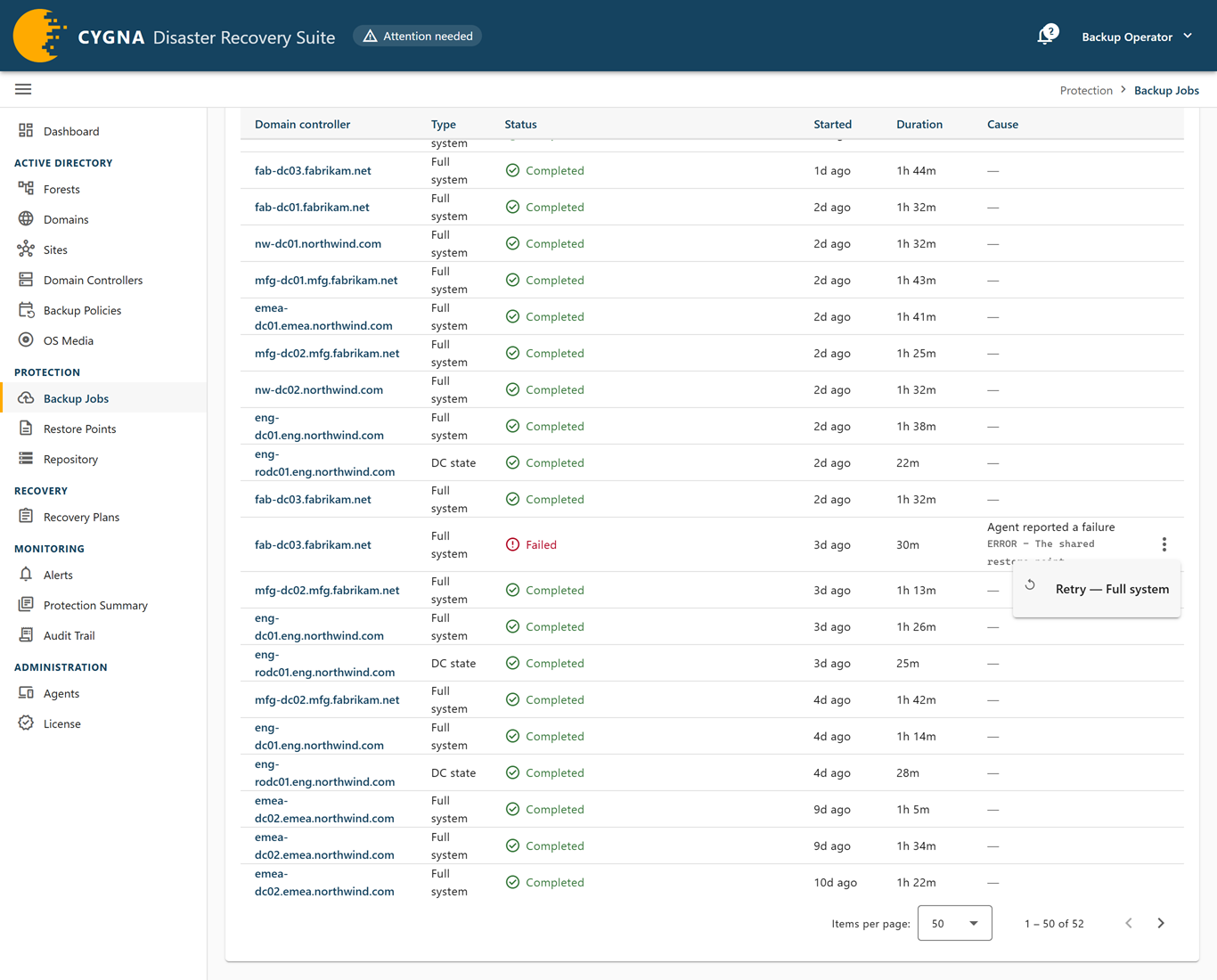
The list is paged, 50 jobs per page by default; you can choose 25, 50, 100, or 200.
Job statuses
| Status | Meaning |
|---|---|
| Queued | Waiting for a backup slot. The Manager runs only as many backups at once as Maximum concurrent backups allows and starts this one when a slot frees. Nothing has been asked of the domain controller yet. A queued backup is kept across a Manager restart. While a recovery is working on the machine, or while the Manager has no active license, it stays queued until it can run. |
| Created | The backup has a slot and the Manager is starting it. The DC agent has not started it yet. |
| Staging | The staging share the backup will be written to is being prepared. |
| Running | The backup is running on the domain controller. |
| Committing | The backup finished on the domain controller and is being moved into the vault. |
| Completed | The backup finished and was committed to the vault. It is a restore point unless retention has since removed its content. |
| Completed (unreconciled) | The backup completed, but the Manager could not confirm it against the vault. Treat it as uncertain, not as a restore point, until this is resolved. |
| Completed, not committed | The domain controller took the backup, but the Manager did not see it reach the vault. The Manager checks the storage machine for these every hour and whenever the storage agent connects. Content still in staging is committed, content already in the vault is recorded as a restore point, and the job changes to Completed either way. If the content is in neither place any more, the job stays as the record that the backup was taken, its detail sheet says so, and it is not a restore point. The Repository screen lists these backups and can check now. |
| Failed | The backup did not produce a restore point. |
| Interrupted | The job stopped before it finished, so it did not produce a restore point. |
| Cancelled | An operator cancelled the job. It did not produce a restore point. A cancelled job is not counted as a failed attempt. |
Job detail sheet
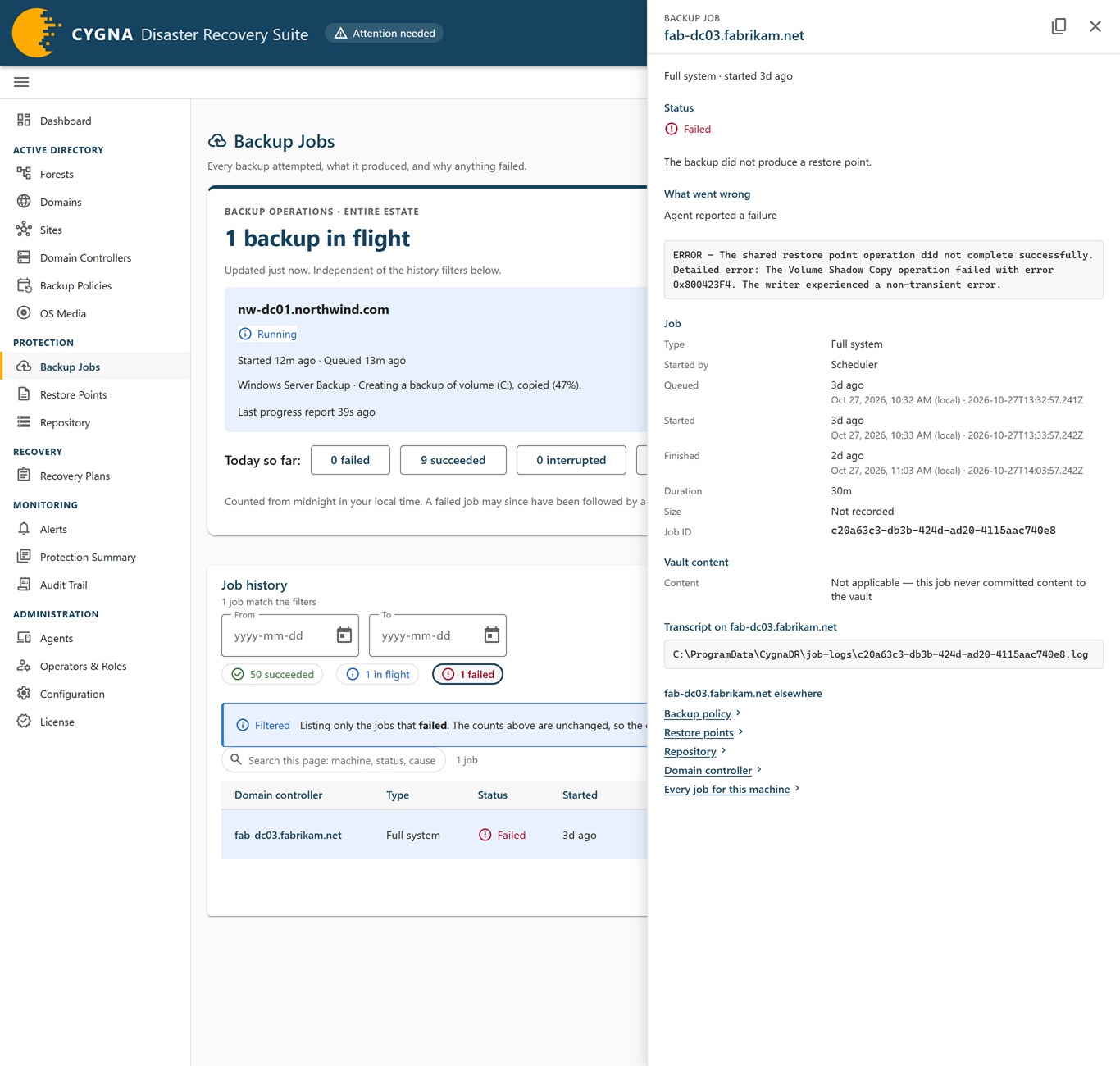
Select a job's domain controller to open its detail sheet. The sheet has these sections:
- Status—The status and a sentence explaining what it means for the backup.
- What went wrong—For a job that did not succeed, the cause and the raw error text, or No error text was recorded.
- Content to rescue—Shown when the backup content is in staging rather than the vault, with its staging path. The Manager commits it on its next check of the storage machine. Not shown once the storage agent has reported the content gone.
- Last reported—The Phase the DC agent last reported, When it reported it, and Volume progress as a percentage. Volume progress covers only the current volume and restarts for each volume.
- Job—Type, Started by (Scheduler or Operator), Queued, Started, Finished, Duration, Size, and Job ID.
- Vault content—In vault, or Pruned with the retention rule that removed it and when. A job that never committed content shows that the section does not apply.
- Transcript on <machine>—The path of the wbadmin transcript on the domain controller. The full transcript stays on the machine; read it there when you need the tool's own output.
- <machine> elsewhere—Links to the same machine on other screens, including Every job for this machine.
Why a job fails
The Manager records an error code on each job that does not succeed, so failures can be counted and grouped. The Cause column and the detail sheet show its label. Common causes include:
- DC agent unreachable—The Manager declined to start the backup because the domain controller's agent was not connected.
- Storage agent unreachable—The storage agent was not available to prepare staging or commit the backup.
- Insufficient staging capacity or Staging account could not be created—The storage machine could not reserve room or create the per-job account the domain controller writes with.
- Agent reported a failure—The backup ran and failed on the domain controller. The error text shows what wbadmin reported.
- Backup not reported in time—The Manager stopped waiting for the result. The backup may still be running and can still complete when the agent reconnects.
- Vault commit failed or Vault commit not confirmed in time—The backup finished but did not reach the vault, or the commit was not confirmed before the timeout.
- Cancelled by an operator—Someone stopped the backup.
Two codes can appear on a Completed job. Backup version identifier not captured means the backup is in the vault but the identifier a restore is addressed by was not recorded. Vault commit confirmed late means the restore point exists, but the commit was confirmed after the Manager stopped waiting for it. The error says why; raise the Vault commit timeout setting only when it says the commit outlasted that setting.
For every error code, what it means, and what to do, see Backup Job Errors.
Cancelling a backup
The Backup Jobs screen has no cancel action. To stop a running or queued backup, use Stop backup… on the Domain Controllers screen, which requires the backup.run capability. The agent stops a running backup cleanly, and the run produces no restore point. A queued backup is cancelled at once, because it never started. For steps, see Monitoring and Cancelling Backup Jobs.
