Domain Controllers
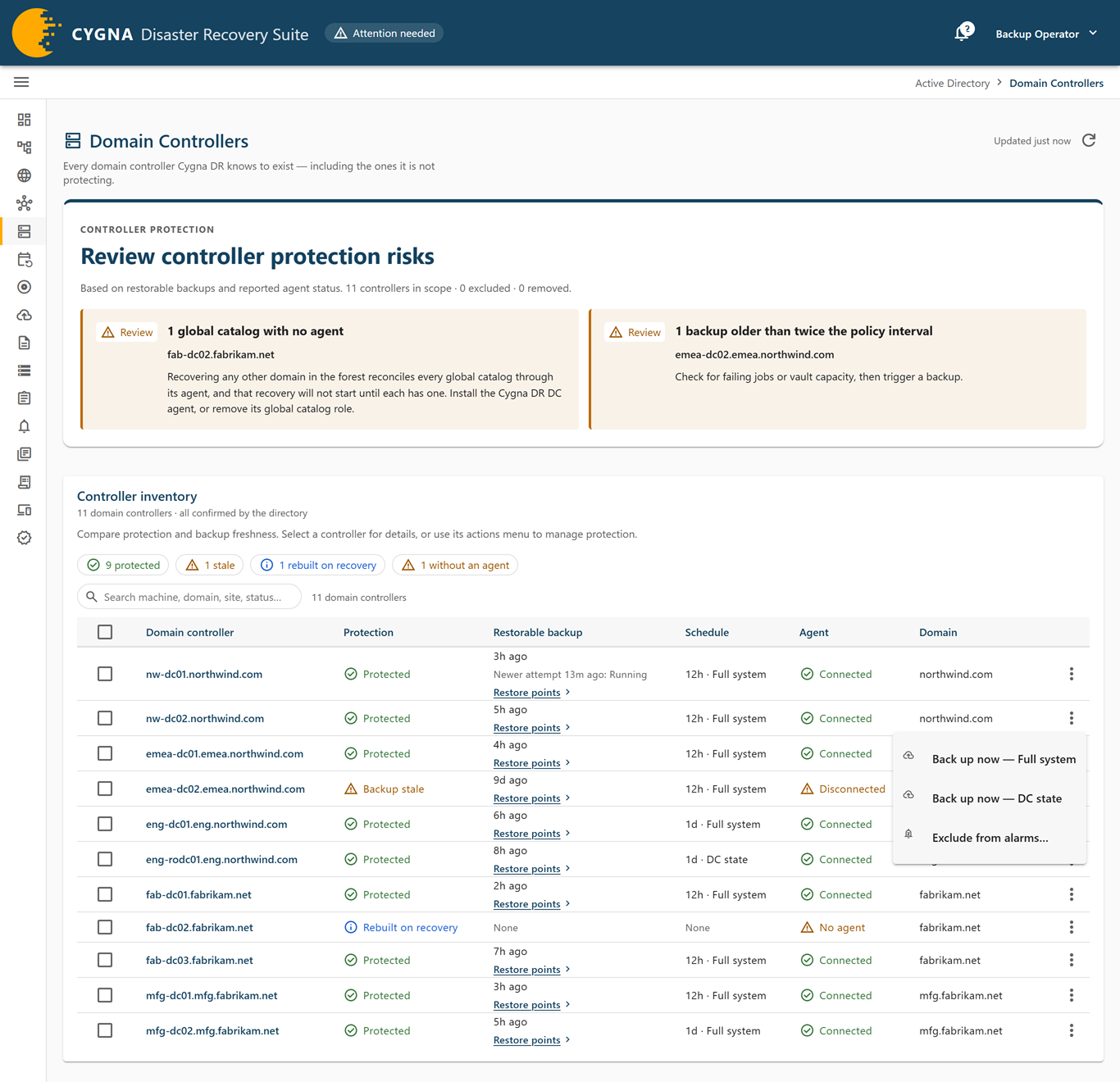
The Domain Controllers screen lists every domain controller this installation knows to exist, including the ones it is not protecting. The list comes from the directory: a DC agent reports every domain controller its forest defines, including machines with no agent. For each machine the screen shows its protection verdict, its newest restorable backup, its schedule, and its agent.
A candidate machine, which runs the DC agent but is not a domain controller, is not listed here and does not count in the screen's figures or alerts. It is listed on the Agents screen. A machine that the directory lists, or that has a backup, stays listed even if its agent reports that it is not a domain controller.
This is also where you start an ad hoc backup, install or update the DC agent from the console, exclude a machine from alerts, and handle domain controllers that have left the directory.
To open the screen, select Active Directory > Domain Controllers. You also reach it from the health chip in the top bar, and from the controller counts on the Forests, Domains, and Sites screens, which open it scoped. Every role can see the screen. The actions depend on your role:
| Role | Actions on this screen |
|---|---|
| Backup Operator | Back up now, Stop backup, exclusions, and recording machines as removed from the directory. |
| System Admin | Install agent and Update agent. |
| Viewer / Auditor, Restore Operator | None. The selection checkboxes and actions menu are not shown. |
The screen refreshes every 10 seconds.
Notices
| Notice | Meaning |
|---|---|
| Scoped | The screen shows only the domain controllers in a forest, domain, or site, and every count and alert describes that scope. Machines with no forest, domain, or site recorded are left out rather than assumed to belong. Select Clear filter to see every machine. |
| Not verified against the directory | No DC agent has reported a forest enumeration yet, so the list shows only machines that have enrolled or been backed up. Domain controllers without an agent appear after the first topology report. |
| Not started | The Manager did not start a backup you requested, and says why. If the attempt was recorded as a failed job, select See the recorded failure. |
| Not stopped | The Manager did not stop the backup, and says why. |
| Request failed | The request may not have reached the Manager. Check the Backup Jobs screen before you try again. |
Controller protection panel
The Controller protection panel at the top of the screen sums up the scope in a headline, such as "n controllers have nothing to restore", Review controller protection risks, Controller protection is not fully confirmed, or All scoped controllers have protected backups. Below it, a scope line gives how many controllers are in scope, excluded, and removed, and how many the directory has not confirmed. A domain controller that recovery rebuilds raises no finding and does not count against the headline. Each raised alert is listed as a finding with the affected machines and what to do, marked Action required (critical) or Review (warning):
| Alert | Severity | What to do |
|---|---|---|
| Global catalogs with no agent | Warning | A recovery of any other domain in the forest reconciles every global catalog through its agent, and does not start until each has one. Install the DC agent, or remove the machine's global catalog role. |
| Backup targets have no restorable backup | Warning | A policy covers each machine and nothing of it is in the vault. Install the agent where there is none; otherwise check the machine on the Backup Jobs screen. Whether this costs a domain its recovery is that domain's verdict on the Domains screen. |
| Backups older than twice the policy interval | Warning | Check for failing jobs or vault capacity, then run a backup. |
| DCs with a backup but no active schedule | Warning | Add or enable a backup policy, or the existing restore point only ages. |
| Domain controllers no agent can reach | Warning | Check the network path from the agents (DNS, and UDP and TCP 389). If the domain controller is gone, clean up its metadata or mark it as removed. |
| Machines backed up but no longer in the directory | Warning | Confirm each was decommissioned deliberately. A domain controller that left the directory unexpectedly needs investigating. |
Controller inventory
The Controller inventory card has filter chips, a search box, and one row per domain controller. The chips count protected, unprotected, stale, failing, unscheduled, and rebuilt on recovery machines, plus machines without an agent, machines not reachable by any agent, excluded machines, and machines removed from the directory. The without an agent chip is a warning only when one of those machines is a global catalog that a recovery needs an agent on; otherwise it is information. Removed machines are listed only while the removed chip is selected.
Protection verdicts
The protection verdict is judged against a window of twice the machine's backup policy interval.
| Protection | Severity | Meaning |
|---|---|---|
| Protected | Good | A restorable backup exists within the window, and the last attempt succeeded. |
| Last backup failed | Warning | The newest restorable backup is within the window, but the most recent attempt failed. A backup refused because the machine had no agent, made before its current agent enrolled, does not count as a failed attempt. |
| Backup stale | Warning | The newest restorable backup is older than the window. |
| No schedule | Warning | A restorable backup exists, but its policy is disabled or no policy covers the machine, so nothing will replace it. |
| Unprotected | Warning | A backup target with no restorable backup: an enabled policy covers the machine, but no agent has enrolled, no backup has run, or every backup has been removed from the vault or never reached it. |
| Rebuilt on recovery | Information | Not a backup target: no enabled policy covers the machine and nothing of it is in the vault. A recovery rebuilds it by promotion, so this is not a finding. Whether its domain can be recovered is the domain's verdict. |
Hover over the verdict to see which case applies. For how backup targets and rebuilt domain controllers are decided, see Backup Targets and Rebuilt Domain Controllers.
Columns
| Column | Description |
|---|---|
| Domain controller | The machine's fully qualified name. Select it to open the detail sheet. An icon marks a machine no directory enumeration has confirmed, or one that was backed up in the past but that neither the directory nor an agent reports now. |
| Protection | The protection verdict, with the exclusion chip and Removed from the directory where they apply. |
| Restorable backup | The age of the newest restorable backup, or Never as a warning chip. A machine that is rebuilt on recovery shows None as plain text. Notes flag a backup whose content is no longer in the vault, one that never reached the vault, and a newer failed attempt. Restore points › opens the machine's restore points. |
| Schedule | The backup interval and type, Disabled, or None. Disabled and None are warning chips, except on a machine that is rebuilt on recovery, where they are plain text. Hover to see when the next backup is due. For a machine whose DC agent has never come online, the cell ends in · waiting for agent: the schedule is held, and its first backup runs as soon as an agent connects. |
| Agent | Connected, Disconnected, Never reported, or No agent. No agent is a warning on a backup target and on a global catalog that a recovery of another domain in the forest needs an agent on; on any other machine it is information, because recovery rebuilds it and needs no agent there. Hover to see which case applies. |
| Domain | The machine's domain. Opens the Domains screen. |
Tables show 50, 100, 250, or 500 rows per page.
When you open a domain controller from a link on another screen, such as the Domain controller item in a row menu or a breadcrumb, the list is filtered to that machine as well, with the notice Showing machine only. The counts and alerts above the card still describe every controller. Select Clear filter to list every domain controller again; the search, sort, and verdict filter are kept.
Row actions
The actions menu (⋮) at the end of each row shows only the actions your role allows.
| Action | Role | What it does |
|---|---|---|
| Back up now — Full system / Back up now — DC state | Backup Operator | Queues an ad hoc backup of that type at once, without confirmation. Select View backup jobs on the confirmation to follow it. Not available when the machine has no agent. While a recovery is working on the machine, the backup is refused with A recovery is working on this DC and nothing is recorded; the machine's scheduled backup runs when the recovery is done. See Running a Backup Now. |
| Stop backup… | Backup Operator | Shown while a backup is queued or running. A queued backup is cancelled at once. For a running one, the agent stops the job cleanly and releases its snapshot. The run produces no restorable version, the machine keeps its last good one, and nothing already in the vault is touched. |
| Install agent… / Update agent… | System Admin | Opens the agent deployment dialog. When the agent is already current, the menu says so; reinstall from the Agents screen instead. Requires a DC agent package in the Manager's Package folder. |
| Exclude from alerts… / Edit exclusion… | Backup Operator | Opens the exclusion dialog. See Excluding and Retiring Objects. |
| Mark as removed from the directory… | Backup Operator | Records that the machine is no longer a domain controller. Offered only when the latest complete enumeration of its forest did not include it. |
| Withdraw removal record… | Backup Operator | On a removed machine: lists and counts it again. |
| Forget this machine… | Backup Operator | On a removed machine: deletes the Manager's record of it. |
Bulk actions
Select machines with the checkboxes to show the bulk bar. Depending on your role it offers Back up n now (choose Full system or DC state), Stop n running backups…, Deploy the agent to n…, Exclude n from alarms…, and Clear n exclusions. Select Select all n matching to include every machine that matches the current filter and search, not only the current page. If some machines are refused, a notice lists each with the reason.
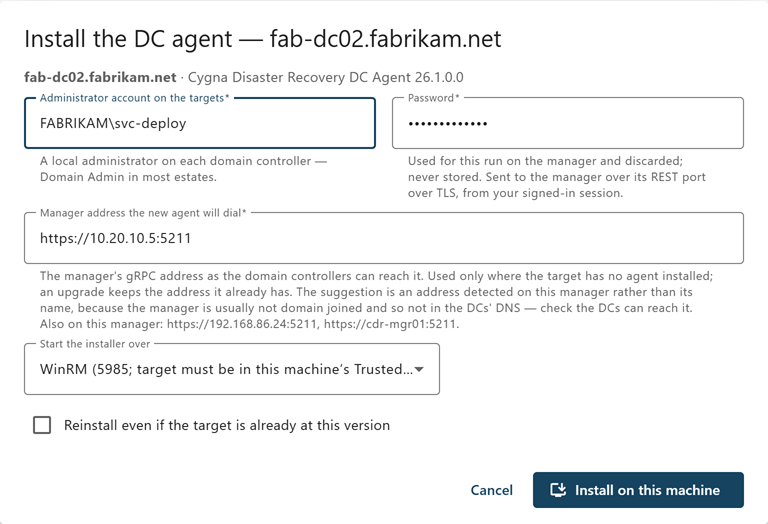
Installing and updating the agent
The Install the DC agent or Update the DC agent dialog (for several machines, Install or update the DC agent when any of them has no agent yet) pushes the DC agent package from the Manager to the selected domain controllers. It asks for an administrator account on the targets and its password, the Manager address a new agent will dial, and whether to start the installer over WinRM or DCOM. When the agent can update itself, Update the DC agent asks for no account: the Manager sends the package over the agent's own connection. For each field, see Deploying DC Agents.
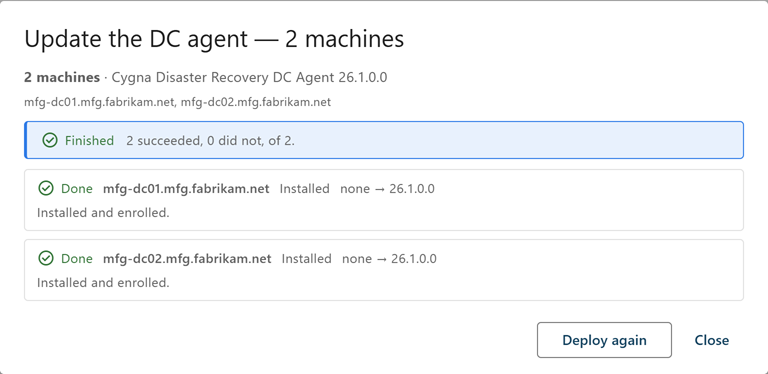
After you start, the dialog follows the run and shows each target's status and outcome, such as Installed, Upgraded, Already current, Unreachable, Credential refused, or Install failed, with the installer log path and transcript. You can close the dialog; the run continues. For prerequisites and the full procedure, see Deploying DC Agents and Maintaining Agents.
Domain controllers removed from the directory
When a domain controller is demoted or deleted, the inventory does not simply drop it. Discovery records a machine as removed from the directory once every agent with a current, complete read of the directory stops seeing it. If more than a quarter of a forest's domain controllers disappear at once, discovery holds the removals for review and raises an alert instead, because that pattern can indicate an attack or an incomplete cleanup. You can then record each removal with cdr cleanup retire; see Directory Cleanup Commands.
A removed machine leaves every count and alert, is listed only under the removed chip, and shows Removed from the directory with the reason, who recorded it, and when. Nothing in Active Directory changes. If an enumeration includes the machine again, the removal record is withdrawn automatically.
- Mark as removed—Records the removal yourself. Enter Why it is gone (required) and select Mark as removed.
- Withdraw the record—The machine is listed and counted again, aging as an unreachable domain controller would. Discovery will not record it as removed again unless the directory lists it and then drops it once more.
- Forget it—Deletes the Manager's record of the machine. Type the machine's name to confirm. The audit trail keeps a copy of what was deleted, and if the directory ever defines the name again, it is discovered as a new domain controller. A machine can be forgotten only when it is recorded as removed, no agent is enrolled for it, no backup jobs exist for it, and no backup schedule names it; otherwise the menu lists what is keeping it.
For when to use each, see Excluding and Retiring Objects.
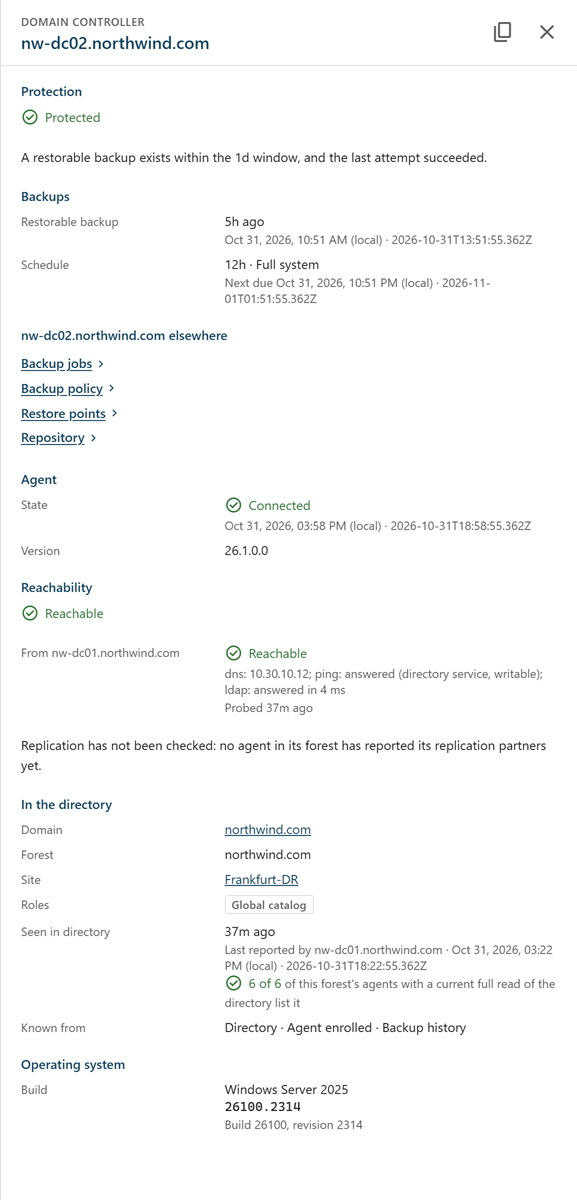
Domain controller detail sheet
Select a machine name to open its detail sheet.
| Section | Contents |
|---|---|
| Protection | The verdict and its reasoning, the exclusion if any, and the removal record. Notes say whether the latest enumeration of the forest still includes the machine. |
| Backups | The restorable backup, and the schedule with when the next backup is due. |
| machine elsewhere | Links to the machine's Backup jobs, Backup policy, Restore points, and Repository entries. |
| Agent | The agent's state and version. A note appears when the Manager holds a newer DC agent package. |
| Reachability | An overall reachability verdict, then one row per agent that probed the machine, with the result and when. Below it, whether replication from the machine has been observed. |
| In the directory | Domain, forest, and site; roles (global catalog, read-only domain controller, and operations master roles); when the directory last listed the machine, and by how many of the forest's agents; and where the machine is known from. |
| Operating system | The build and revision (UBR). Full system recovery preflight checks build and revision together, so a missing revision is flagged. |
| Reachability | Meaning |
|---|---|
| Reachable | Agents can reach the machine over LDAP. |
| Reachable from some agents | Some probing agents reach it and some do not. |
| Not reachable from any agent | No probing agent reached it. Individual probe results say why, for example Name does not resolve or No answer on LDAP. |
| A different DC answers at this name | The name resolves to another domain controller. |
| Not probed | No agent has probed the machine yet. Agents report probes with their next topology enumeration. |