Monitoring and Cancelling Backup Jobs
Every backup, scheduled or started by an operator, runs as a job. Check jobs to confirm that new policies produce restore points, to find out why a backup failed, and to follow a backup you started by hand. Stop a running backup when it is in the way, for example when it would block a restore of the same machine or is loading a domain controller at a bad time.
Before you begin
- Any operator who can view backups can monitor jobs.
- Stopping a backup needs the Backup Operator role. The Backup Jobs screen has no stop action; you stop a backup from the Domain Controllers screen or with
cdr jobs cancel.
Follow backup jobs
To check recent backup jobs:
-
Go to Protection > Backup Jobs.
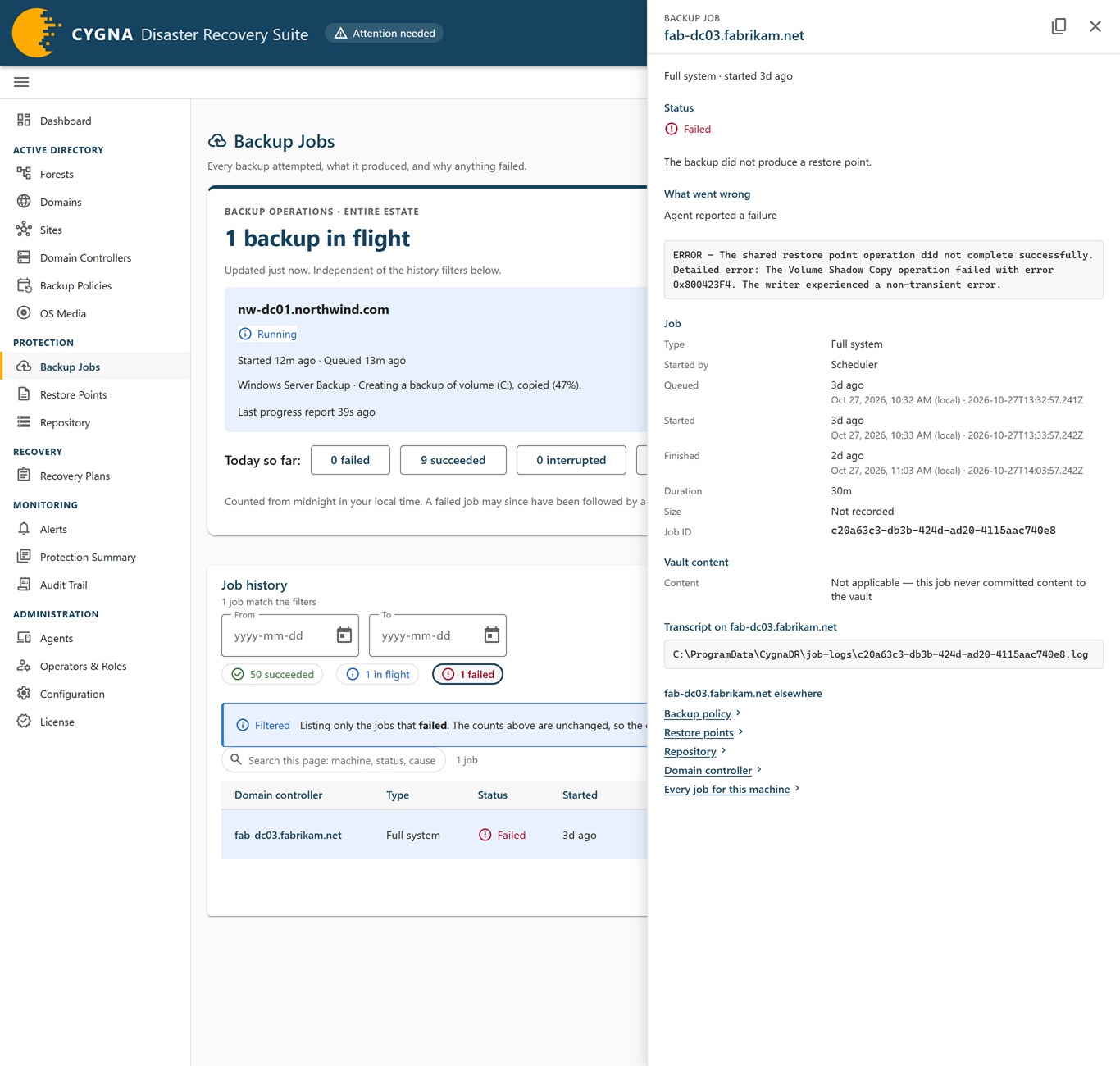
The Job history card lists jobs, newest first, with counts across the top. The screen refreshes itself every few seconds.
-
Narrow the list as needed:
- Select a count chip, such as in flight or failed, to list only those jobs. Select it again to list all jobs.
- Enter dates in From and To to limit the list to jobs created in that range.
- Enter text in the search box to search the jobs on the current page by machine, status, cause, or error text.
-
While a job is in flight, read the line under its status. It shows the last phase the agent reported and how long ago.
-
Select the domain controller name on a row to open the job's details.
The details show what the status means, what went wrong, the last progress report, the job's timings and size, whether its content is in the vault or has been pruned by retention, and the path of the transcript on the domain controller.
What to watch for
| Status | What to do |
|---|---|
| Completed | Nothing. The backup is in the vault and is a restore point unless retention has since removed it. |
| Failed or Interrupted | No restore point was produced. Read the cause in the details and look it up in Backup Job Errors. After you fix the cause, select Retry — type in the row's actions menu (Backup Operator role), start a new backup, or wait for the next scheduled one. A Cancelled job can be retried the same way. |
| Completed, not committed | The domain controller took the backup, but the Manager did not see it reach the vault. Usually nothing. The Manager checks the storage machine every hour and whenever the storage agent connects. It commits content still in staging and records content already in the vault, so the job changes to Completed. If the content is in neither place, the job stays as a record and is not a restore point. Take a new backup. To check at once, select Check now under Backups not in the vault on the Repository screen. |
| Completed (unreconciled) | The Manager could not confirm the backup against the vault. Treat it as uncertain, not as a restore point, until this is resolved. |
| A job that stays in flight | A Queued job is waiting for a backup slot; its Started column reads Waiting for a slot. If many jobs stay queued, backups are taking longer than their schedules allow; see Maximum concurrent backups in Settings Reference. For a job that has started, check the time of the last report under its status. If nothing has been reported for a long time, check the agent's connection on the Agents screen. The Manager fails a job that does not report within the Backup job timeout. |
For all statuses and columns, see Backup Jobs.
Stop a running backup
Stopping a backup is a clean stop: the agent ends the job and releases its snapshot. Nothing already in the vault is touched, and the machine keeps its last good restore point. The stopped job produces no restore point, and the next scheduled backup runs as normal.
To stop a running backup:
-
Go to Active Directory > Domain Controllers.
-
Open the actions menu on the row for the domain controller and select Stop backup….
To stop several, select their rows and then select Stop n running backups… in the bar at the bottom of the screen.
-
Select Stop the backup (or Stop n backups).
The message says the machine has been asked to stop. The job stays in flight until the backup winds down, and then its status changes to Cancelled. A backup that was still Queued never started, so it changes to Cancelled at once.
Using the command line
cdr jobs list --running
cdr jobs list --failed --detail
cdr jobs list --machine dc01.corp.example.com
cdr jobs cancel 3f2a9c1d
cdr jobs cancel takes the job ID, or the short form that cdr jobs list prints, and asks you to confirm; --yes skips the confirmation. For every option, see Backup Commands.
Next steps
- For job errors and their remedies, see Backup Job Errors.
- To see the overall effect on protection, check the Dashboard and Alerts.
