Components and Architecture
Cygna Forest Recovery is made up of a central Manager, agents on the machines it protects and on the machine that stores the backups, a recovery environment used to restore whole servers, and an optional Isolated Recovery Host on which backups are test-restored. This topic describes each component, where it runs, and how the components communicate.
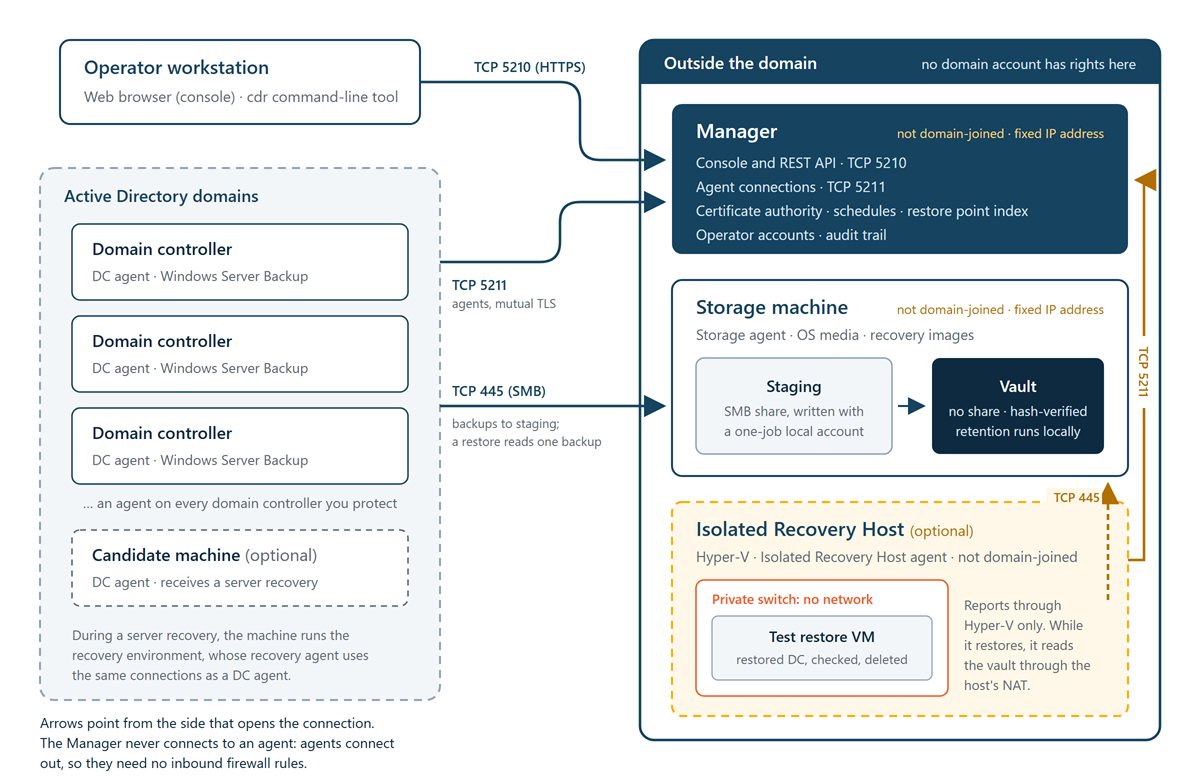
Components at a glance
| Component | Where it runs | What it does |
|---|---|---|
| Manager | A Windows Server machine that is not joined to any domain | Schedules backups and holds the inventory, the restore point index, recovery plans, settings, operator accounts, and the audit trail. Serves the console and the REST API, and runs its own certificate authority. |
| Console | Served by the Manager and opened in a web browser | The web interface for monitoring protection, managing backups, and planning and running recoveries. |
cdr command-line tool |
The Manager machine | Performs the same operations as the console from a command prompt or a script, plus deployment, sizing, and directory cleanup tasks. |
| DC agent | Every domain controller, and any candidate machine prepared to receive a recovered server | Reports the directory topology, runs backups, and carries out restores and recovery plan steps on its machine. |
| Storage agent | The storage machine, which is not joined to any domain | Receives backups, verifies them and moves them into the vault, applies retention, and builds recovery images. |
| Recovery agent | Inside a recovery image, on a machine being recovered | Restores a whole server from a full system backup when the server's own Windows cannot be used. |
| Isolated Recovery Host agent (optional) | A Hyper-V host that is not joined to any domain | Builds isolated virtual machines in which backups are test-restored and checked, and reports whether the host is ready. |
Manager
The Manager is the control point of the deployment. It runs as the Windows service CygnaDRManager under the LocalSystem account and hosts its own web server, so it needs no IIS. Its data is kept in an embedded database, %ProgramData%\Cygna Labs\Disaster Recovery Suite Manager\cygnadr.db, so no SQL Server is needed either.
The Manager:
- Decides when each domain controller is backed up and sends the job to its agent. Agents never start backups on their own.
- Keeps the inventory of forests, domains, sites, and domain controllers that the agents report, and the index of restore points.
- Builds, checks, and coordinates restore runs and recovery plans.
- Stores the operator accounts, roles, settings, and audit trail.
- Runs the certificate authority that secures every connection to it.
The Manager never reads or writes the vault. Only the storage agent, running on the storage machine, has access to stored backups.
Console
The console is a web application that the Manager serves on HTTPS port 5210. You open it in a web browser at https://<manager address>:5210/. If the redirect port is enabled, http://<manager address>/ redirects you to the HTTPS address.
You sign in with a Cygna Forest Recovery operator account. These accounts are kept by the Manager, not by Active Directory, so you can sign in while the directory is unavailable. For a tour of the console, see Using the Console.
cdr command-line tool
The cdr command-line tool (cdr.exe) is installed with the Manager, in its program folder %ProgramFiles%\Cygna Labs\Disaster Recovery Suite Manager. It is not added to the system path, so run it from that folder or from a folder you copy it to. On the Manager machine it connects to https://localhost:5210 by default.
cdr uses the same operator accounts and permissions as the console. A few commands work without the Manager, such as estimating backup storage before you deploy. For details, see Command-Line Reference.
DC agent
The DC agent runs as the Windows service CygnaDRDcAgent under the LocalSystem account. You install it on every domain controller, including read-only domain controllers. The DC agent:
- Reports the topology it can see in the directory, so the console shows every forest, domain, site, and domain controller, including those with no agent.
- Runs each backup with Windows Server Backup and writes it to a staging folder on the storage machine.
- Records the hardware and network configuration of its machine, which becomes part of each restore point.
- Carries out restores and recovery plan steps on its machine, using standard Windows tools such as
ntdsutil,nltest,w32tm,dcdiag,repadmin, and PowerShell. - Prepares the recovery image on its machine when a server is recovered in place, and applies network settings and other follow-up instructions when the recovered server first starts.
You also install the DC agent on a candidate machine: a machine that is not a domain controller, prepared to receive a full system recovery when the original domain controller cannot start. For more information, see Restore Methods.
Storage agent
The storage agent runs as the Windows service CygnaDRStorageAgent under the LocalSystem account on the storage machine. It owns two folders under the storage root you choose at installation: staging, where domain controllers write new backups, and vault, where committed backups are kept. The storage agent:
- Creates a short-lived local account for each backup job and removes it when the job ends.
- Computes a hash of each backup and moves it from staging into the vault.
- Applies the retention rules that decide which backups are kept, and re-verifies stored backups against their hashes on a schedule.
- Reports the capacity of the vault to the Manager.
- Scans a folder of Windows Server installation media (ISO files) that you supply, and builds the recovery images used for full system recovery. It uses the DISM tool included in Windows, so you don't need the Windows Assessment and Deployment Kit.
An installation has one storage machine, the first storage agent to enroll. Another storage agent that enrolls is given no work until an operator makes it the storage machine in place of the first. The storage agent also creates local groups on the storage machine that control access to staging and the vault. For details, see Accounts and Permissions.
Recovery agent and recovery images
A recovery image is a Windows PE environment that the storage agent builds from the Windows Recovery Environment in your own Windows Server installation media, with the recovery agent added. It is not a copy of the domain controller's own operating system. One image is built for each operating system variant in use.
You don't install or enroll the recovery agent separately. It is included with the storage agent and copied into every recovery image. During a full system recovery, the machine being recovered starts the recovery image once from memory. The recovery agent then reads the selected backup from the storage machine, restores the whole server, and reports its progress to the Manager using a credential that is valid for that run only. For more information, see Recovery Images.
Isolated Recovery Host agent
An Isolated Recovery Host is a Hyper-V host that you dedicate to Cygna Forest Recovery, on the same network as the Manager and the storage machine. It is optional: backup and recovery never depend on it. It runs the Isolated Recovery Host agent as the Windows service CygnaDRHostAgent under the LocalSystem account. The agent:
- Checks the host and reports whether it can run test restores: Hyper-V, its virtual switches, disk space, memory, and domain membership.
- Installs Hyper-V when it is missing, and creates the recovery network that test restore virtual machines use.
- For each test restore, builds a virtual machine shaped like the backed-up domain controller, moves it to a private switch of its own before the restored system first starts, relays the results of the restored system's checks, and deletes the virtual machine afterward.
A host is given test restores only once an operator approves it, and you can approve more than one. Like the storage machine, the host is not joined to any domain, and no credential is stored for it. The Manager never connects to the host; it asks the agent, and the agent enforces the isolation itself. For more information, see Test Restores.
How the components communicate
- Agents connect to the Manager—DC agents, storage agents, Isolated Recovery Host agents, and recovery agents open connections to the Manager on TCP port 5211. The Manager never opens a connection to an agent; it sends work, such as a backup job or a recovery step, over the connection the agent keeps open. Because agents only connect outward, they need no inbound firewall rules.
- Operators connect to the Manager—The console and
cdrconnect to the Manager on TCP port 5210 over HTTPS. - Domain controllers connect to the storage machine—Domain controllers write backups to the staging share over SMB, and a domain controller or recovery environment reads a backup over SMB during a restore. A test restore reads its backup through the Isolated Recovery Host.
- The Manager connects to a domain controller only to install the DC agent—When you deploy the DC agent from the console, the Manager connects to the target to copy and run the installer. Normal operation needs no connection from the Manager to a domain controller.
Every connection to the Manager is encrypted with TLS, and agents and the Manager authenticate each other with certificates issued by the Manager's certificate authority. For details, see Certificates and Trust. For the full list of ports, see Ports and Protocols.
Addressing by IP address
Agents reach the Manager by its IP address, and the storage agent gives domain controllers its own IP address as the staging location. There are three reasons:
- The Manager and storage machine are not domain members, so their names are usually not in any DNS zone that the domain controllers use.
- The directory, and with it DNS, may be down at exactly the moment you need to recover.
- A host name can be redirected. If DNS were poisoned during an attack, a name could send backup data to a machine the attacker controls.
This is why the Manager and storage machine need fixed IP addresses. For more information, see Planning Your Deployment.
Off-domain storage design
Backups are kept on a storage machine that is not joined to any domain, and no domain account has rights to it. Access to backups is granted only through local accounts that the storage agent creates for one job and removes afterward.
Each backup follows the same sequence:
- The Manager starts a backup job. The storage agent creates a local account for that job, named
cdr-followed by 12 hexadecimal characters, with write access to a staging folder for that job only. - The DC agent writes the backup to that folder over SMB, using the job's account.
- The storage agent computes a hash of the backup content and records it.
- The storage agent revokes the job's access: it closes the account's SMB sessions, removes its permissions, and deletes the account.
- The storage agent moves the backup into the vault. The vault has no network share and grants no access to any account the storage agent creates.
As a result, between a backup and a restore, no credential exists that can read or delete the backup over the network.
When a restore needs a backup, the storage agent first confirms that the backup still matches its hash. It then shares that one backup read-only, to a separate account created for the restore (named cdr-r- followed by 12 hexadecimal characters), and removes the share and the account when the restore has read it.
Backups are deleted only by the retention rules that the storage agent applies locally. No network interface can delete or overwrite a stored backup. The most protective retention limits are set on the storage machine itself, and the Manager can tighten them but never weaken them. For more information, see Vault Protection and Integrity and Retention.
Note: You can run the Manager and the storage agent on the same machine, but separate machines are recommended. On a shared machine, anyone who gains control of the Manager is also on the machine that holds the backups. For guidance, see Planning Your Deployment.
Working when the directory is down
Cygna Forest Recovery is designed to keep working when Active Directory and DNS are not available:
- Operator accounts are kept by the Manager, so you can sign in without the directory.
- The Manager runs its own certificate authority, so secure connections don't depend on a domain certificate service.
- Components find each other by IP address, so they don't depend on the directory's DNS.
