Restoring a DC with DC State Recovery
A DC state recovery undoes the changes made to chosen parts of Active Directory since a restore point, on every domain controller of the domain. You name the subtrees and objects to roll back. The DC agent on one domain controller copies the backup to the machine's own disk, restarts it into Directory Services Restore Mode (DSRM), and restores DC state with wbadmin. Still in DSRM, it marks each subtree and object you named authoritative with ntdsutil, and then restarts the machine normally. The marked objects replicate out to every other domain controller as they were at the restore point. Everything else on this domain controller converges from its replication partners, as after any restore.
Use it when a change has already replicated across the domain and must be undone: for example, a mass password reset, or accounts and group memberships changed in bulk. Every change made to the named objects since the backup is undone, including attributes, password resets, and group memberships. It is a supported Windows system state restore with wbadmin, not a virtual machine snapshot revert, so it does not cause USN rollback. It works from both full system and DC state backups.
Before you begin
- You need the Restore Operator role, or one operator who can approve and another who can execute.
- The domain controller starts Windows and its DC agent is connected. The console lists only domain controllers with a connected agent. The DC agent must be as current as the Manager and run as its Windows service, so that it can hold back the restart wbadmin starts; otherwise preflight blocks approval.
- You know the distinguished names of the subtrees and objects to roll back, as they were when the backup was taken.
- The domain controller is not a read-only domain controller, and its operations master roles were not seized by another domain controller after the backup. Either case means it must be rebuilt, not restored.
- You have a restore point that:
- was taken on the same Windows build and revision the machine runs now. If the machine was patched since the backup, DC state cannot go back onto it.
- is younger than the domain's tombstone lifetime.
- has a wbadmin version identifier.
- The domain replicates SYSVOL with DFS Replication.
- The machine has free space for a local copy of the backup, about 1.15 times its size. The agent copies the backup to the machine before it restarts into Directory Services Restore Mode, and the restore runs from that copy. See Restore staging volume in Settings Reference.
- No backup is running on the machine. Let it finish or stop it first.
For the full list, see Recovery Requirements.
Note: Anything written to this domain controller after the restore point that has not replicated to another domain controller is lost.
Choose what to roll back
Name only what should go back. Each entry is one of:
- Subtree—the object and everything beneath it, for example
OU=Sales,DC=corp,DC=example,DC=com. - One object—a single object, for example
CN=Bob,OU=Sales,DC=corp,DC=example,DC=com.
Objects created since the backup are not in it, and are left as they are. A rollback names at most 50 entries; plan a larger one as several runs. The Manager checks every entry when you plan, and the DC agent checks them again before it marks anything. The Not accepted, and why list on the planning page shows what is refused:
| Not accepted | Why |
|---|---|
A partition's head (DC=…, CN=Configuration,…) |
It would roll back every password and trust in the domain. Name the subtrees or objects instead. |
| The schema | It cannot be restored authoritatively. |
A krbtgt account on its own |
It holds nothing but the old Kerberos keys. To undo a password reset, roll back CN=Users instead, as described below. |
OU=Domain Controllers, and anything in it |
Old machine passwords break every domain controller's secure channel. A domain controller is restored or rebuilt, not rolled back by object. |
CN=System and the objects directly in it |
Trusts and AdminSDHolder live there. Group Policy objects under CN=Policies can be rolled back. |
| Anything outside this domain controller's domain or the forest's configuration partition | This domain controller cannot mark it. |
The Manager also refuses an entry that is not a distinguished name, one that contains a double quote (mark its parent instead), one named twice, and one that lies inside a subtree already named. Planning is refused if the Manager has not yet recorded which domain the domain controller belongs to; wait until the domain controller is listed under its domain on the Domains screen, and plan again.
Group Policy objects roll back in the directory but not in SYSVOL. SYSVOL is restored non-authoritatively, so the policies' files come back from the other domain controllers as they are now. Preflight warns you; once the rollback has replicated, restore the policies from a Group Policy backup, for example with Restore-GPO.
Rolling back CN=Users and krbtgt
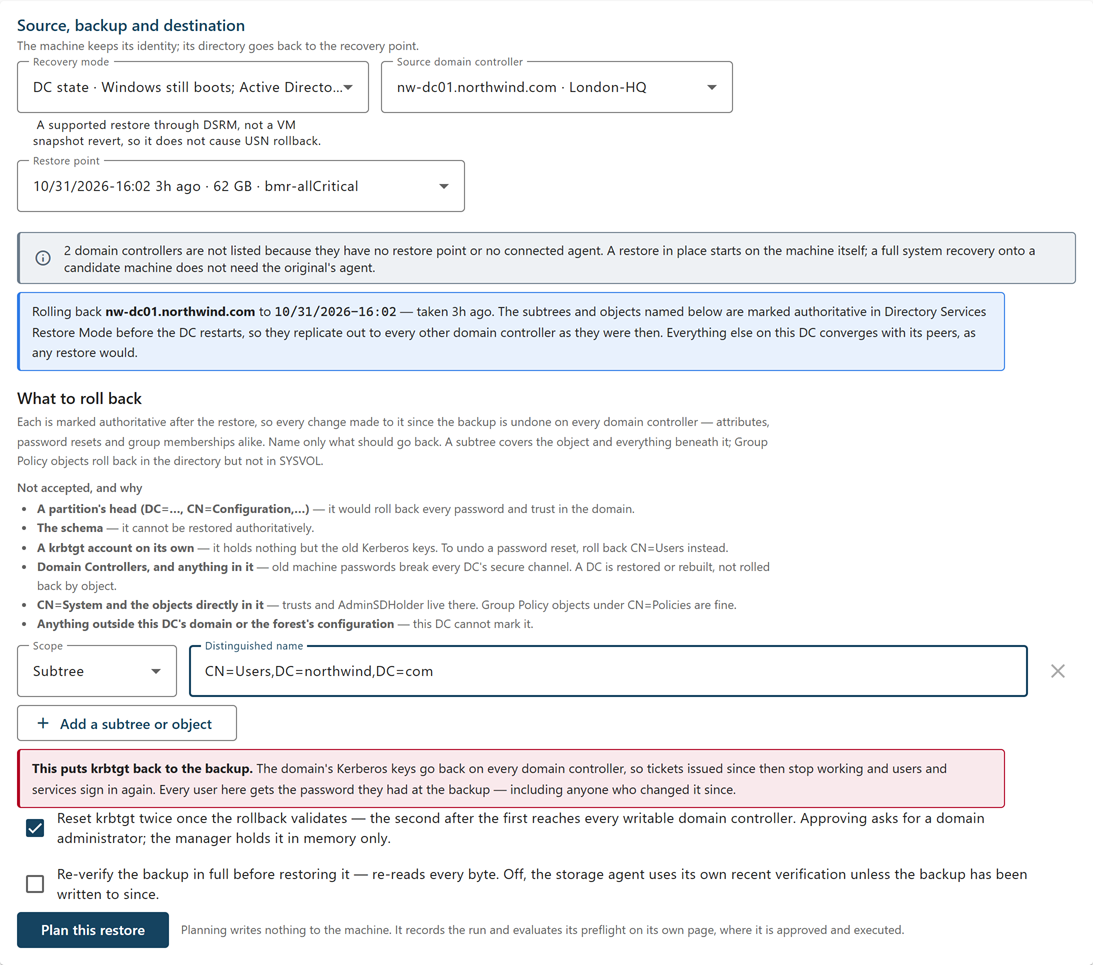
To undo a mass password reset, roll back the CN=Users container, or any subtree that holds the domain's krbtgt account. That puts krbtgt back to the backup too. The domain's Kerberos keys go back on every domain controller, including the read-only domain controllers' krbtgt accounts, so tickets issued since then stop working and users and services sign in again. Every user in the subtree gets the password they had at the backup, including anyone who changed it since.
An old key may be one an attacker holds. When a subtree holds krbtgt, the planning page offers Reset krbtgt twice once the rollback validates, selected by default. With it selected, Cygna Forest Recovery resets krbtgt twice once the rollback validates, so the backup's keys stop validating tickets. The second reset waits until the first has reached every writable domain controller. Approving then asks for a domain administrator. If you clear it, approving asks for no credentials, and you reset krbtgt twice yourself once the rollback has replicated, the second time after the first has reached every writable domain controller.
Plan the restore
To plan a DC state recovery:
-
Go to Recovery > Recovery Plans.
-
Under Active Directory recovery, select Single-DC recovery.
The New single-DC restore page opens.
-
In Recovery mode, select DC state.
-
In Source domain controller, select the machine.
-
In Restore point, select the backup to restore.
The newest usable restore point is preselected. Restore points that cannot be used are listed but unavailable, with the reason. Below the fields, the page states what the rollback will do and from when.
-
Under What to roll back, select Subtree or One object in Scope, and enter the Distinguished name.
To name another, select Add a subtree or object. To remove one, select its Remove button.
-
If a subtree holds
krbtgt, read the warning that appears, and leave Reset krbtgt twice once the rollback validates selected, or clear it to resetkrbtgtyourself. -
Optionally, select Re-verify the backup in full before restoring it.
This re-reads every byte of the backup against its recorded hash. When it is cleared, the storage agent relies on its own recent verification unless the backup has changed since.
-
Select Plan this restore.
The button is available once at least one distinguished name is entered. If the Manager refuses an entry, the page says why. The restore's own page opens with the status Planned. Its Rolled back — marked authoritative card lists each subtree and object. Nothing has been sent to the machine.
Approve and execute
To approve and execute the restore:
-
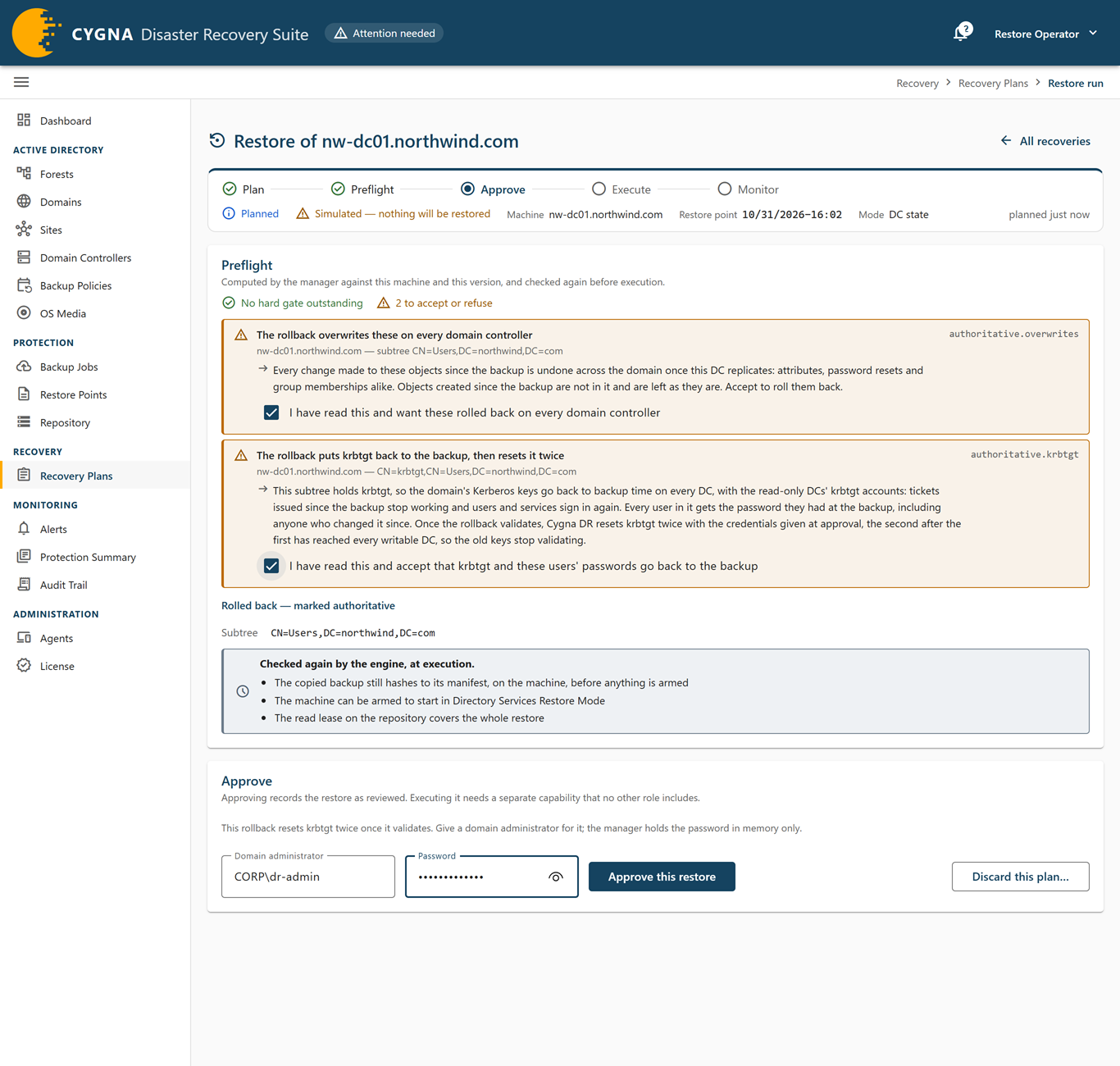
On the restore's page, review the Preflight card.
Resolve every hard check. Each one shows a remedy. Read the advisory checks: they do not block approval, but they say what the restore costs.
-
Accept the rollback's own checks, after reading them:
- The rollback overwrites these on every domain controller (
authoritative.overwrites) lists what is rolled back. Select I have read this and want these rolled back on every domain controller. - When a subtree holds
krbtgt, The rollback puts krbtgt back to the backup, then resets it twice, or …, and nothing resets it (authoritative.krbtgt). Select I have read this and accept that krbtgt and these users' passwords go back to the backup.
- The rollback overwrites these on every domain controller (
-
If the rollback resets
krbtgt, enter a Domain administrator, asDOMAIN\useroruser@domain, and its Password.The Manager holds the credentials in its memory only, for the reset. They are not stored on the run or written to the audit trail, and the Manager forgets them when the reset is done or fails, 8 hours after they were given, or when the Manager restarts. If the Manager already holds credentials for the run, the page says so, and credentials you enter replace them.
-
Select Approve this restore.
The button is available only when no hard check is outstanding, every check that needs your acceptance is accepted, and, for a
krbtgtreset, the credentials are entered. The card shows who approved it. To take the approval back, select Withdraw approval. -
Select Execute….
The confirmation says the machine will restart into Directory Services Restore Mode, have its Active Directory database replaced, and restart again.
-
Enter the machine's short name in capitals, for example
DC01, and select Restore DC01 now.
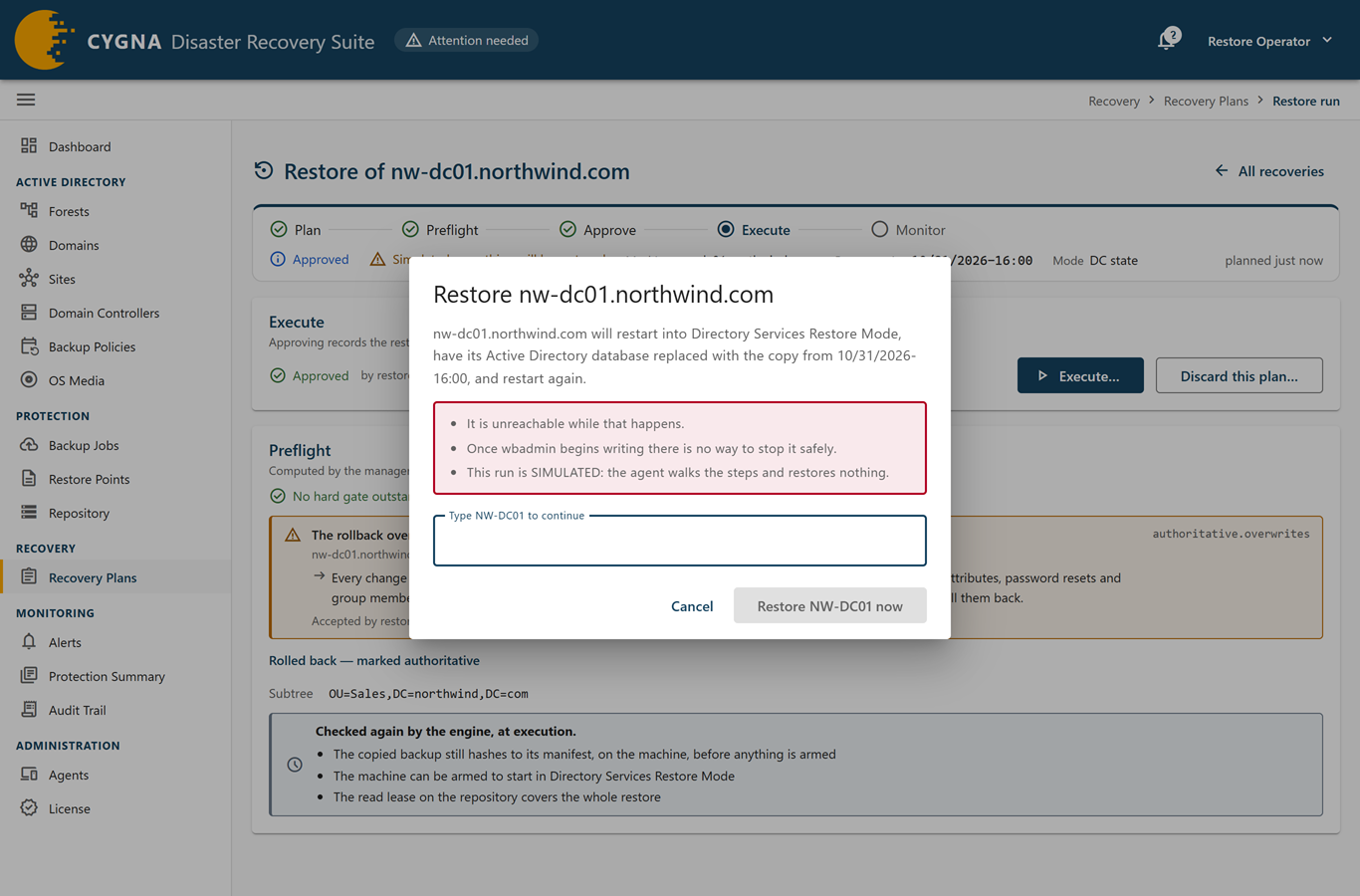
Note: Important: Once wbadmin begins writing, the restore cannot be stopped safely. The machine is unreachable while it restores.
What happens during the restore
Before anything changes, the Manager checks again that the backup still matches its recorded hash, that the version is present on the machine, and that the machine's boot configuration can be set and cleared. For a DC state recovery, the agent copies the backup to the machine's own disk and verifies it there, so the restore does not depend on the network in DSRM. The copy shows its progress on one line, by bytes copied. The agent also keeps a copy of its own installer package, and raises Windows' service start limit to 180 seconds so that it starts in time in DSRM; the limit is put back when the run ends. It then arms a one-time start into DSRM and restarts the machine; if anything goes wrong, the next start is a normal one. wbadmin restores DC state, and from that point the restore cannot be stopped.
wbadmin starts a restart of the machine as it exits. The agent holds that restart back until it has recorded the restore's outcome and marked every entry, for at most 2 hours per entry still to mark plus 15 minutes, and then lets it go ahead. Nothing is stopped while the restart waits. An agent that cannot hold back a restart refuses the rollback before anything is changed.
Still in DSRM, the agent marks each subtree and object authoritative with ntdsutil, which raises their version numbers so that they win over the copies on the other domain controllers. It tries every entry, even after one fails, and takes the object list ntdsutil writes as the evidence of each mark. ntdsutil also writes back-link files: the group memberships of the marked objects that are held on objects that were not marked. The agent records each file's hash before the machine leaves DSRM.
After a normal restart, the agent imports the back-link files with ldifde against the restored domain controller, using only the recorded files and only while each still matches its hash, so group memberships come back too. It then reads the marked objects' replication metadata to confirm the raised versions. The Manager checks that AD DS starts, that the marks and back-links are in place, that replication with inbound and outbound partners converges, and that dcdiag is clean. The run is shown as restored only when the marks have been read back.
A check the agent could not make shows Not checked on the run's Steps card. To make it again, select Validate again or run cdr restore validate. For a DC state recovery, this also imports any back-link file that failed and reads the marks again. For each status the run shows along the way, see Recovery Lifecycle.
If an entry could not be marked, the machine still restarts normally, and the run fails and names the entries that were not marked. Those come back from the other domain controllers as they are now; entries that were marked replicate out. To try again, plan a new DC state recovery.
In DSRM, and on the normal start until its checks are done, the agent reports live when the machine can reach the Manager: the run shows Restoring, with wbadmin's progress on one line. Without a network path, the page says how long it expects the machine to be unreachable, and silence during that time is expected. Either way, the agent reports the whole timeline when it returns. The What the machine reported card shows each phase and the end of the transcript, which also holds wbadmin's recovery summary.
If an agent that reports live has not been heard 10 minutes after the restart into DSRM, the run's timeline shows No word from the agent in restore mode. Check the machine's console, and start the CygnaDRDcAgent service if it is not running. The run itself is not changed.
On the first normal start after the restore, the agent checks that Windows Installer can still update it. If the agent was updated after the backup was taken, it reinstalls the version that was running before the restore, and its service restarts once. See Installer Messages.
If the run stops with Stopped — needs an operator and the page shows This machine needs you, do not start another restore of the machine until somebody has looked at it. Its directory may be inconsistent. Read the note and transcript the agent left on the machine, and then either restore again from a different restore point or rebuild the domain controller.
The krbtgt reset
For a rollback planned with the krbtgt reset, the Steps card has a step R-04 that starts once the rollback validates. The agent on the restored domain controller resets krbtgt as the domain administrator given at approval, then waits until the first reset has reached every writable domain controller of the domain before it makes the second. A domain controller that cannot be read counts as not reached. If the first reset has not reached every writable domain controller within 30 minutes, the second is not made, and the step names the domain controllers that are behind. Resetting again before a domain controller has the first key would leave it rejecting tickets.
The run stays completed whatever happens to the reset: the rollback itself is restored. If the reset fails, or the Manager no longer holds the credentials because 8 hours passed or the Manager restarted, the step fails and the run shows that it needs an operator.
To start the krbtgt reset again:
-
On the run's page, find krbtgt has not been reset twice yet.
-
Enter a Domain administrator and its Password.
-
Select Reset krbtgt.
This needs execution rights. It does only what is left: if the first reset was applied, only the second is made.
From the command line, run cdr restore reset-krbtgt <run> --admin DOMAIN\user.
Stopping or discarding a restore
Discarding and withdrawing approval need approval rights; stopping and abandoning need execution rights.
- Discard a plan you have not executed—select Discard this plan…, and then Discard plan. The run is closed as cancelled and the machine can be planned again at once. Use this for a plan whose preflight failed, for example.
- Stop an executing restore—select Ask the machine to stop…, and then Ask it to stop. The machine abandons the restore only if wbadmin has not started writing. After that, the Manager refuses. Once the machine has restarted into DSRM and its agent is away, the Manager also refuses, because the restore may be running there.
- Close a restore whose machine is gone—if the restore is past the point where it can be stopped and the machine is gone or will be rebuilt, select Close as abandoned…, enter a reason, and select Close as abandoned. Nothing is sent to the machine. Do not use it as a domain controller until it is rebuilt or its transcript has been read.
Using the command line
cdr backup list --machine dc01.corp.example.com
cdr restore plan dc01.corp.example.com --version "09/02/2026-23:00" --authoritative-subtree "OU=Sales,DC=corp,DC=example,DC=com"
cdr restore plan dc01.corp.example.com --version "09/02/2026-23:00" --authoritative-subtree "CN=Users,DC=corp,DC=example,DC=com" --reset-krbtgt
cdr restore show <run>
cdr restore approve <run> --accept authoritative.overwrites
cdr restore approve <run> --accept authoritative.overwrites --accept authoritative.krbtgt --admin CORP\admin
cdr restore run <run> --wait
cdr restore reset-krbtgt <run> --admin CORP\admin
cdr restore cancel <run>
cdr restore discard <run>
cdr restore abandon <run> --reason "Machine replaced"
cdr restore plan plans a DC state recovery by default, and needs at least one --authoritative-subtree or --authoritative-object; each can be repeated. Copy the version identifier exactly as cdr backup list prints it. With --admin, cdr prompts for the password, or reads it from the CYGNADR_RESTORE_ADMIN_PW environment variable. cdr restore run asks you to type the machine's name. For every option, see Restore Commands.
Result and next steps
The domain controller runs the same Windows installation. The subtrees and objects you named are as they were at the restore point on every domain controller of the domain, and everything else on this domain controller has caught up from its partners. Next:
- If the rollback reached Group Policy objects, restore their files from a Group Policy backup.
- If the rollback put
krbtgtback and you did not choose the reset, resetkrbtgttwice, the second time after the first has reached every writable domain controller. - Take a fresh backup of the domain controller and complete the follow-ups in After a Recovery.
- For the screen itself, see Recovery Plans.
