Recovery Lifecycle
Every recovery moves through the same stages: plan, preflight, approve, execute, and monitor. The console shows these as a stepper at the top of each recovery's page. This topic explains each stage, the states a recovery can be in, and the ways to stop one, so that you know before you start what you can still undo at each point.
Plan
You create a restore run (single-DC recovery) or a recovery plan (domain or forest recovery) on the Recovery Plans screen. Planning writes nothing to any machine. It records your choices and evaluates preflight. A forest or domain plan starts as a Draft, which you can edit until it is approved. A forest can have only one active recovery at a time, whether of the forest or of a domain in it.
Preflight
The Manager checks the plan against the estate and lists every finding. Hard findings block approval until they are cleared. Advisory findings do not block approval; they say what the restore will cost or what to watch for. A restore run can also raise findings that need your acceptance: something that failed from where the Manager looked but may not fail from where the recovery environment runs, such as a storage machine name the target cannot resolve now. The approver accepts each one by its code, or cancels the run. Preflight is evaluated when the plan is built, and again at approval and execution. In a domain or forest plan, approval also re-checks the firmware and disks of each candidate machine against the backup restored onto it, and is refused if one of those checks blocks. See Preflight Check Reference.
Survey
For a full system recovery, the Manager asks the target machine's DC agent to describe its hardware as it is now: firmware, memory, disks, free space, network adapters, whether it can reach the storage machine at the address the recovery environment will use, and, for a candidate, whether the original domain controller still answers. The survey is taken when the run is planned, approved, and executed, and you can ask again from the run's page with Ask the machine again. Preflight checks the backup against the survey.
Approve
A Restore Operator approves the plan with plan.approve. Approval records that the plan has been reviewed, under the approver's name. The Manager refuses to approve a plan with an outstanding hard finding, or a restore run with a finding nobody has accepted. Accepted findings are recorded on the run under the approver's name. Until execution, a single-DC approval can be withdrawn with Withdraw approval.
Execute
A Restore Operator executes the plan with plan.execute. Execution asks you to type a confirmation: the domain controller's short name in capitals for a single-DC restore, or the forest or domain name for a recovery plan. The checks that can run only against the live estate run now, including the hash verification of each backup before any read access is granted.
A recovery plan built to run unattended is confirmed at execution: whoever executes it types the forest or domain name and attests, then and there, that the restore targets are isolated. From then on the plan does not stop for a person at points of no return, attestations, the backup checkpoint, or restore preflight findings; each is accepted in the name of the operator who executes the plan and recorded. It still halts on a failed step, waits for a missing credential or DSRM password, waits out a krbtgt gap the plan set, and stops at every trust reset carried out by hand, such as this forest's side of an external trust. Whoever holds plan.execute can take a running plan back, after which every pause waits for a person again. See Recovering a Forest.
Monitor
While a recovery runs, its page shows each step or phase as it happens. A domain controller being restored is expected to go quiet while it restarts; the console says how long to expect, and the agent reports the whole timeline when it returns. A banner across the console's screens shows recoveries in progress and any recovery waiting for you; the Dashboard shows them in its own Recovery in progress panel instead. Times on a run's timeline are shown on the Manager's clock, even when a machine's own clock is off.
A recovery plan can also email its own notification addresses when it halts, is aborted, or waits for a person, and sends them the recovery report when it completes. The report is built from the plan's own records whenever it is asked for, so it is also available on the plan's page and from cdr recovery report at any time after the plan starts.
Restore run states
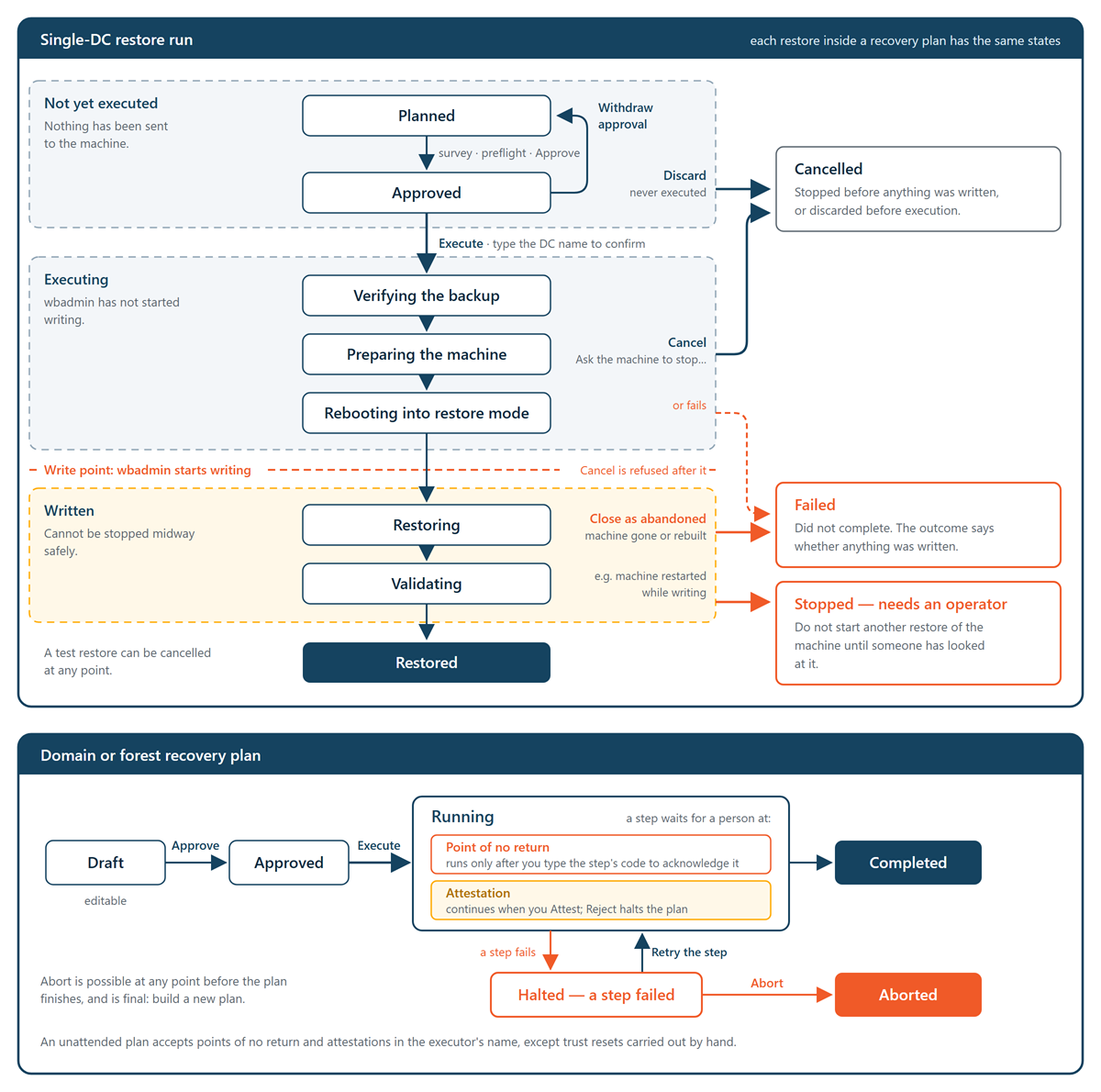
A single-DC restore, and each restore inside a recovery plan, has one of these states:
| State | Meaning |
|---|---|
| Planned | Recorded, with preflight evaluated. Nothing sent to the machine. |
| Approved | Reviewed and ready to execute. |
| Verifying the backup | The backup's hash is being verified and its read lease granted. |
| Preparing the machine | The backup is being copied to the machine (DC state recovery), or the recovery image is being staged (full system recovery). |
| Rebooting into restore mode | The machine is restarting into Directory Services Restore Mode or into the recovery image. |
| Restoring | wbadmin is restoring DC state or the volumes. |
| Validating | The restored domain controller is being checked: AD DS running and SYSVOL ready, then replication converging and dcdiag clean. After a full system recovery, the restored domain controller's own agent makes these checks once it reconnects, waiting up to 15 minutes for replication. |
| Restored | Completed and validated. |
| Failed | The restore did not complete. The outcome says whether anything was written. |
| Cancelled | Stopped before anything was written, or discarded before execution. |
| Stopped — needs an operator | The restore stopped in a state that cannot safely be resumed or stopped automatically, for example because the machine restarted while the restore was writing. Do not start another restore of the machine until someone has looked at it. The ways forward are a fresh restore from a different restore point, or a rebuild. |
Recovery plan states
A domain or forest plan moves through Draft, Approved, and Running, and ends as Completed or Aborted. If a step fails, the plan becomes Halted — a step failed, and nothing more is issued until you retry the step or abort the plan. A retry runs the step again from its checkpoint, without repeating what it already did, and keeps its point-of-no-return acknowledgment. Within a running plan, each step is Pending, Running, Done, or Failed, or waiting:
- Waiting for acknowledgement—A point of no return. See below.
- Waiting for you—Something only a person can do or check. Attest to it, or reject it, which halts the plan. A restore whose preflight raised a finding only a person can accept is decided on its restore run instead.
- Waiting for a credential—The step cannot run without a domain's administrator credential or the new DSRM password, and the Manager holds none. It runs by itself once one is supplied.
- Waiting (krbtgt)—Only in a plan created with a gap between the two
krbtgtresets. By default there is none: both resets run while the directory is isolated, and going live waits for the second. The second reset runs by itself when the gap ends, or earlier if you override the wait with a reason. - Waiting for its machine to be built—A rebuild is waiting for the machine it promotes to connect with the DC agent for the first time.
- Restarting—A rebuilt machine is restarting between steps. Nothing is needed from you.
How steps can be stopped
Each step is classified by what stopping at that point means. A single-DC restore's In progress card shows the label for where the run is now. For a recovery plan, the abort dialog says which points of no return are behind the plan and which changes stay to finish or undo by hand.
| Label | Meaning |
|---|---|
| Safe to stop — nothing was changed | Stopping here leaves the machine as it was. |
| Stopping needs cleanup — the machine was changed | The step changes the machine. If you stop after it, the machine must be restored again or rebuilt. |
| Point of no return — runs only after an operator acknowledges it | The step cannot be undone, for example seizing roles, removing metadata, or resetting krbtgt. The plan waits until you acknowledge it by typing the step's code as the console shows it. The acknowledgment is recorded in the audit trail. |
| Cannot be stopped or resumed — needs an operator | Applies to a single-DC restore while wbadmin is writing. A DC state recovery cannot safely be stopped midway. |
Attestations
Some steps are checks only a person can make. The plan waits, shows a prompt, and continues when you select Attest. The attestations are:
- Isolation—Nothing of production can reach any restore target, it has no route out, and its only links are firewalled paths to the Manager's agent port and the storage machine's SMB, enforced outside the target. See Isolating Recovery Targets.
- Pre-damage check—You signed in to the restored domain controller and the corruption or encryption is absent.
- Logon continuity—In a domain recovery, the default administrator of every domain in the forest is enabled and its password is known.
- Reconnect—The recovered forest or domain goes live on the production network, and none of the original machines the recovery replaced can rejoin it. This is also a point of no return.
Steps that the agents do not carry out themselves also wait for you in the same way: the step shows what to do, you carry it out, and you attest. If a check fails, select Reject and give a reason. Rejecting halts the plan.
In an unattended plan, every attestation is accepted without asking, and a step you would carry out by hand, such as the backup checkpoint, is passed over and listed in the recovery report. Trust resets carried out by hand are the exception: they always wait for a person. Trust resets the agents carry out are accepted like any other point of no return.
Stopping a recovery
| Action | Applies to | What it does |
|---|---|---|
| Discard (Discard this plan…) | A single-DC restore that was planned or approved but never executed | Closes the plan as cancelled. Nothing was sent to the machine, and it can be planned again straight away. Needs plan.approve. Not available for a restore that belongs to a recovery plan; abort the plan instead. |
| Cancel (Ask the machine to stop…) | A single-DC restore in progress, before wbadmin starts writing |
The machine abandons the restore. Once writing has started, the Manager refuses, because stopping midway cannot be done safely. It also refuses a DC state recovery whose machine has restarted into DSRM and is away, because the restore may be running there. Needs plan.execute. |
| Abandon (Close as abandoned…) | A single-DC restore past the write point whose machine is gone or will be rebuilt | Closes the run as failed with the reason you give. Nothing is sent to the machine, and whatever was written stays there. Do not use that machine as a domain controller until it is rebuilt or its transcript has been read. Needs plan.execute. |
| Abort (Abort…) | A domain or forest plan, at any point before it finishes | Stops the plan where it is, with the reason you give. Abort is final: an aborted plan cannot be resumed, and you build a new one. Steps that already ran are not undone; the dialog says what aborting at this point leaves. Each restore the plan started is asked to stop; one already writing carries on. Needs plan.execute. |
Credentials during a plan
A domain or forest plan acts in each domain as an account you supply on the plan's page while it is approved or running: a Domain Admin for each domain, and an Enterprise Admin and Schema Admin for the forest root. A domain recovery also needs one for each partner domain whose live domain controller resets its side of a trust. The plan's page shows which domains the Manager holds a credential for; it never reads one back out. The Manager holds each credential in memory for that plan only, never writes it to disk or shows it again, and drops it when the plan ends. It holds the new DSRM password you choose for the recovered domain controllers the same way. If the Manager restarts, it forgets them, and a step that needs one waits in Waiting for a credential until it is supplied again.
Audit
Every stage is recorded in the audit trail under the operator's name: planning, approval and its withdrawal, accepted preflight findings, execution, each gate result, acknowledgments, attestations and rejections, acceptances made by an unattended plan, credential supplies (never the secret), retries, wait overrides, cancellations, discards, abandonments, aborts, notification and report emails, and each vault read lease. See Auditing Operator Activity.
