Repository
The Repository screen shows the state of backup storage: how much room the vault has left, how far back each machine's history goes, what retention has removed, and whether stored backups still match the hashes recorded when they were committed.
To open it, select Protection > Repository. The screen requires the backup.view capability, which every role includes. Apart from the requests described below, it is read-only. Capacity and retention are measured and enforced on the storage machine; this screen reports what the storage agent tells the Manager. To change retention or verification settings, use the Storage agents tab of the Configuration screen.
The capacity half of the screen appears when the storage machine enrolls and measures its volume. The history half appears with the first completed backup. The screen reads the storage machine alone; a candidate storage agent, or one that was replaced, is not counted.
Requests waiting for a second operator
When an operator who holds only one of the two capabilities it needs asks to replace the storage machine, the request waits here for an operator holding the other, usually a Backup Operator. The Requests waiting for a second operator card at the top of the screen names each pending request, who asked and when, when it lapses, the capability approving it needs, the asker's note, and how many restore points would have ended when it was asked. The buttons shown depend on who you are:
- Review and approve…—For an operator holding the missing capability who did not ask. It opens the replacement dialog as things stand now, which can differ from when it was asked, and asks for the candidate's agent ID before Approve and replace the storage machine carries it out.
- Decline…—For an operator who could approve it, with an optional reason.
- Cancel request…—For the operator who asked, or anyone holding one of the two capabilities.
Requests decided in the last week are listed under Decided in the last week, with who decided them. With no request pending or recently decided, the card is not shown. See Replacing the storage machine.
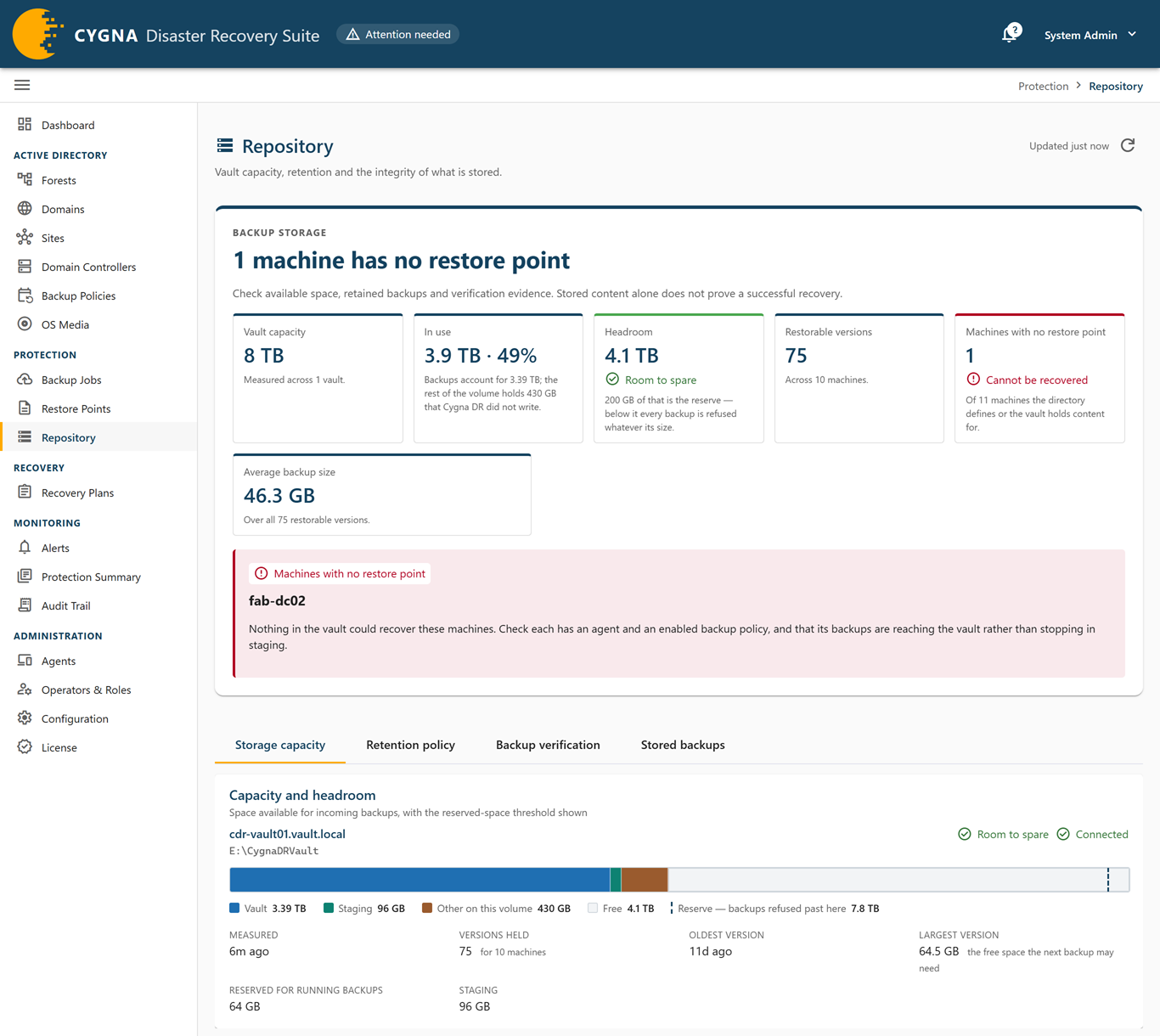
Backup storage panel and notices
The Backup storage panel at the top of the screen opens with a headline that sums up the state of storage, holds the tiles described below, and lists a finding when storage threatens recovery:
| Finding | What to do |
|---|---|
| Vault is refusing backups (critical) | Free space is at or below the reserve, so every backup is refused. Add capacity, or lower the retention ceilings so the sweep can reclaim room. The retention floor is never crossed to make space. |
| No room for another version (warning) | Usable space is below the size of the largest version held, so the next backup of the biggest machine will not fit. Add capacity or lower the retention ceilings before backups are refused. |
| Vault volume could not be read (unknown) | The storage agent could not reach its storage root. Check that the volume is mounted. Capacity is unknown, not zero. |
| Abandoned staging is holding space (warning) | Staging folders from jobs that never committed are taking space. With Delete abandoned staging folders on, the default, they are deleted on the next sweep; a finished backup that was never committed is committed by the Manager before then. With it off, they are reported and kept; inspect them on the storage machine. |
| Machines with no restore point (critical) | Nothing in the vault could recover these machines. Check that each has an agent and an enabled backup policy, and that its backups reach the vault. |
| A backup was refused rather than history deleted (critical) | The retention floor stopped a prune short of the space a backup needed. This is the floor working as designed. Backups are refused until you add capacity or lower the ceilings. |
| Backups completed but never reached the vault (warning) | A domain controller finished these backups, but the Manager did not see them reach the vault, so they are not restore points. The Manager checks the storage machine for these every hour and whenever the storage agent connects. Content still in staging is committed, content already in the vault is recorded as a restore point, and content that is gone stops being counted. |
When such backups exist, Backups not in the vault lists each one with its Machine and job, when it was Taken, Why not committed, the Last check, and what was Found: In staging, being committed, In staging, commit failed, Could not be confirmed, No storage agent connected, Storage agent did not answer, or Not checked yet. Backups the check resolved are not listed. With backup.run, select Check now to check at once instead of waiting for the hourly check.
Two notices can also appear. Retention is in dry run means prunes are selected and reported but nothing is deleted, so versions named in the prune history are still restorable. No storage agent means there is nowhere to commit backups; install the storage agent (see Setting Up the Storage Machine).
Tiles
- Vault capacity—The total measured across all vaults.
- In use—Space used, and how much of it is backups versus other data on the volume.
- Headroom—Free space, with the capacity verdict and how much of it is the reserve.
- Restorable versions—Versions held across all machines, and how many machines they cover.
- Machines with no restore point—Machines the directory defines, or the vault holds content for, that have nothing to restore from. Machines excluded by an operator are not counted.
- Average backup size—Over the restorable versions that have a recorded size.
Storage capacity tab
The Capacity and headroom card shows each vault as the storage machine measures it, with its storage root, a capacity verdict, and the storage agent's connection state. A bar divides the volume into Vault, Staging, Other on this volume, and Free, with a line marking the reserve below which backups are refused.
| Capacity verdict | Meaning |
|---|---|
| Room to spare | The vault can take more versions. |
| No room for another version | The next backup of the largest machine will not fit. |
| Refusing backups | Free space is at or below the reserve. |
| Volume unreadable | The storage agent could not read the volume. |
| Never measured | The storage agent has not reported a measurement yet. |
The facts under each vault are Measured, Versions held, Oldest version, Largest version (the free space the next backup may need, and the threshold for No room for another version), Reserved for running backups, and Staging. An Abandoned staging notice lists idle staging folders whose jobs never committed; an Unmeasured versions notice lists versions that could not be sized at the last measurement.
Retention policy tab
The Retention policy card shows the retention policy each storage agent is enforcing: Age floor, Minimum per machine, Delete beyond age, Delete beyond count, Reserve, Sweep every, Abandoned staging, and Mode (Enforcing or Dry run). The age floor and minimum per machine are set on the storage machine itself; nothing the Manager sends can weaken them. A Ceilings decide the real depth notice appears when a version count ceiling means history is shallower than the floor suggests.
Expand Cleanup history · why an older backup was removed to see the Retention activity card. It lists the prunes the storage agent has reported: When, Outcome, Vault, Trigger (Scheduled sweep or Space pressure), Rules, Versions, Reclaimed, Free after, and Machines. A Backup refused chip marks a prune the floor stopped, and a Retention was blocked notice above the section names the storage agent, when, and why. Rows marked as a preview (from dry run) deleted nothing.
For how retention decides what to keep, see Retention.
Backup verification tab
The Integrity of what is stored card shows how many restorable versions carry a content hash, and how many have been re-read since commit and still match it. Notices explain any gap:
- No results yet—Scheduled verification is running and has not checked a version yet. This is normal on a new installation.
- Not yet checked—Versions a verification pass has not reached yet.
- Could not be checked—Versions the check could not run on, for example because no hash was recorded or a file would not open. This is not a finding about the content.
- Verification failed (critical)—Versions that no longer hash to the value recorded at commit. Each one also raises the alert Vault content whose hash does not match, whose View repository link opens this screen. Nothing is deleted or repaired. Check the storage volume for faults and the vault for unauthorized writes.
- No hash recorded—Versions committed without a content hash. They can never be verified and remain a gap until they age out.
- Unreadable on disk—Versions that could not even be sized at the last measurement.
A failures table lists each failing version, the expected and read hash, how long it has been failing, and what the storage agent reported. For how verification works, see Vault Protection and Integrity.
Verification finds changes to content at its next pass. Changes to committed backups that retention did not make, such as a deletion, are detected as they happen and raise Committed vault content changed outside retention on the Alerts screen instead; cdr repository changes lists them with their paths and who made them. See Detecting changes to committed backups.
Stored backups tab
The Stored backups by machine card shows what the Manager's own job history says is restorable for each machine. Filter chips select machines that are recoverable, have content stranded in staging, have no restore point, are excluded, or are no longer in the directory.
Columns: Machine, Recoverable, Versions, Total, Storage details, Oldest, Newest, and Hashed. Expand Details in the Storage details column for the machine's average and largest version size and how many versions retention removed. Each row's actions menu (⋮), at the right edge of the row, opens the same machine on the other backup screens, filtered to it.
Domain controllers that have been removed from the directory and have nothing in the vault are not listed; a line under the table says how many. The Domain Controllers screen lists them under its removed chip.
Below the table, a reconciliation line compares the number of restorable versions in the Manager's records with the number the storage agents counted on disk. The two are measured independently, so a disagreement means something has diverged and is worth investigating.
