Sites
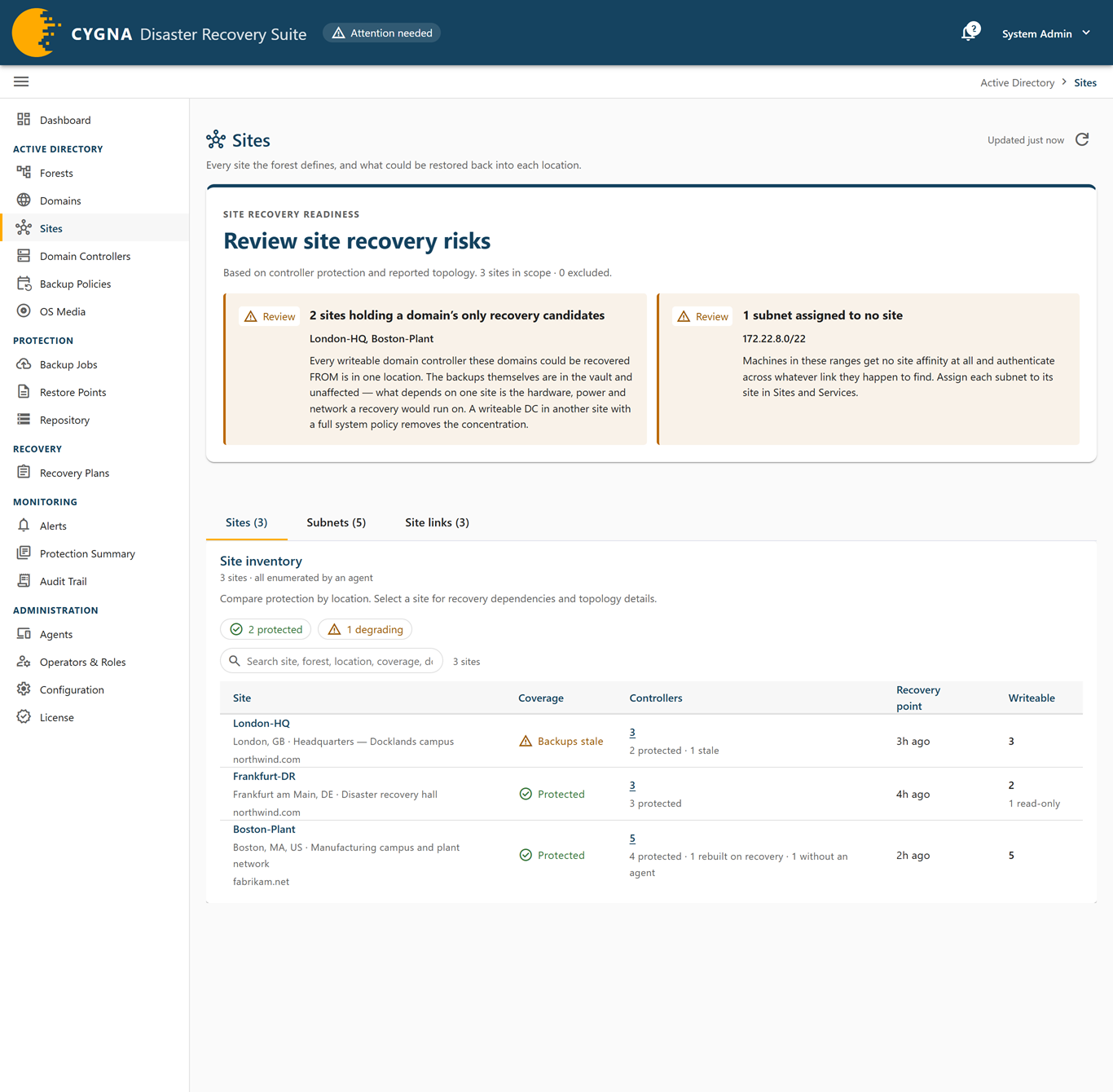
The Sites screen lists every site the forest defines and says what could be restored back into each location. It also shows the subnet map and the site links across which a recovery repopulates each location.
Unlike the domain and forest verdicts, a site's verdict is a roll-up of the protection of the backup targets in it, the domain controllers you back up. Domain controllers that recovery rebuilds by promotion are counted beside them and are not findings. No site verdict is critical: a location comes back by promotion, and whether a domain could be recovered is that domain's verdict on the Domains screen. See Backup Targets and Rebuilt Domain Controllers.
To open the screen, select Active Directory > Sites, or select the site count in a forest's detail sheet. Every role can see the screen. Only a Backup Operator (or the break-glass account) sees the row actions menu, which holds the exclusion action.
Scope and notices
When you open the screen from a forest, it is scoped: a Scoped notice names the forest, and every count and finding describes that forest alone. Select Clear filter to see every site.
| Notice | Meaning |
|---|---|
| No site attribution yet | No domain controller has a site recorded, so which sites are occupied is not known. Every site is reported as unjudged rather than empty until a forest enumeration arrives. |
| Partly enumerated | Some sites are known only because domain controllers name them; no site object was enumerated, so they have no description, subnets, or site links. Usually a topology report's site step failed; the Agents screen shows the last report. |
| Unplaced | Domain controllers with no site recorded. They count toward no site and are listed on the Domain Controllers screen. Domain controllers removed from the directory are not counted. |
Findings
Findings appear in the Site recovery readiness panel at the top of the screen, under a headline that sums up the sites' state, and cover sites that are not excluded. Every site finding is a warning, marked Review. Sites with no domain controllers, sites whose domain controllers are all rebuilt on recovery, and sites whose occupancy is unknown raise no coverage finding.
| Finding | Severity | What to do |
|---|---|---|
| Sites whose backup targets have nothing to restore | Warning | The location has domain controllers under a backup policy, and not one holds a restorable backup. Open the Domain Controllers screen scoped to each site to see why nothing is landing. |
| Sites only partly protected | Warning | Some backup targets in the location have nothing to restore from. Open the Domain Controllers screen scoped to each site to see why nothing is landing. |
| Sites where a recovery could not begin | Warning | Every domain controller in the location whose flag has been read is read-only, and a recovery starts by restoring a writable domain controller. Place a writable domain controller there, or accept that recovery starts elsewhere. |
| Sites holding a domain's only recovery candidates | Warning | Every writable domain controller a domain could be recovered from is in this one location. The backups are safe in the vault, but the recovery depends on this location's hardware, power, and network. Add a writable domain controller with a full system policy in another site. |
| Sites with no global catalog | Warning | Everything in the location that needs a global catalog crosses a site link to reach one. Promote a domain controller to global catalog, or confirm the link is dependable. |
| Occupied sites reached by no site link | Warning | Replication cannot be built for a site no link names, and after a recovery nothing would promote back into it. Add each site to a site link in Active Directory Sites and Services. |
| Occupied sites with no subnet | Warning | Nothing places clients in these sites. Assign the location's IP ranges to the site. |
| Subnets assigned to no site | Warning | Machines in these ranges have no site affinity. Assign each subnet to its site. |
Site inventory
The Site inventory card on the Sites tab has filter chips for each verdict.
| Coverage | Severity | Meaning |
|---|---|---|
| Protected | Good | Every backup target in the location is protected. Domain controllers rebuilt on recovery do not change this verdict. |
| Partly protected | Warning | Some domain controllers have a restore point, and some backup targets have nothing to restore from. |
| No schedule | Warning | No backup target lacks a restore point, and some domain controllers have a restore point that nothing is scheduled to replace. |
| Backups stale | Warning | Some domain controllers have a restore point older than their policy window. |
| Last backup failed | Warning | Restore points are fresh, and some machines' newest backup attempt failed. |
| Nothing to restore | Warning | The location has backup targets, and no domain controller in it holds a restorable backup. The location would come back by promotion; whether a domain could be recovered is that domain's verdict. |
| Rebuilt on recovery | Information | The site has domain controllers and none of them is a backup target, so a recovery brings the location back by promotion. This is normal in a large estate, not a fault. |
| No domain controllers | Information | The forest defines the site and no domain controller sits in it. This is normal design, such as a branch office, not a fault. |
| Occupancy unknown | Unknown | No domain controller anywhere has a site recorded, so the site cannot be judged. |
The chips group No schedule, Backups stale, and Last backup failed under degrading. Two further chips filter the table: cannot start a recovery (every domain controller whose flag has been read is read-only) and excluded.
Sites tab
| Column | Description |
|---|---|
| Site | The site name, its location description, and its forest. Not enumerated marks a site known only because domain controllers name it. Select the name to open the detail sheet. |
| Coverage | The coverage verdict and any exclusion. Hover for the reasoning. |
| Controllers | The number of domain controllers in the site, with counts by protection state, for example 2 protected · 4 rebuilt on recovery. Opens the Domain Controllers screen scoped to the site. |
| Recovery point | The age of the newest restorable backup taken in this location. The backup itself is in the vault, so losing the location does not lose it. None means nothing in the location can be restored. |
| Writable | How many domain controllers are confirmed writable and how many are read-only. Read-only only means a recovery cannot begin here. |
The actions menu (⋮), shown to Backup Operators, has Exclude from alarms… or Edit exclusion…, and Domain controllers. A site that has not been enumerated cannot be excluded yet. See Excluding and Retiring Objects.
Subnets tab
| Column | Description |
|---|---|
| Prefix | The subnet. |
| Site | The site the subnet is assigned to. No site is a misconfiguration: machines in the range get no site affinity. Unknown site means the subnet names a site this installation has no record of, usually because an enumeration failed partway. |
| Forest | The forest that reported the subnet. |
| Location | The subnet's description and location attributes. |
| Seen in directory | When an enumeration last reported the subnet. |
Site links tab
| Column | Description |
|---|---|
| Link | The site link name and its forest. |
| Transport | IP or SMTP. SMTP cannot replicate a domain naming context, so nothing a domain recovery depends on travels over an SMTP link. |
| Cost | The link cost. Replication prefers the cheapest path. |
| Replicates | The replication interval. |
| Sites joined | The sites the link connects. Members this installation has no record of are counted as unknown. |
| Seen in directory | When an enumeration last reported the link. |
Site detail sheet
| Section | Contents |
|---|---|
| Coverage | The verdict, its reasoning, and the exclusion if any. |
| Recovery | Domain controllers, writable domain controllers, and the recovery point. |
| Topology | Global catalogs; domains with a domain controller in the site, and whether a domain's recovery candidates are all concentrated here; operations master roles held in the site; subnets; and site links with the cheapest cost and slowest interval. |
| Directory | Forest, location, where the site is known from, and when it was last seen in the directory. |
| Distinguished name | The site object's distinguished name. A site with none has not been enumerated and cannot be excluded. |
Operations master roles concentrated in one site all have to be seized together if that location is lost. The Topology section shows this so you can plan for it.
