Forests
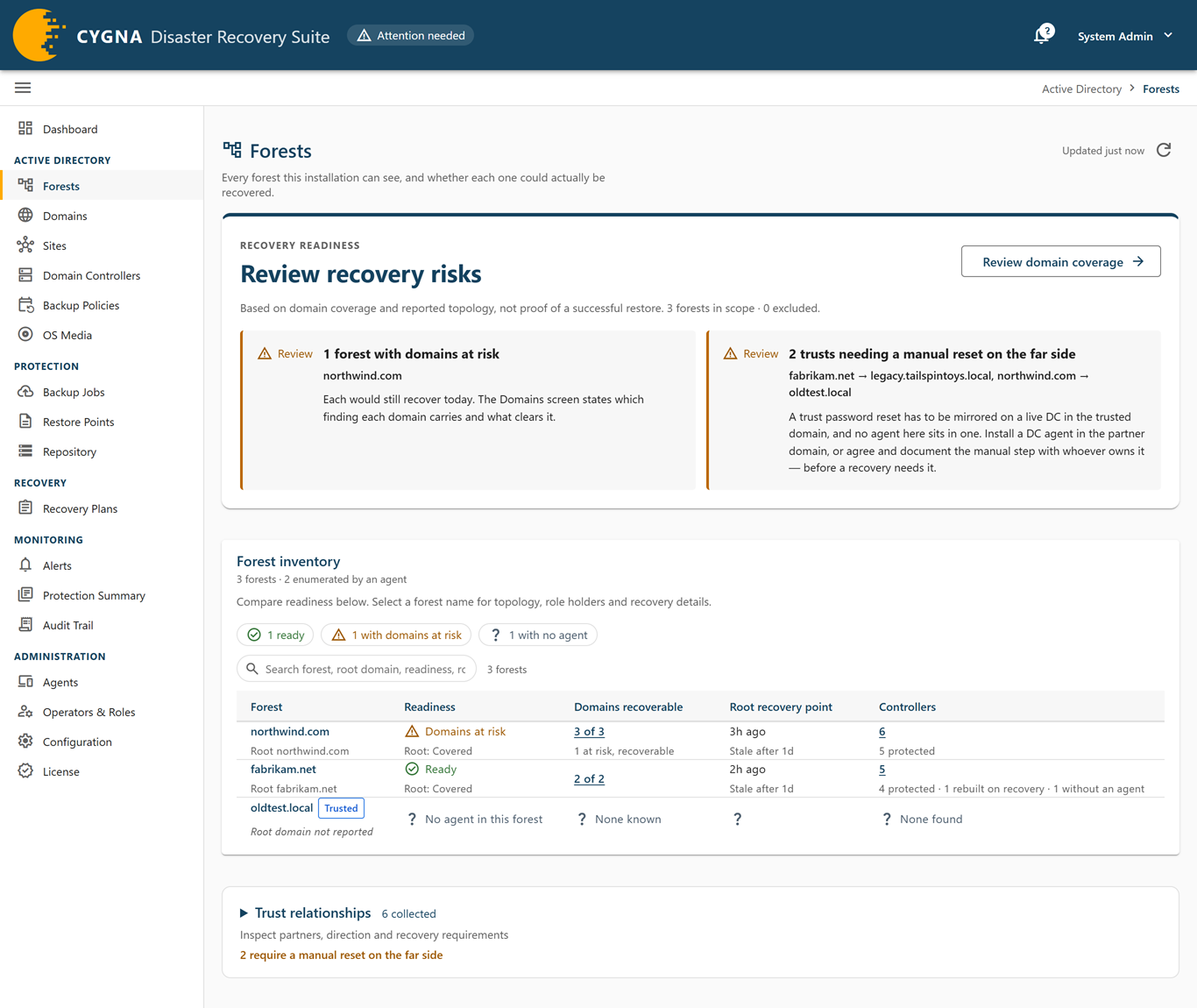
The Forests screen lists every forest this installation can see and says whether each one could be recovered. A forest recovery restores the forest root domain first and every other domain after it, so a forest's readiness depends on its root domain above all. The screen also lists the trusts each forest holds and what each one needs at recovery time.
To open it, select Active Directory > Forests. Every role can see the screen. Only a Backup Operator (or the break-glass account) sees the row actions menu, which holds the exclusion action.
Forests appear when a DC agent reads its forest's configuration. That read also reports forests on the far side of a trust, which this installation can see but not protect. If no forest is known yet, the screen shows No forest is known yet. See Deploying DC Agents.
Notices
| Notice | Meaning |
|---|---|
| No forest enumeration yet | No DC agent has reported a forest enumeration. The forests listed are the ones machines claim membership of; nothing on the screen was read from Active Directory yet. |
| Unattributed | Some domains or domain controllers could not be placed in any forest, so they count toward none of the readiness figures. They are listed on the Domains and Domain Controllers screens. Retired domain controllers are not counted. |
Findings
Findings appear in the Recovery readiness panel at the top of the screen, under a headline that sums up the forests' state, and cover forests that are not excluded. Each finding is marked Blocked (critical) or Review (warning). Select Review domain coverage to open the Domains screen.
| Finding | Severity | What to do |
|---|---|---|
| Forests cannot begin recovery | Critical | The forest root domain has no usable recovery option. Give a writable domain controller in each root domain a full system backup policy. The root's row on the Domains screen says what is missing. |
| Forests would stop partway through recovery | Critical | The root domain would restore but a child domain would not. Open the Domains screen for the forest and fix every domain reported as unrecoverable. |
| Forest roots with a finding against them | Warning | Every other domain recovers after the root, so a finding here matters most. The root's row on the Domains screen names it. |
| Forests with domains at risk | Warning | Each domain would still recover, with a finding. The Domains screen states the finding and what clears it. |
| Forests whose topology is stale | Warning | No agent has enumerated these forests within twice the expected interval. Check on the Agents screen that a DC agent is connected and its last topology report succeeded. |
| Trusts needing a manual reset on the far side | Warning | A trust password reset must be mirrored on a domain controller in the trusted domain, and no agent sits there. A domain recovery always resets the domain's trusts; a forest recovery resets trusts only when it is planned as a security breach response. Install a DC agent in the partner domain, or agree the manual step with the domain's owner before a recovery needs it. |
| Forests had a forest-wide FSMO role move after the root's recovery point | Warning | Confirm each move was a transfer, not a seizure. A domain controller whose roles were seized elsewhere after its backup must be rebuilt, not restored. |
Forest inventory
The Forest inventory card has filter chips for each verdict, a search box, and one row per forest.
| Readiness | Severity | Meaning |
|---|---|---|
| Ready | Good | Every domain in the forest is covered: recoverable, root domain first, with no finding against any of them. |
| Root domain unrecoverable | Critical | The forest root cannot be recovered, so a forest recovery cannot start. Every other domain depends on the root's schema, Enterprise Admins, and DNS records. Chip: cannot begin recovery. |
| Domains unrecoverable | Critical | The root is recoverable, but at least one other domain is not. A recovery would restore the root and stop when it reached that domain. Chip: would stop partway. |
| Root domain at risk | Warning | The root could be recovered today, with a finding against it. |
| Domains at risk | Warning | One or more other domains carry a finding but would still recover. |
| Root domain unidentified | Unknown | The installation cannot yet judge the root domain, usually because no enumeration has said which of its domain controllers are writable. |
| Recoverability unconfirmed | Unknown | Every domain that can be judged is recoverable, and some are not judged yet. This is normal on a new installation until a topology enumeration arrives. |
| No domains found | Unknown | An enumeration reached the forest and returned no domains. Check the DC agent's last topology report for failures. |
| No agent in this forest | Unknown | The forest is known only because a trust names it. Nothing in it is protected, and its state cannot be judged from here. Chip: with no agent. |
Two further chips filter the table: stale topology (forests not enumerated within twice their expected interval) and excluded (forests an operator excluded from alerts; their readiness is still shown).
Columns
| Column | Description |
|---|---|
| Forest | The forest name, its root domain, and tags. Trusted marks a forest known only from a trust. Select the name to open the detail sheet. |
| Readiness | The readiness verdict, with the root domain's coverage verdict beneath. Hover for the reasoning. |
| Domains recoverable | Recoverable domains out of all known domains, with counts of unrecoverable, at-risk, and unjudged domains. Opens the Domains screen scoped to the forest. |
| Root recovery point | The age of the newest restorable backup of a writable domain controller in the root domain, and when it becomes stale. None means a forest recovery has nothing to start from. Role moved since warns that a forest-wide role changed holder after that backup. |
| Controllers | The number of domain controllers in the forest from every source, with counts of protected, need a backup policy, rebuilt on recovery, unprotected, without an agent, excluded, and removed machines. Domain controllers rebuilt on recovery are not backup targets and are not a shortfall in protection, except those a domain needs backed up because it has too few backup targets, which are counted as need a backup policy. Opens the Domain Controllers screen scoped to the forest. |
Row actions
The actions menu (⋮), shown to Backup Operators, has Exclude from alarms… or Edit exclusion…, and Domains, which opens the Domains screen scoped to the forest. Excluding a forest excludes everything in it. See Excluding and Retiring Objects.
Forest detail sheet
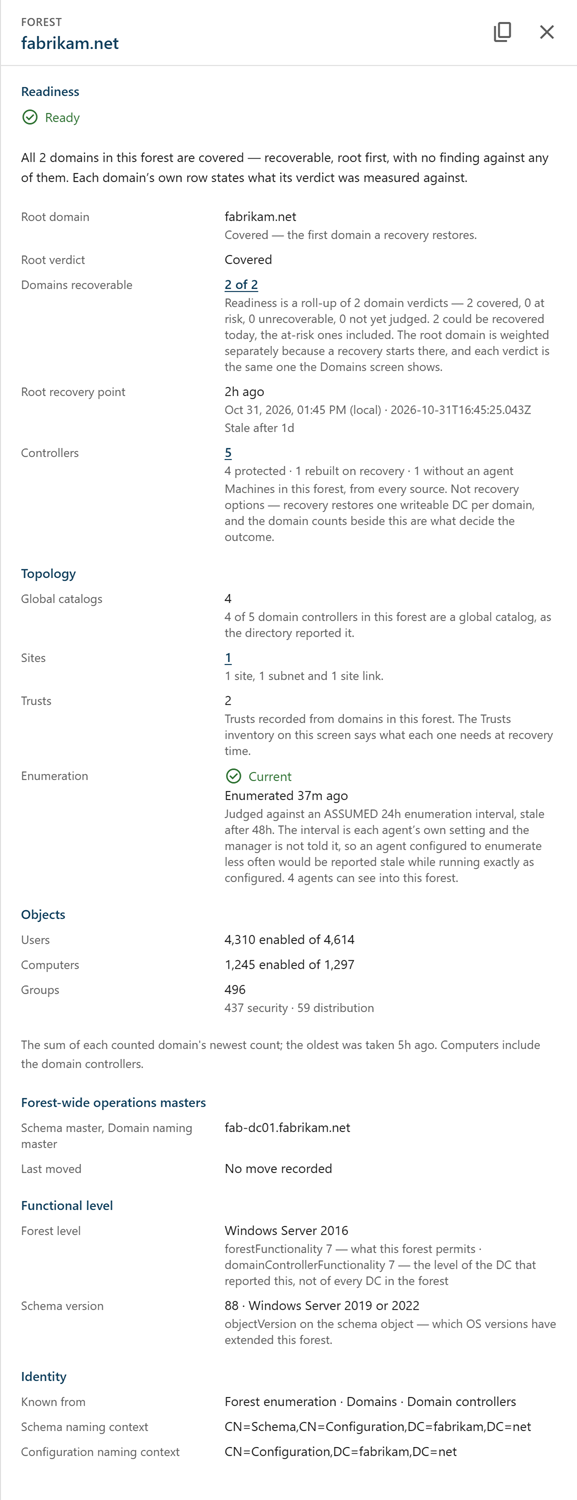
Select a forest name to open its detail sheet.
| Section | Contents |
|---|---|
| Readiness | The verdict and its reasoning, the exclusion if any, the root domain and its verdict, domains recoverable, the root recovery point, and controllers. |
| Topology | Global catalogs, sites (with a link to the Sites screen scoped to the forest), trusts, and Enumeration: when the forest was last enumerated and whether that is Current, Enumeration due, Stale, or Never enumerated. |
| Objects | Users, computers, and groups, summed from each domain's latest count. Domains with no agent are not counted. |
| Forest-wide operations masters | The schema master and domain naming master holders, and the last recorded move. |
| Functional level | The forest functional level and schema version. |
| Identity | Where the forest is known from, and the schema and configuration naming contexts. |
Trusts
Expand Trust relationships at the bottom of the screen to show the Trusts card. It lists every trust recorded by the domains in the known forests, as read from each domain's trusted domain objects. Trusts that discovery, an operator, or cdr cleanup recorded as removed are not listed; the card's subtitle counts them.
| Column | Description |
|---|---|
| Trusting domain | The domain whose trusted domain object records the trust. |
| Partner | The other side of the trust, with its NetBIOS name. |
| Direction | Inbound, Outbound, Two-way, or Disabled. |
| Type | Active Directory, Windows NT (downlevel), MIT Kerberos realm, or DCE. |
| Attributes | The trust attributes that are set, such as Forest trust, SID filtering, or Selective authentication. None set means an ordinary external trust. Attribute bits the console has no name for are counted as unrecognized rather than hidden. |
| At recovery | What the trust needs after a forest recovery. See the table below. |
| Seen in directory | When an enumeration last reported the trust. |
| At recovery | Meaning |
|---|---|
| Restored with the forest | A parent-child or tree-root trust inside the forest. It comes back with the forest recovery: each side keeps the trust password its restore point holds, and the recovery resets the trust only when it is planned as a security breach response. |
| Re-create · reset drivable | A trust that is not restored from backup and must be re-created after the recovery. An agent in the partner domain can run the mirrored password reset when a recovery resets the trust. |
| Re-create · manual reset | Must be re-created after the recovery, and the mirrored password reset on the partner side has to be run by hand, because no agent sits in the partner domain. Agree this with the partner domain's owner in advance. |
| Manual reset · far side excluded | As above, and the partner side is excluded from alerts. |
For what recovery leaves to you, see What Recovery Does Not Cover and After a Recovery.
